Wednesday, 26 April 2017

The 12 Best RSS Reader Apps to Follow Your Favorite Blogs, Sites, and Feeds

The internet is overloaded with content. Even if you only set out to read the most important articles and watch the top videos, you'll never get done.

Just staying up-to-date and informed is a challenge. You have news to read, blogs to check, and YouTube hits you've got to watch. But instead of opening each site a half-dozen times a day, you can use an RSS app to curate your content automatically.

RSS stands for Really Simple Syndication. It's a file that most websites update with their newest blog posts, videos, deals and more, so you can "subscribe" to sites and have new content automatically pushed to you. Instead of checking the 40 websites you follow, you can just open an RSS reader app and see what's new on all of those sites together.

In the years since Google Reader died, a wide range of RSS feed reader apps have come and gone. Today, there are still a number of great RSS tools that are actively being improved, apps you can use to follow your favorite sites—from powerful crowd favorites like Feedly to simple Chrome extensions like Feeder. Whether you want a simple app for consuming news on the go, or a powerful tool that archives the best content from hundreds of sites, there's an app here for you.

The Best RSS Reader Apps

For over a decade, Google Reader was the gold standard for RSS apps. That is, until July 2013, when Google abruptly stopped supporting the tool to focus on other products. The internet let out a collective groan.

Suddenly RSS readers were popular again, with hundreds of apps competing for Google Reader's former users on sites like ReplaceReader. Today, many of these apps are polished, high-quality feed readers that are a great tool for following your favorite sites.

At their core, RSS reader apps let you subscribe to content from your favorite sites. Typically, they'll download images and text from articles so you can read them offline, and will list all of the stories in chronological order. Many RSS apps then include tools to discover sites based on your favorite topics and let you save favorite articles to reference later.

There's two main types of RSS readers: online RSS services, and native RSS apps. The former run automatically in the background, finding new articles as soon as they're published. You can read your articles online, or typically sync them with apps for your phone or computer—either made by the RSS service, or from third-party developers. Then, native RSS apps sync RSS feeds directly on your device and often work with popular RSS services.

There are apps for every reading style, budget, and platform—here are some of the best ones.

The Best Hosted RSS Services

App Icon:  Best for: Price Platform
Feedly Feedly Building a personalized newsfeed Free; $7/mo. Web, iOS, Android
Panda Panda A custom reading layout Free; $4.99/mo. Web, iOS, Chrome
Feedbin Feedbin Advanced search $3/mo. Web
NewsBlur NewsBlur Predictive article filtering Free; $2/mo. Web, iOS, Android
Feed Wrangler FeedWrangler Advanced feed organization $1.60/mo. Web, iOS
Inoreader Inoreader Long term content archiving Free; $1.25+/mo. Web, iOS, Android, Windows Phone
Selfoss Selfoss Customizing your RSS reader Free Self-hosted

Feedly (Web, iOS, Android)

Best for: Building a personalized newsfeed
feedly

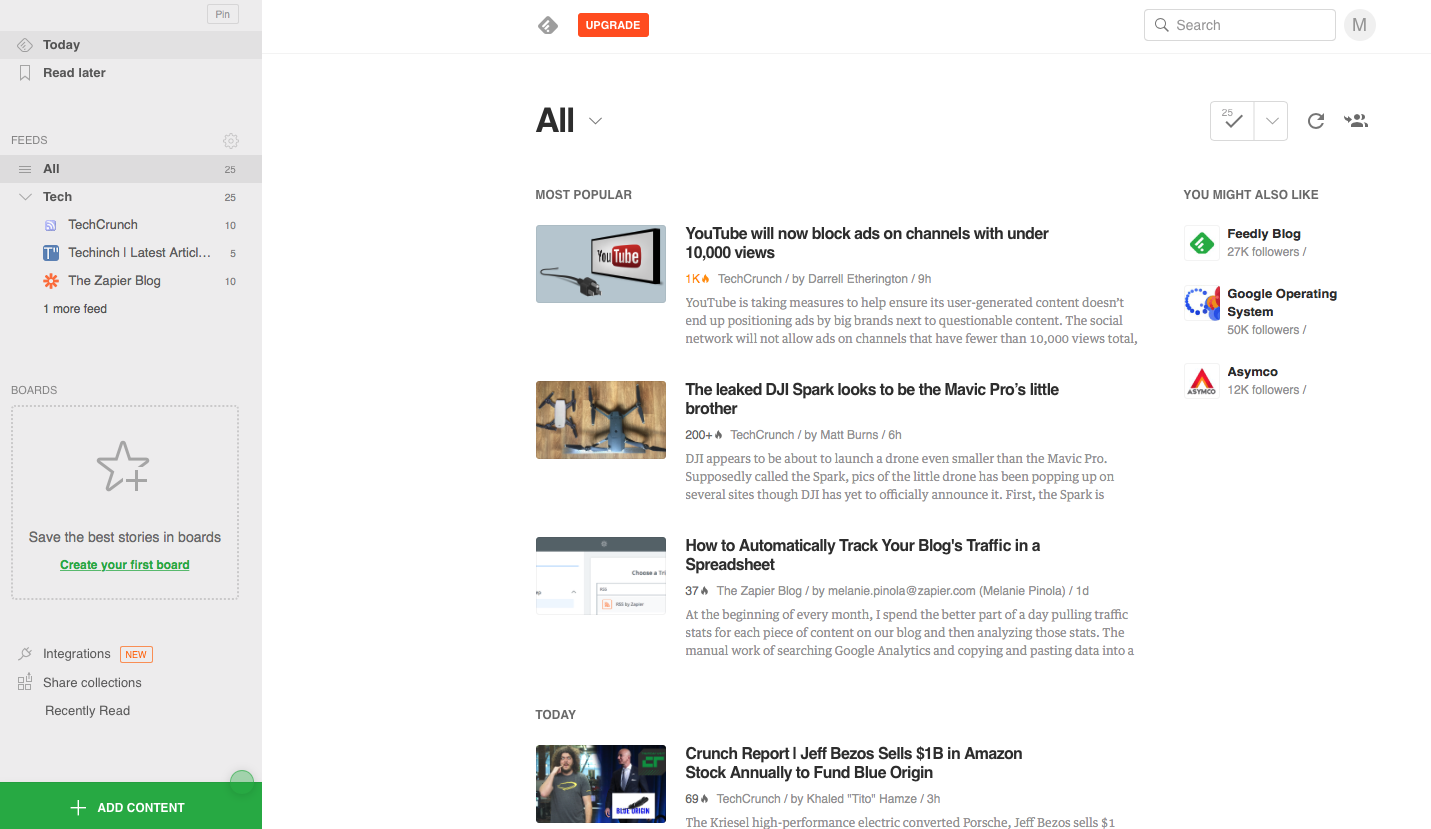
When Google announced that Google Reader was being discontinued, Feedly gained 3 million new users in less than a month. It's continued to be popular and is one of the first RSS reader apps you'll hear mentioned if you ask people how they follow sites today. It's not hard to see why—its clean and simple interface is a perfect solution for the casual reader who wants to see all of their websites in one place.

Feedly is designed to be a simple way to build your own newsfeed about your favorite topics. Just search for a favorite site's name to follow it, or look up a topic to follow related stories. Feedly also curates "starter kits" of content focused around a certain topic, which can be a great way to discover new websites. You can group your favorite sites and topics into "collections," add custom tags, and save articles to boards to read them later without needing another reading app. These and other features make it easy to curate the best articles in your personal newsfeed.

Feedly integrates with most social media apps, so sharing interesting things you find is simple. And, if you upgrade to the Pro version, you’ll get extra features like keyword-based search and automatic backups to Dropbox.

Feedly Price: Free; from $7/month Pro plan for unlimited feeds, search and filtering, third-party integrations, and more

For a deeper look at Feedly's features and pricing, check out our Feedly review.

See Feedly integrations on Zapier

Panda (Web, iOS, Chrome)

Best for: A custom reading layout
Panda RSS reader

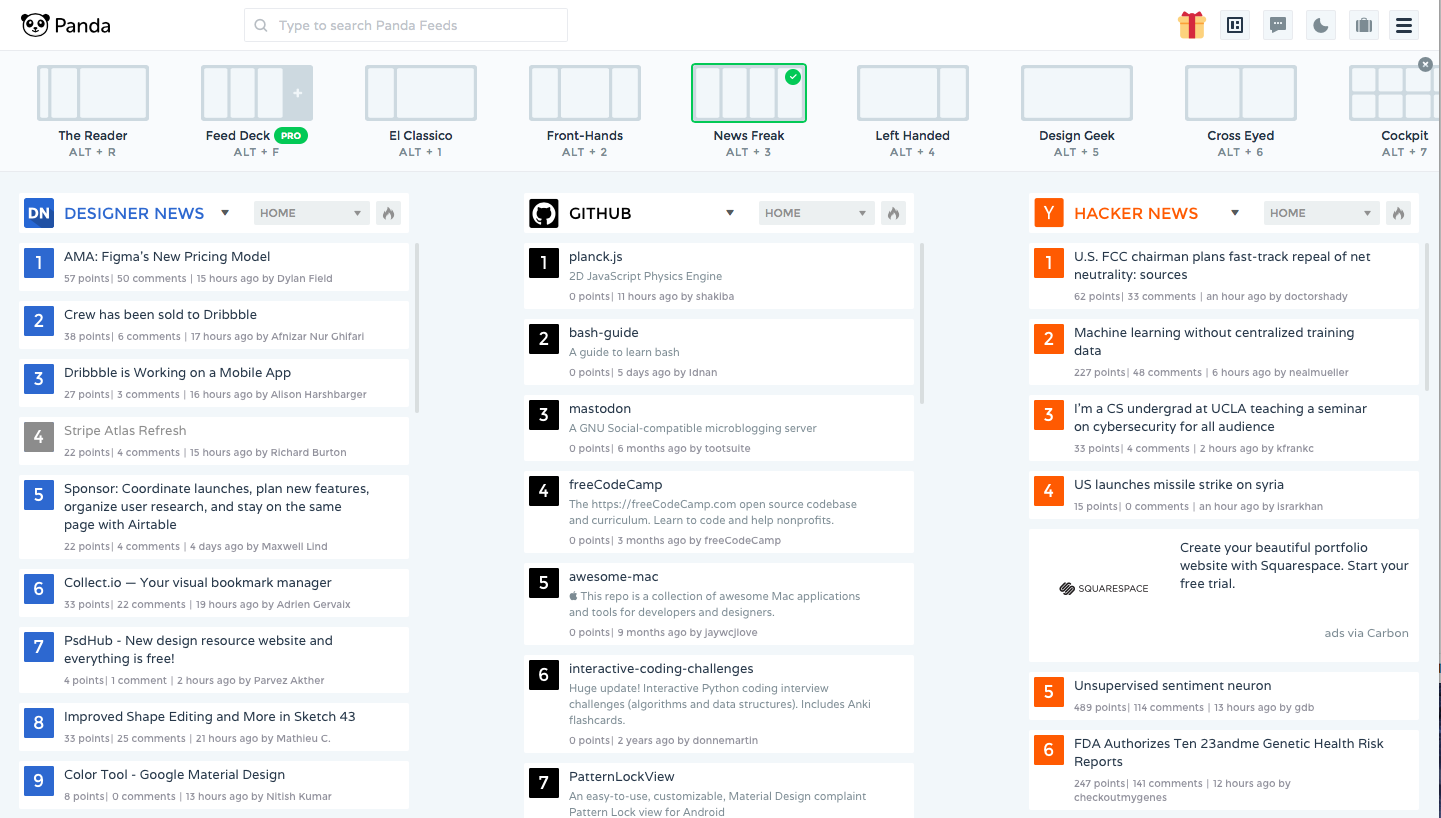
One of the more unique new RSS reader apps, Panda lets you read your RSS feeds the way you want to. It includes a standard three column layout with your feeds, articles, and a preview of the original story by default. Or, tap the layout switcher button, and you can add multiple columns to view all of your favorite sites' stories at once, remove columns to focus just on your articles, and more. You can even switch to the different layouts with keyboard shortcuts to jump from a dashboard with all of your feeds to a clean reading view.

You can bookmark articles to read later or switch to a night mode to make it easier on your eyes when reading in the dark. Install it in Chrome, and it'll replace your New Tab page for an easy way to keep up with the news throughout your day.

Panda Price: Free; $4.99/month for no ads, unlimited feeds, and integrations

Feedbin (Web)

Best for: Advanced search

feedbin

Another very popular RSS app is Feedbin. Once you’ve subscribed to your favorite sites, you can use Feedbin’s tagging system to organize your content into categories. Reading content on Feedbin is a breeze—the interface is nicely designed and allows for distraction-free reading (think Pocket with built-in feeds). Feedbin integrates with many popular Read Later and social media apps, and also allows you to add custom sharing services if your favorite tool isn't supported.

Feedbin's killer feature is search. Not only can you search all your content by keyword, but you can also save search criteria. That way, you can set up a dynamic folder that gives you a quick overview of a specific topic. Feedbin even creates a saved search API, in case you want to do something more with the data than just view it in the reader.

Feedbin Price: $3/month

NewsBlur (Web, iOS, Android)

Best for: Predictive article filtering

Newsblur

Like the first two apps, NewsBlur lets you subscribe to different sites and organize your content into folders. Its reading modes, though, let you switch between a simplified article view or an original view that shows the source website right in your feed reader.

NewsBlur's most interesting feature is its sophisticated filtering, which can automatically highlight or hide stories based on certain criteria. If you spend some time "training" your filters, the system will learn your preferences and try to surface the stories that interest you most. That way, you can subscribe to as many sites as you want, and still only see the content you're interested in.

NewsBlur also lets you share your favorite stories, either on social networks or inside of NewsBlur. Within the app, you can add stories that you read and like to your personal "blurblog," or find people with similar interests and follow their blurblogs as well. Or, you can run it on your own server for free, if you'd like.

NewsBlur Price: Free for subscribing to 64 sites; $24/year Premium account for unlimited sites, saved searches, and more; free open-source to run on your own server

Feed Wrangler (Web, iOS)

Best for: Advanced feed organization

feed wrangler

Feed Wrangler’s goal is to help you "wrangle" the news. It's a distraction-free reader—boasting perhaps the cleanest interface in this list—that makes managing feeds simple. You can follow your favorite sites, and even use its beta podcast stream to listen to podcasts.

Your website and podcast subscriptions are organized into "streams." Streams can be simple: you can create a stream and assign different subscriptions to it. Or, you can build advanced streams by applying topic-based search criteria to your feed. If you're overwhelmed by content, Feed Wrangler can clean things up and empty out your reading queue.

Because Feed Wrangler is focused on reading, it doesn’t have social media integrations. It does, however, let you move articles you don’t have time to read to Instapaper, Pocket, or Pinboard with a single click—perfect for saving the best for later. And with its companion iOS apps for feeds and podcasts, you can keep your important news with you everywhere.

Feed Wrangler Price: $19/year

Inoreader (Web, iOS, Android, Windows Phone)

Best for: Long-term content archiving

innoreader

Not sure where to start with RSS feeds? Inoreader’s "Discovery Mode" can help you find and follow specific topics and trending items. To stay organized, you can group your feeds in folders and use tags to separate out individual articles as you read them. Similar to Feed Wrangler, you can write more advanced rules to automatically sort content, too.

Inoreader allows you to subscribe to Twitter and Google+ users or searches, giving you one app for all of your online reading needs. You can then share your favorite articles on social networks or broadcast them within Inoreader, which shares your favorite content with your followers.

While most RSS apps only cache content for the short-term, Inoreader doesn’t have limited time archives: Your content—even the stuff you’ve already read—is stored permanently.

Inoreader Price: Free with ads; from $14.99/year Starter Plan for ad-free reading with customizable dashboard

Selfoss (Self-hosted Web, 3rd party iOS, Android)

Best for: Customizing your RSS reader

Selfoss

Want to host an RSS reader app on your own server? Selfoss is one of the best options for that today (along with the aforementioned NewsBlur). It's an RSS reader that lets you follow sites and your favorite people on Twitter in one app. Like many of the other RSS apps so far, it simplifies the reading experience and has some basic features that help you organize your feeds.

Selfoss is open source, so you can download it for free, dig into its code, and customize things if you'd like. You can add additional data sources, build plugins to add extra features, and download pre-made extras from its community. And with a Fever API bridge, it can sync with apps that were designed to work with the now-unsupported Fever RSS reader. It'll take a bit more work to start using, but will let you make a feed reader that's tailored to your needs.

Selfoss Price: Free open-source

Other Great Hosted RSS Reader Services

App Icon:  Best for: Price Platform
The Old Reader The Old Reader Called "the ultimate social reader", The Old Reader lets you follow others and see their favorite sites and articles—much like Google Reader did. It even has a CLI app to read feeds from Terminal. Free; $3/mo. Premium Web
Bloglovin' bloglovin' A social news reader mixed with an RSS app, Bloglovin' lets you browse popular articles by topic and follow your favorite sites via RSS. It includes a built-in blogging tool, so you can write a simple blog right from your blog reader. Free Web, iOS, Android
BazQux Reader BazQux Reader Read the latest articles from sites and the comments on those articles, along with Twitter, Facebook, and Google+ updates in the same app. $19/year Web
Digg Reader Digg Reader The original social news site, Digg's new Reader service is a full-featured RSS reader that lets you subscribe to your favorite sites right alongside the best content Digg's recommending today. Free Web, iOS
Netvibes Netvibes Follow your RSS feeds, keep track of the weather and stock prices, and much, much more in Netvibes' "Dashboard of Things" that puts everything in one at-a-glance place. Free; $2+/mo. Premium Web, iOS
FlowReader APP Read your feeds along with your full Facebook and Twitter timelines in one app—then share updates about what you're reading to Buffer, Tumblr, and more. Free Web, iOS, Android
Feedreader Feedreader One of the original PC RSS readers, Feedreader now has a new online RSS reader app—along with tools to help you discover great RSS feeds. You could use it to browse today's top stories without even setting up an account. Free Web
FreshRSS FreshRSS Have your own server? FreshRSS is a self-hosted RSS reader that looks very similar to the original Google Reader. Browse feeds by date, and sync over 100k articles without trouble. Free open-source Self-hosted Web
Tiny Tiny RSS Tiny Tiny RSS Want to tweak your RSS reader? Tiny Tiny RSS is a self-hosted tool with plugins and themes so you can customize it like you want. It also supports podcast feeds, and lets you share your favorite articles inside Tiny Tiny RSS. Free open source Self-hosted Web, Android

The Best Native RSS Reader Apps

Many of the best hosted RSS services include apps for your phone, but if you want offline access to your feeds on a Mac or PC, you'll often need to look for another app. Native RSS reader apps are often more powerful and customizable. You can set them to sync as often as you'd like, tweak their interface, and get notified as soon as a new story comes in.

Here are a few of the most popular options (and if you don't find one you like, be sure to check your device's App Store for other options).

App Icon:  Best for: Price Platform
Feeder Feeder Simple RSS feeds Free; $2/mo. Chrome, iOS, Android
Newsbar Newsbar A news ticker on the side of your screen $4.99 Mac, iOS
ReadKit ReadKit Syncing multiple RSS and Reading Services $4.99 Mac
Reeder Reeder Streamlined reading on iOS and Mac $9.99 Mac, iOS
RSSowl RSSowl Automated actions and organization Free Windows, Linux, Mac

Feeder (Chrome, iOS, Android)

Best for: Simple RSS feeds
Feeder

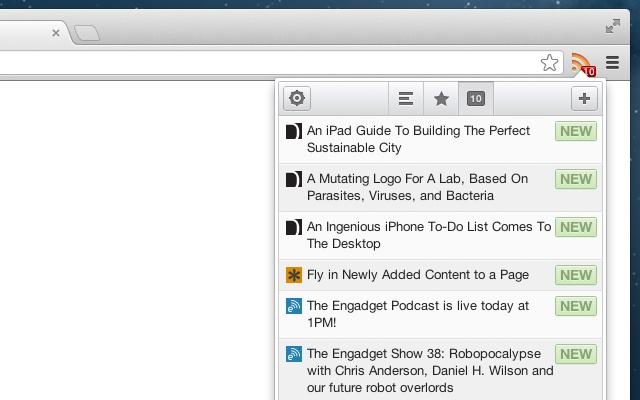
Feeder is perhaps the simplest way to read RSS feeds—one that's especially popular with those who want to quickly read the headlines and get on with their day. It's built around a Chrome extension that shows a list of your RSS headlines in your browser. Tap an article to read it, or just quickly skim through the latest updates without reading everything.

You can take your RSS feeds on the go with its paid plan and mobile apps, where you'll get both the headlines and a simplified view of the full articles. It's a great way to stay informed of what's going on, and read more deeply from your phone.

Feeder Price: Free on Chrome; $2/month for mobile apps and sync

Newsbar (Mac, iOS)

Best for: A news ticker on the side of your screen

newsbar

Ever wished you could get a news ticker on your computer like the ones on the bottom of TV news stations? Newsbar does the trick. Install it and add your favorite feeds, and Newsbar will show the latest headlines on the side of your Mac's desktop (or in a dedicated app on your iPhone).

As you're browsing the latest headlines, you can hover over an interesting article to see the entire post. Or, you can hide Newsbar and set up notifications for keywords, and Newsbar will let you know whenever an article comes in about your most important topics. It's a simpler way to follow RSS feeds, one that'll make sure you always know what's happening.

Newsbar Price: $4.99 for Mac; $3.99 for iOS

ReadKit (Mac)

Best for: Syncing multiple RSS and Reading Services
ReadKit

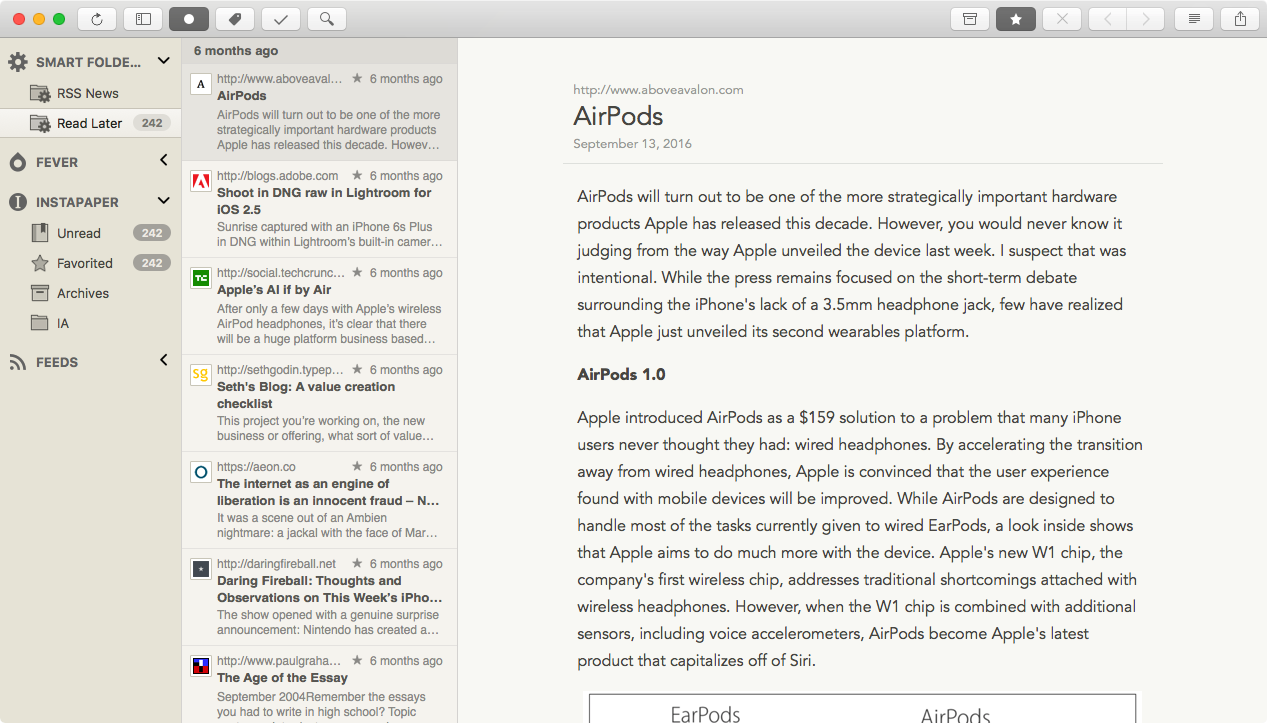
Want a powerful RSS reader that always has an article queued up for you? ReadKit is a popular Mac RSS reader app that can sync feeds on its own, but also integrates with the most popular RSS services and reading later tools. It can sync your Feedly, NewsBlur, Feed Wrangler, or Feedbin feeds to your desktop, as well as the articles you've saved to Instapaper and Pocket.

ReadKit has sophisticated search and sort capabilities, allowing you to build custom rules to move articles into the right folders. You can also customize your reading experience with themes and typefaces, and store articles offline so you'll have something to read even when the internet is down.

ReadKit Price: $9.99; 14-day trial available

Reeder (iOS, Mac)

Best for: Streamlined reading on iOS and Mac
Reeder

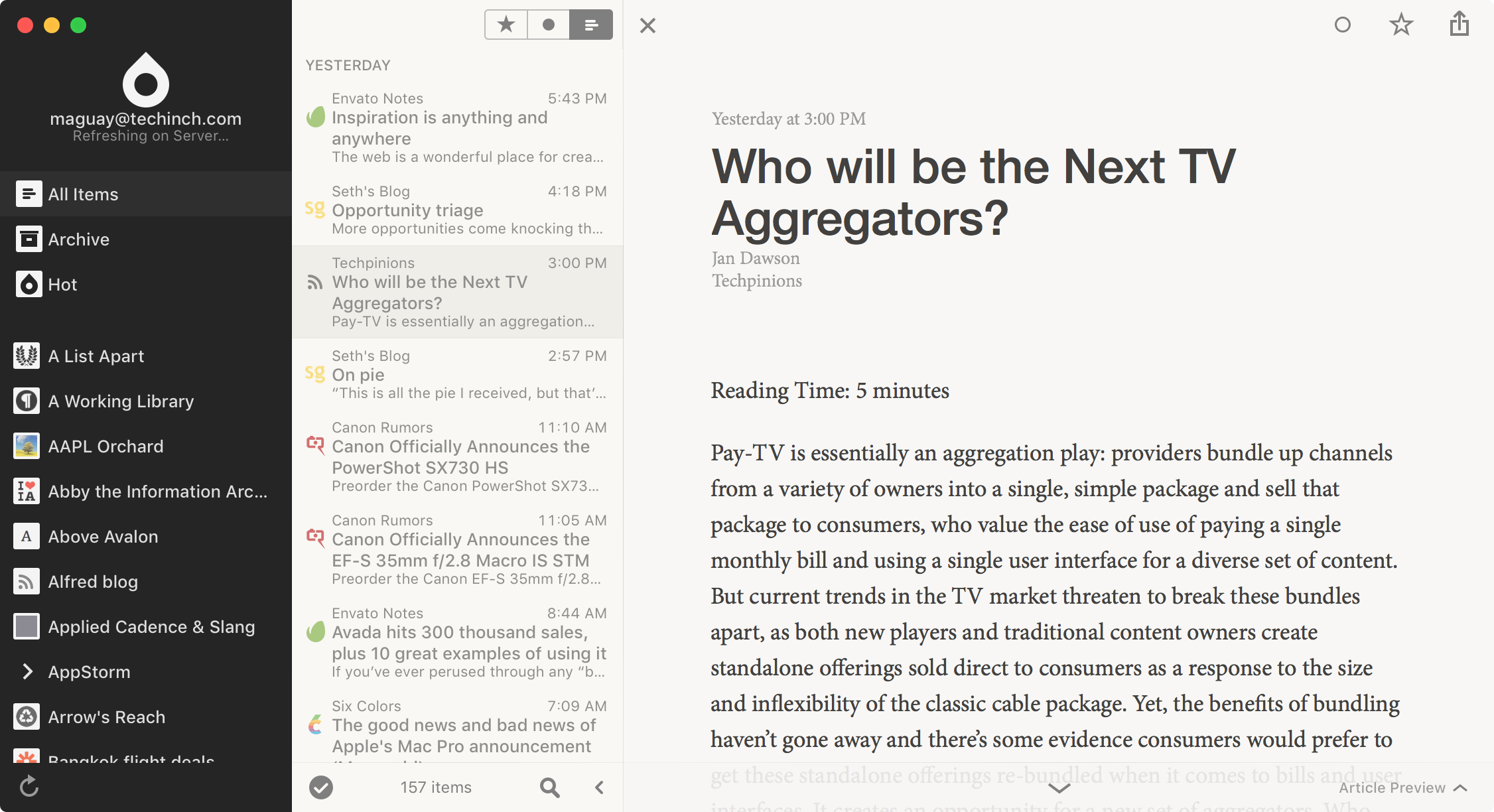
A similar app that runs on both iOS and Mac, Reeder lets you read articles from 10 RSS reader services including Feedbin, Feedly, NewsBlur, and more. It can also sync RSS feeds on its own, along with your Instapaper articles for offline reading. You can then share your content with over a dozen different services, to start a draft blog post from an article, save an article to Evernote, or share it on social networks.

You can customize Reeder to look the way you want, with detailed reading and theme options along with keyboard shortcuts to help you read faster on your Mac. It even includes gestures: Pull up on an article to go to the next one, pinch to parse the article text, and swipe up to share a piece.

Reeder Price: $9.99 for Mac; $4.99 for iOS

RSSOwl (Mac, Windows, Linux)

Best for: Automated actions and organization
RSSOwl

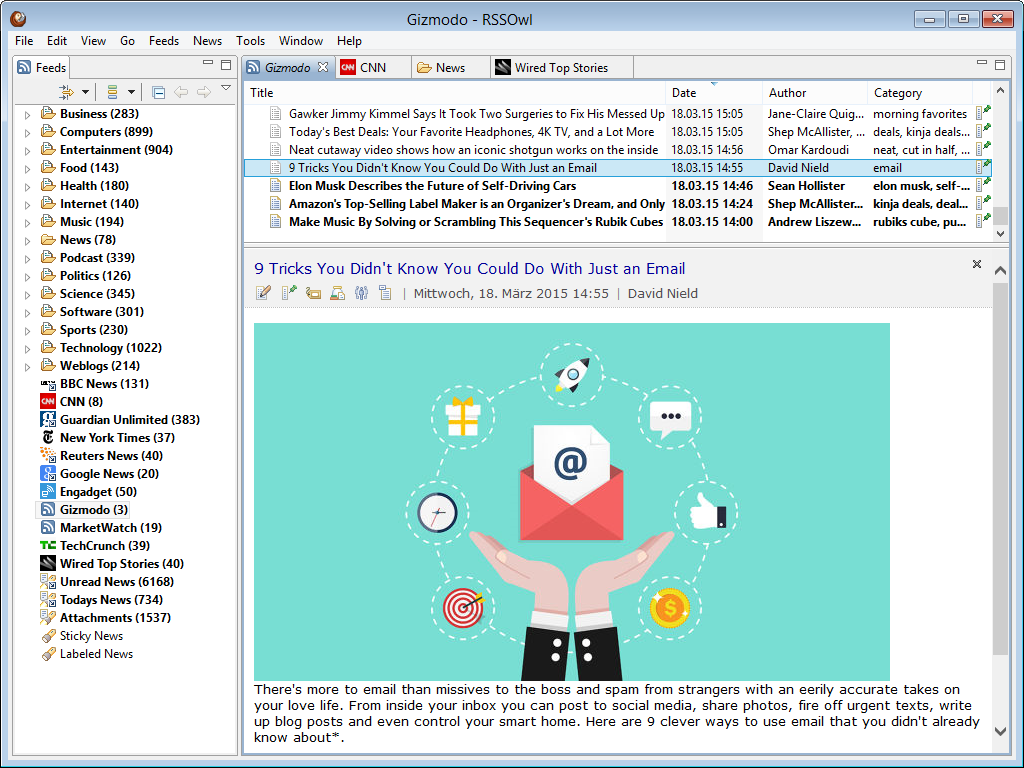
For a more utilitarian approach, RSSOwl is another desktop RSS app that's extremely customizable. It syncs RSS feeds on its own, so you can keep a local database on your computer of your favorite articles.

Then, you can drill into them with its search capabilities. Within the search engine, you can use logic expressions to look at anything in an article. Searches can be saved to create dynamic feeds to find future articles, and you can even automate actions to send an alert if certain criteria are met using the "News Filter" feature. If you want to save an article, you can move it to the archive folder or use the "News Bin" feature to organize your saved content.

RSSOwl Price: Free, donation supported

Other Great Native RSS Reader Apps

App Icon:  Best for: Price Platform
NetNewsWire NetNewsWire After a long hiatus, the Mac companion to the original and now defunct PC RSS reader FeedDemon has returned with a brand new set of apps and its own sync service. You can open articles in multiple tabs, get started quickly with recommended sites, and sync feeds on your iPhone and Mac without paying for a hosted service. $19.99 Mac; $7.99 iOS Mac, iOS
gReader gReader For a simple way to get the news on Android, gReader is one of the most popular options. It can sync RSS feeds on its own or with Feedly and The Old Reader, caches your articles for offline reading, and even supports listening to podcast feeds. If you want, it can even read your RSS feeds out loud to you. Free; $4.99 Android
Reeder Reeder Another RSS reader app that syncs with nearly every popular service, Reeder was one of the original popular RSS apps for iOS. It's polished, and uses gestures to switch between services and reading modes. $9.99 Mac; $4.99 iOS Mac, iOS

Build an RSS Reader in Your Favorite App

It seems like there should be an RSS app for everyone. But if you're struggling to find the perfect tool, the best tool might just be one you're already using.

Like reading articles in Pocket? Feedhuddler can turn it into an RSS reader, automatically sending your new RSS articles into your Pocket queue. Or, Zapier's RSS integrations could save new RSS feed posts to Instapaper, Pocket, Evernote, or other reading apps:

Maybe you just need a notification about new posts. Or perhaps you need a more robust way to log every article published. Zapier's can help, sending you a push notification, email, or Slack message about new articles—or logging them to a Google Sheets spreadsheet for you.

Or maybe your favorite apps and sites don't include RSS feeds. Zapier can help turn almost any app's notifications into an RSS feed, so you can subscribe to them in one place.

Alternately, you can use Zapier to make your own filtered, combined RSS feed that will show all of the articles from your favorite sites, with filters to only show the articles you're interested in.

google sheets feed reader
A custom RSS feed reader built in Google Sheets

You can even build a custom RSS feed reader inside Google Sheets, using its =importfeed() function. Here's how.

Be sure to experiment—with a few tricks, you can read RSS feeds in your favorite apps, anywhere.


RSS is one of the oldest parts of the internet, but even in today's social media-addicted world, it's still useful. It's one of the best ways to make sure you see everything your favorite sites publish, and never miss out on that amazing Craigslist deal.

If you're just getting started using RSS, try picking an app that's simple to use. Add its extension to your browser and subscribe to favorite sites, then you'll start looking out for RSS feeds everywhere. Power users—those still mourning Google Reader—should consider which features they need most and find an app that matches their need.

From unique organization tools to simple reading experiences, there's an RSS reader for everyone. We'd love to hear why you picked your RSS reader in the comments below!

Zapier senior writer Matthew Guay contributed to the updated version of this article.


source https://zapier.com/blog/best-rss-feed-reader-apps/

Tuesday, 25 April 2017

Treat Your Career Like a Triathalon: 11 Productivity Lessons from Endurance Athletes

Imagine adding a part-time job to your already crazy schedule. Turns out your friendly neighborhood triathlete has. Training for an Ironman—a 2.4-mile swim, 112-mile bike, and 26.2 mile run—requires a minimum of 20 hours per week for six months, the equivalent of adding a part-time job to the athlete’s schedule. Even a marathon with its relatively lower physical demands still necessitates four or five hour-long runs, speed training sessions, and at least one 10+ mile run weekly.

It’s easy to imagine athletes as the endurance equivalents of surf bums, people who work at a running store just often enough to pay for all of their race fees. After all, who could possibly train on top of a real job? But nearly half of athletes registered with USA Triathlon are white-collar workers, and 19 percent are doctors, lawyers, accountants, and other professionals. Ultramarathon and marathon runners also fit a similar demographic.

If you’re struggling to make time for spin class after work, it may seem impossible to reconcile a serious training schedule with an equally high-powered career. But not only do endurance athletes survive this insane schedule, they thrive on it, often registering for races the morning after their last one.

Whether you’re planning an Ironman or your company’s five-year strategy, you can apply some practices of endurance athletes to your own professional life. Here's how they do it:

They Use Exercise to Boost Their Brainpower

bikes

Exercise may grow your muscles, but it’s equally helpful for your mind. Any cardiovascular activity will increase the flow of oxygen and glucose to the brain, which helps synthesize ideas more quickly.

Muscle movements also send hormones rushing to your brain, including serotonin—a mood booster that also influences memory—and dopamine, which encourages us to work for rewards (i.e., a raise). Once they reach the brain, hormones mix with a protein called brain-derived neurotrophic factor which is involved in brain cell growth and learning.

Cardiovascular exercise also promotes neurogenesis, or the birth of new brain cells, enabling people to make novel connections between seemingly unrelated areas.

Translation: Exercise literally grows your brain. Researchers have even discovered that exercise training increased the volume of the hippocampus, the brain structure responsible for memory, by 2 percent. If that figure sounds insignificant, realize that a two percent growth of the hippocampus can offset one to two years of age-related memory loss. Better yet, because the hippocampal cells produced by exercise are newer and stronger than older ones, they’re more quickly integrated into our neural circuits and therefore more effective.

Several lines of research have linked these physical benefits directly to better work performance. People who exercise during their workday were 23 percent more productive on those days than they were when they didn't exercise, according to one study from the International Journal of Workplace Health Management.

Best of all, you can reap these benefits without biking 100 miles every Saturday. Even 150 minutes of moderate-intensity cardio per week can promote serious cognitive improvement.

They’re Driven by Purpose

Of course, none of those perks matter if you sleep through your swim session every morning. So how do serious athletes resist the snooze button? Although they truly enjoy physical activity, even the most dedicated endurance athletes are tempted by a warm bed and Netflix. To remain committed, they connect their training to a deeper purpose, from their communities to their personal fulfillment.

For some, it’s the memory of a loved one or a mantra. For others, it's their desire to test and transcend their mental and physical limits. For William Gane, who is planning to run 600 miles across California's Death Valley National Park this summer, it's raising funds for organizations that support gender equality.

When you feel particularly disengaged at your desk, reconnect to your own reasons for doing what you do. Are you inspired by your company’s mission? Do you feel invested in a creative process or your relationships with team members? Do you thrive on competition? Tapping into your “why” will get you back on track when you’re falling asleep during that conference call.

They Measure Their Results

Athletes can get obsessed with their stats, to the point that they’ll run laps around their house to turn a 4.9-mile run into an even 5-miler. To ensure that they train the right cardiovascular and respiratory systems, athletes need to enter each workout with a specific, quantified goal: Run 6 intervals at a given pace with 30 seconds of recovery or climb a hill with a 10 percent grade without slowing down. Such specificity leaves little room for excuses or ambiguity. These concrete goals also enable athletes to track their improvement over time, itself a powerful motivator.

So measure your own work product as concretely as possible. For recurring tasks, compare your performance with last week, last month, last year—and strive for improvement. Competition can easily inject excitement into an otherwise thankless task. Especially if you’re not emotionally invested in your job, compete with yourself to remain productive at work—and enjoy yourself in the process.

They Hold Themselves Accountable

track

Athletes also hold themselves accountable using coaches or, more recently, social media. Though a few athletes might use their Facebook posts to humblebrag, social media serves a powerful source of accountability for serious athletes, a way to congratulate, support, and even compete with one another. When he ran 3,067 miles from San Francisco to New York City last fall, Pete Kostelnick posted the entire journey on running and cycling app Strava for fans to follow. Just try skipping a day with the whole internet watching.

Though you likely won’t track your progress on your next work project through Twitter, you can set intermediate goals and deadlines for yourself. To increase team-wide accountability, consider setting up a communal calendar for team members to keep everyone apprised of their progress and to foster collaboration between employees.

They Don’t Manage Time—They Master Time

But as you’ve probably learned through painful experience, good intentions don’t compensate for poor planning. Since they have so little time to waste, endurance athletes plan every aspect of their day to death. They’ll pack their gym bag, lunch, and recovery tools the night—or maybe even a full week—before each workout. They’ll check the weather to protect against any surprises the following morning. They might even sleep in their running clothes to save a few sleepy seconds the next morning.

And after months of training, athletes don’t take chances on race day. They won’t sample a new breakfast food for fear of indigestion. They won’t wear the new shorts they found at packet pick-up the day before. Both during regular workouts and race days, athletes conserve all of their mental energy for the race at hand.

Their adherence to a strict schedule translates well to the workplace. After all, how many times have you stopped to check a few emails at 9 A.M., only to look up and realize that it’s time for lunch?

They Delegate and Prioritize

Unfortunately, nifty scheduling tools still can’t put us in two places in once. Nor can they insert extra hours into our days. Life happens: Sometimes there is literally not enough time to achieve every single thing.

It's easy to shut down from anxiety when staring at an overflowing to-do list. But when they're struggling to balance their hours-long workouts, professional obligations, family life, and relaxation, endurance athletes realize that doing something is preferable to doing nothing. Instead of scrambling to catch every ball they’re juggling, they decide which balls are worth dropping.

Meredith Atwood, an Ironman finisher, triathlon coach and blogger, provides triathletes a model for prioritizing with her Sucky Rotation Schedule. Essentially, athletes list all of their “sucky” responsibilities—their workouts, work projects, errands, chores, and whatever else—and split it with a Suck Line, which separates the “must-do” duties from the “nice to haves.”

If they’re staring down a major deadline at work, maybe their swim workout falls below the Suck Line. Three weeks before race day? They’ll skip that stretch project for an extra bike session.

As your schedule fills with meetings and deadlines, create your own Sucky Rotation Schedule. A written list will help you visualize all of the responsibilities on your plate and decide which can be saved for tomorrow or next week. Can you delegate a few daily tasks to a junior employee? Can you save a side project or conference call until next week? Once you set your Suck Line, you can stick to it with confidence that you’re accomplishing as much as possible under the constraints of your schedule.

They Anticipate Deviations to the Plan

wetsuit swim

Even the best-laid plans can be derailed by last-minute emergencies. With time on their hands before a big race, endurance athletes will forecast any and all potential disasters. “What if my bike breaks down? What if the weather gets too hot? What if I crash halfway through the race?” With these nightmares scenarios in mind, they can prepare themselves for the unforeseen obstacles.

“If my bike breaks down, I’ll move off the road and find a race official for assistance. If I start overheating, I'll grab ice and slow down. If I lose my energy, I’ll ingest more carbs.”

Triathlon coach Matt Fitzgerald suggests that our amount of suffering stems from expectations: We're less disappointed by setbacks when we're not shellshocked by them. Approach your high-stakes projects with a similarly cautious mindset. Once you’ve envisioned the worst-case scenarios and game-planned some alternatives, you’ll respond to unexpected setbacks more gracefully and rationally. While nobody is psychic, a proactive mindset makes it less likely that a shoddy Skype connection or unreliable partner will sink your success.

They Get to the Root of Their Underperformance

Have you ever put “spend three hours on social media” or “put off that performance review” on your to-do list? We never arrive at work excited to procrastinate the day away, nor do we strive to shoot ourselves in the foot. Yet we routinely undermine our own productivity by avoiding unpleasant tasks at work. Why, you ask?

When we ignore a specific work situation, we’re really resisting the underlying negative emotions that they produce. Not preparing for your big pitch to management? It could stem from your belief that you’re not worthy of success, anyway. Faking sick from another networking event? You could assume that you can’t spark interesting conversation, or that your skills and connections couldn’t possibly help anyone else.

But these self-defeating thoughts aren’t always based in reality, and Ironman and marathon finishers are as susceptible to them as us mere mortals. That's why when ultramarathon runner and adventure racer Travis Macy noticed that his own dysfunctional beliefs were undermining his training, he recognized them as fictional “stories” that can be rewritten.

In his book The Ultra Mindset, he counsels readers on how to rewrite their own stories to improve their performance, both in sports and in life.

  • Step 1: Sit down and write the negative story.
  • Step 2: Read it and reread it. Recognize it for what it is: just a few words…nothing that should have the power to rule you.
  • Step 3: Write out positive alternative that can be used to battle it, and find a new ‘plot’ for your positive story. Could it be a new goal? Changing a behavior? Eliminating the negative?
  • Step 4: Turn one or more of these positive affirmations into a mantra.
  • Step 5: Determine what you will do to prove that the negative story is not true and that the positive story is true.
  • Step 6: Repeat the actions above, in any order, as many times as they need to be repeated.

Next time you’re saving your presentation to the last second or skipping a networking event, investigate whether your own negative stories are behind that behavior. Once you answer those questions, you can attack the underlying issues and stop self-sabotage in its tracks.

They Optimize Work Conditions to Maximize Efficiency

bike

Endurance athletes are constantly seeking an edge. In their attempt to grow stronger, they become students of their sport, often taking up additional activities like strength training and yoga to reach new levels of fitness. As he increased his weekly mileage to 110 miles per week, ultramarathon runner Scott Jurek explored every possible avenue to become stronger. In his book Eat and Run, Jurek describes his own open-minded process of development.

“I was reading more about posture and stabilization and core strength. I hit the gym, working on my upper body, because I was beginning to realize how much a strong torso and arms could propel tired legs. I experimented with Pilates. I took up yoga for flexibility, body awareness, and centered focus. I even tinkered with my breathing.”

Jurek’s experimentation has netted him enormous success: He’s won more than ten 100-plus mile races. So whether you’re an executive or an entry-level employee, seek unconventional ways to broaden your skillset. Learning how to use a new piece of software may not turn you into a Silicon Valley billionaire, but your knowledge could save you some time and headache in the future. Practical benefits aside, lifelong learning has also been found to reduce the risk of Alzheimer’s and depression among seniors.

They Prioritize Self-care

Have you ever hunched over your desk for so long that your back began to throb? Maybe you ordered some bad takeout during a long night? Or you pulled so many 12-hour days that you started snapping at everyone who looked at you the wrong way? You knew you should take better care of yourself, but you just couldn’t break your concentration or waste any time.

True, stretching, walking, and preparing meals can distract you from your tasks. But by skipping these vital self-care chores, you risk your long-term productivity, as these office-related health conditions are the leading causes of workplace disability.

Despite their hectic training schedules, endurance athletes devote time to recover properly afterwards. Take, for instance, elite marathoner Shalane Flanagan's extensive recovery routine. "I try to hydrate with an electrolyte drink and a snack that combines protein, fat, and carbs," she says, "I also use a foam roller to work out any tight areas that need help. For really deep tissue work, I see a physical therapist or massage therapist. If I am particularly sore or fatigued I will also take an ice bath or swim; I find the hydrotherapy to be helpful in flushing out toxins in the legs." So important is recovery that triathletes consider it the fourth discipline of their sport.

No matter how pressing your next deadline, incorporate the same self-care into your life, even (or especially) if it’s inconvenient. That extra yoga class may extend your project to tomorrow, but it will pay dividends in the form of increased concentration and mental clarity once you’re back at your desk. Similarly, the long-term benefits of a well-balanced diet and avoiding chronic health conditions far outweighs time and cost of cooking.

They Take Off-Seasons to Prevent Burnout

As unbreakable as they may appear, no athlete can maintain their peak fitness year-round. To prevent serious injury and mental burnout, endurance athletes plan substantial off-seasons following their last big race every year. Though she runs 90-100 miles per week leading up to her marathons, elite runner Tina Muir takes two full weeks off after each race. After winning the 2014 Boston Marathon, American marathoner Meb Keflezighi relaxed and proudly gained 12 pounds in the ten days following the race. This downtime allows both body and mind to rebuild themselves following the prolonged stress of a training season.

In today’s 24/7 work environment, professionals need to schedule their own off-seasons to avoid stress-related illness or burnout. If you work for the 4 percent of companies offering paid sabbaticals, take advantage of the opportunity to decompress on your company’s dime. If you lack this flexibility, consider planning one email-free day per week, as checking email consumes 28 percent of the workday and increases stress.


Whether you're training for an Ironman or gunning for a promotion, take some productivity tips from the endurance pros. Pace yourself. Get fit. Plan for the long term. Eke out every performance boost you can.

After all, your 40-year career is the ultimate endurance sport.

Title photo by Presidio via Flickr; track photo by Pete via Flickr; bike photo by Priit Grepp via Flickr; solo bike photo by West Point via Flickr; wetsuit photo by Michael Dawes via Flickr.


source https://zapier.com/blog/athlete-productivity/

Monday, 24 April 2017

How to Make Your Mondays More Productive (and Less Stressful)

Monday. It’s the day we all love to dread. Garfield famously hates Mondays, and if you want to have some fun with Urban Dictionary definitions, Monday is either "the biggest waste of exactly one-seventh of your life" or "the reason Sundays suck."

But what if I told you that you have the power to make your Mondays calmer, more productive… even happier?

For a Calmer Monday, Start with a Deep Breath

Meditate on Monday

Your alarm goes off Monday morning. Instantly, your head is filled with thoughts of everything you have to do this week. You try to remember your meetings and commitments (both inside and outside the office), maybe even wonder how you can possibly squeeze it all into one week.

Kicking off your week with this mental whirlwind is a surefire path to a bad day. Stop the stress-spiral before it begins with just 10 minutes of mindfulness meditation.

Meditation has gained popularity in recent years, but don’t write it off as a fad. Over the last decade, studies like this one have shown that meditation and mindfulness help decrease stress and anxiety. A large part of this is because meditation helps you become a third-party observer of your emotions, which gives you you the control you need to experience negative feelings, allow them to pass, and return yourself to your main focus.

Meditation also increases your willpower and ability to focus—after all, if you can sit in silence and focus on something as simple as your breath, you can much more easily focus on your work despite the world of distractions around you.

The best part is, it hardly takes any time in order to make a big difference in your day. Even if you have a long commute or kids to get to school, all you have to do is force yourself to forgo the snooze button and get up 10 minutes earlier.

Best Meditation Apps

The Internet is full of wonderful resources for meditation. Here are a few of the Zapier team’s favorites to get you started.

Icon:  App Best for Price Platforms
“Stop, Stop, Breathe & Think tailors guided meditation sessions to your emotions and moods. Features a Slack bot and Facebook messenger bot. Free; upgrades for purchase iOS, Android, Web
“Headspace” Headspace features meditation sessions based on different goals, moods, and lifestyles. free 10-lesson app; from $7.99/mo iOS, Android, Web
Calm Calm features nature ambiences and guided meditations especially for improving sleep and reducing stress 7 free meditations; from $4.99/mo iOS, Android, Web

You should also check out Spotify’s Guided Meditation Playlist features a wide selection of guided meditation tracks, from 10 minute breathing exercises to themed meditations to 40 minute sitting sessions. Apple Music includes several similar meditation playlists.

For a More Productive Monday, Plan Ahead

Plan Your Monday

The Monday that starts with the blaring alarm and anxious thoughts speeds along into the dread of Friday's unfinished work.

By the time you get caught up on emails and finally figure out your priorities for the day—let alone the week—the better part of your day is spent without even thinking through your whole week's work. It seems overly simple to suggest planning ahead as your solution, but hear me out. The magic of planning is in the how, what, and when.

"Plans are nothing; planning is everything."Dwight D. Eisenhower

How Should I Plan?

The sheer volume of planning, to-do, and general productivity tools can easily cause analysis paralysis. So I’ll make this answer simple: You should plan in whatever format comes most naturally to you. Paying attention to what feels natural will narrow your search considerably.

Maybe you’re a pen and paper person. Great! Treat yourself to a fresh pack of Post-It notes, or check out our favorite pen and paper productivity systems.

Maybe you need the big picture of your week—work, hobbies, family, community—in order to feel on top of things. Week Plan excels at organizing your whole life in one place.

On the quest to find the Holy Grail of to-do apps? Here’s a tip: first figure out which of the 5 Types of To-Do Apps works best for you. Then browse the best to-do list apps in each type!

What Should I Plan?

No matter how good of a planner you become, you’ll never be able to plan for all the contingencies and possibilities you’ll face in a day, let alone a week. Trying to plan every minute of your week is a good way to become discouraged.

Instead, remember the advice in the classic analogy of the rocks, pebbles, and sand—start your plan with your top priorities, and you will have room for them. When planning your week, limit yourself to 3 priorities for your week. This limit will force you to really think about what's important, and help you say no to the non-essentials .

Day-by-day, set yourself an MIT (Most Important Task). This will be the one thing you must get done today. Once you’ve set this task, you can prioritize the rest of your task list—be ruthless!

When Should I Plan?

So if this “planning ahead” thing is so great, why don’t more people do it? We all know why—there is no magical bubble of spare time to focus on planning. You’ll have to carve the time out of a packed schedule, and that’s difficult. There are really only 3 good options:

Friday Afternoon
The best time to plan for the week ahead is Friday afternoon. Wrap up your core work by 4pm, and spend the last hour of your week decompressing and making your plan for following week.

According to research from Accountemps, most employees have mentally checked out by 4pm anyways, so this is likely the most productive thing you’ll be able to do with your Friday afternoon.

But beyond that, it will help you end your week with a sense of completion, and free your mind to relax and enjoy the weekend without worrying about the coming week.

The Weekend
The weekend is an important time to rest and recharge, but if you can’t fit in some planning time on Friday afternoon, it’ll be well worth your time to set a "power hour" on Saturday or Sunday.

This hour will reduce anxiety about the coming week, and prepare you to glide into your Monday morning feeling prepared and confident.

Monday Morning
If neither of these times works for you, that’s okay! You know what else is okay? Dedicating the first 30 minutes to 1 hour of your workday to planning out your week. Here’s how you can do it without derailing your morning:

  • Wait until you start your workday. Use your time at home to meditate, center yourself, and take care of your family. Don’t try to fit a planning session in-between walking the dog and packing school lunches.

  • Set a timer. Whether you use a Pomodoro timer or just set an alarm on your phone, a time limit will help you focus on the priorities, and say “no” to your inbox or eager coworkers. Let them know you’ll be available within the hour, then get back to work.

  • Don’t open your inbox. Seriously, don’t. You may be thinking “but what if I plan my week, then check my email and find an emergency task or project?” Problem is, our inboxes have a way of making us think they’re more urgent than they really are. You should be proactive in setting your priorities. Don’t let your plans become a reaction to your inbox.

This dedicated, protected hour on Monday mornings will give you confidence going into the rest of the day and set you up for a successful week.

For a Happier Monday, Practice Thankfulness

Gratitude Journal

Sloppy puppy kisses, the constant beauty of nature, the taste of coffee, the support of loved ones—these are usually the last things on our mind heading into a hectic week. That’s a shame, since science tells us gratitude reduces stress.

Even the best planning will go astray. Sometimes all it takes to throw off your whole week is a surprise email or task that hits you on a Monday. That’s why planning isn’t enough for a great Monday—you also need to cultivate thankfulness.

In the beginning of his book The Happiness Advantage, author Shawn Achor makes a bold claim:

“Data abounds showing that happy workers have higher levels of productivity, produce higher sales, perform better in leadership positions, and receive higher performance ratings and higher pay.”

The Happiness Advantage details several exercises that will help you become more positive in your thinking. One of the most profound is the Gratitude Exercise.

Every day, write down three things you are grateful for. They can be simple or profound, detailed or just one sentence—it doesn’t make a difference. Do this daily for at least 21 days in a row (the minimum time for a new habit to form]. Studies on gratitude show that practicing daily thankfulness creates a lasting positive impact.

Once you start gratitude journaling, you’ll have the added benefit of a log of positive experiences that you can read on difficult days and weeks.


While making your Mondays more productive can seem like a lot of extra work, these steps are very simple and quick (with the exception of your planning hour). The return on this time investment, however, is profound.

So take a breath. Carve out some time for yourself. And experience the difference you can make in your Mondays.

Journal images by Cathryn Lavery. Meditation image by Ashley Batz.


source https://zapier.com/blog/productive-mondays/

Sunday, 23 April 2017

Milwaukee 2429-2: The best sub compact bandsaw ?

Finding the perfect tool is an amazing feeling that always reminds of the scene where Harry Potter is choosing the wand. You don’t choose the wand – it chooses you! That is to say that when you find the perfect tool, you know it.

And the perfect tool will vary from person to person. It all depends on the kind of work you intend to do, the way you prefer to operate and even little details like how strong you are or how big your hands are. But when you find the right match for you, it will fit snugly into your hand, glide through whatever material you throw at it and ultimately help you to up your game. It becomes an extension of your own arm, a joy to use and something you are always reaching for.

Is the Milwaukee 2429-21 the perfect cordless bandsaw for you?


When you picture a bandsaw, you might well think of a benchtop bandsaw or a free-standing unit. The Milwaukee 2429-21 is far removed from those types of saws though and is instead a light tool that can be held in one hand in order to make quick and dirty cuts.

The design is built around this notion. It has a nice, slim and ergonomic handle along the top, a trigger located in just the right place and a rugged design in red and black. The cordless nature of the bandsaw makes it more versatile still, meaning you don’t need to worry about finding a power outlet or having cabled dangling all over the material you’re trying to cut.

The blade length is 27” x ½” x .020”. This gives a 1-5/8” cut capacity, which is fairly good for the small size. It is a 12V tool and has an SFPM of 280. While this can be used for cutting wood then, the small cutting depth means that it is going to be somewhat limited in that regard. Therefore you may find you are more likely to use it for cutting pipes or tubing. For cutting thicker wood, you’ll either need to spend a little more, or you’ll need to consider using a reciprocating saw instead. Think of it as your perfect replacement for a hacksaw.

The battery will give you up to 150 cuts per charge.

Lightweight but powerful enough ?

The Milwaukee 2429-21 is a very lightweight and easy-to-use saw that is perfect as a replacement for a hacksaw. If you are tired of sawing through thin branches or cutting through piping, then you’ll find that having something powered to do the same job is a life saver.

As for woodwork, this certainly can be useful for cutting through thin pieces of wood if that’s something you find yourself doing often. It’s not so precise as using a tabletop bandsaw or as easy to control as a jigsaw but in a pinch, it will do the job.

The tool looks good too and comes with a couple of nice extra features. For instance, there is an LED light that highlights the cutline for you and the pack includes a carry case and charger. Another pro is the safety. This is suitable for one handed use and meets the OSHA guarding requirements.

The drawback of course is that you’re not going to use this for cutting through thicker materials and you’re not going to use it for very precise jobs. This is more of a DIY tool to keep around the house in other words.

Another slight drawback is the omission of a hook. There are ways around this limitations but it would have been nice for those who like to hang their tools on the wall and it’s a shame not to see it included here.

Opinion

In conclusion then, the Milwaukee 2429-21 is a handy tool to keep around if you are looking to cut through piping and tubing. It has a range of other great uses too but isn’t going to replace a table-top bandsaw anytime soon. If you are looking for a useful cutting implement you can use to save yourself some elbow grease, then this is well made with lots of positive reviews and we can recommend it!


from Toolerant http://www.toolerant.com/milwaukee-2429-2-the-best-sub-compact-bandsaw/

source https://toolerant.tumblr.com/post/159892863255

Hitachi M12VC Router Review: Meet Mr.Woodgilder!

Some people claim that the router is the single most versatile tool in any workshop. It’s easy to see why: with a router you can make nice deep cuts in any surface, starting right from the middle if it is a plunge router. You can then use this to do everything from cutting grooves, to cutting straight through wood, to making intricate patterns and decorative fluting. It can take the place of a miter saw by allowing you to make stunning bevel cuts, it can round of edges and when you own one you’ll constantly find new things for it to do besides.

With all that in mind then, it follows that getting the right router is a good investment. This is a tool you’re going to find yourself constantly reaching for and it’s a tool that can take the place of many others. But not every router is made equal and in order to get the very best results, you need to do your research and ensure you are spending your money well.

So the question is: is the Hitachi M12VC money well-spent?

Gliding through wood…

The Hitachi M12VC is a powerful looking tool that has a lot of heft to it. It’s particularly thick and wide and has an imposing grey and green colorscheme. The top of the router has the appearance almost of a robotic visor. All in all, it makes a good first impression and looks and feels well made and like a serious piece of kit.

What’s more important when it comes to design though is just how the tool feels to hold. The good news is that it is very comfortable and ergonomically designed. You should have no problem using this for long stretches without feeling too much fatigue.

So far so good. But how does it actually perform?

Well, with a 2-¼ HP motor powering it, you can rest assured that this is no slouch in the power department. The Hitachi M12VC has no problem whatsoever when it comes to gliding through a range of woods and other materials and for the price you really are getting a lot of power here – we were very impressed in our reviews and found that it made some other routers we’ve used lately seem relatively underpowered!

Better yet is the fact that the motor is also a variable speed. That means you can adjust the speed to suit the nature of the job you’re doing – speeding it up if you’re cutting through tough woods for instance or slowing it down where a little more delicate care is required.

Also impressive is the usual electronic speed control to ensure constant RPMs under heavy loads. This results in some vary straight and smooth cuts. The noise level is also low and with a 2-stage motor release clamp, depth adjustments are also easy.

The good and bad

This is a router that has an awful lot going for it. It is incredibly powerful for the amount you’re paying, it is very well made and it has a lot of functionality thanks to the variable speed controls, easy depth adjustment and more. In short, it really is up to most tasks you can throw at it and it represents particularly good value for money.

But there are a couple of faults that prevent this from being an absolutely perfect experience. For one, the plunge base is a little stiff out of the box and requires some adjustment. Likewise, bits can occasionally come lose if you aren’t cautious.

Summary & Conclusion

These flaws are minor though and can be easily fixed. You will need to do a little adjusting and for that reason, absolute beginners might be better off with something else. But if you’re willing to tweak, then you’re getting one of the best routers out there in terms of the power, function and price. It is rare to see something this powerful for such a low cost and especially with variable speed control as well. This is highly recommended for pros and intermediates.

So what do you think? Is the Hitachi M12VC a great deal? Let us know in the comments below or check out some of our other reviews for a range of other great tools!


from Toolerant http://www.toolerant.com/hitachi-m12vc-router-review-meet-mr-woodgilder/

source https://toolerant.tumblr.com/post/159892863145

Saturday, 22 April 2017

Testing the BLACK & DECKER BDCR20B – The archetypical Recip Saw ?

A new tool for your workshop means new possibilities and new things you can do. Moreover, it often also means fewer things that you can’t do. Fewer scenarios where you need to fix something around the house and just don’t have the available tool for the job. Fewer situations where you try and cut that piece of pipe, cord or wood and find that the equipment you have just isn’t up to the task.

This is certainly the case when you add a reciprocating saw to your arsenal. This is a tool that lacks finesse. This is not a piece of equipment for woodworkers who take pride in creating beautiful and perfect pieces of furniture. Neither is it something that you will enjoy using to make intricate patterns.

What it is is a tool that you’re going to pull out time and time again for all manner of odd jobs around the house. This is something you can use free hand and that will give you plenty of power for reaching into crevices and even around corners in some case. It is power on a stick.

And for those reasons, it doesn’t need to be particularly fancy or expensive – but you should get yourself one.

So how does the BLACK+DECKER BDCR20B stack up?

A typical recip saw ?

If a reciprocating saw is a down and dirty piece of equipment, then this is the archetypal reciprocating saw. That is to say that there are no fancy features here and this is no beautiful or powerful-looking piece of equipment. It’s just an orange and black handle with a saw poking out the end and that’s fine.

It’s still good quality for the money though and you know it’s going to do the job from the name alone. Black and Decker make highly reliable and functional tools and this one is no different.

The stroke length is 7/8-inch. There is a pivoting shoe to give you a little more versatility in terms of how you’re working and the saw is capable of 3,000 strokes per minute. The good news is that you also get variable speed in the trigger, this is very important because it means you can choose precisely how much power you want to use and how much speed – when cutting through metal for instance, you are going to find yourself using a much slower speed but you still need that power.

What’s also always important with a reciprocating saw is that the blade be easy to change. This is a tool-less job, which means you can easily pop the blade out and stick a new one in to suit the type of job that you’re doing.

This is a battery powered saw that will last a decent amount of time but note that this is sold as a bare tool, so you’ll need to get all your bits and pieces separately.

The good and the bad …

The good thing about this tool is that it is powerful and versatile for the price. The pivoting shoe really is very handy and this is great when combined with the variable speeds. In short, you can use this to tackle a range of jobs. The power is also going to be more than adequate for most household tasks, even if there are beefier tools out there.

The weight is good and this makes it easier to work at unusual angles. Of course this is a big advantage of any battery-powered recip saw.

On the negative end of things though, you will find that the tool vibrates a little bit during use and can occasionally show its limitations in that regard. The price is very good but of course it’s important to remember that this is a bare tool and to factor that in when considering the total cost.

What is left to say ?

Overall, this is a good if very basic recip saw. It does what it says on the tin, which is to lie in weight, always ready to go and capable of cutting through all manner of things when you don’t need any particular precision. This is a tool that you’ll find yourself reaching for often and while this certainly isn’t the most advanced of its kind, it’s perfectly fit for purpose and offers everything that most people will need.


from Toolerant http://www.toolerant.com/testing-the-black-decker-bdcr20b-the-archetypical-recip-saw/

source https://toolerant.tumblr.com/post/159890373225