Monday, 13 February 2017

WEN 6510 Oscillating Spindle Sander Review

A good spindle sander is a basic tool that belongs in every home improvement fan’s collection. A spindle sander essentially allows you to smooth off curved edges and cuts. Once upon a time, these devices would need to be mounted on bench tops and worktops but today, they take a much smaller and more portable form factor, in some cases even being handheld.

An oscillating spindle sander meanwhile is a sander that has a tube that moves up and town as it rotates. This is ideal for quickly smoothing off a curved edge or cut and is a good choice if you find yourself making lots of furniture.

And when it comes to choosing an oscillating spindle sander, then the WEN 6510 is a great choice. Let’s take a closer look in our full review…

Product Description: A Surprisingly Powerful Sander in a Tiny Form Factor

The WEN 6510 oscillating spindle sander is a sander that has been designed primarily for portability and ease of use. It is a great choice for smoothing arcs, curves and contors and should play nice with all manner of other unusual shapes.

One of the great things about the WEN 6510 is just how easily you can swap out the plates and drums. This means that you can quickly adapt your unit to suit the task in hand. And because the device is so light, it can be easily moved around.

Despite the light weight and small size, the WEN 6510 is actually a surprisingly powerful sander. It has a 3.5 Amp motor which is capable of 58 oscillations and 2000RPM. It has a very ergonomic grip and is generally comfortable to use as well as being so light.

Pros and Cons: Portable but Plastic

The biggest pro when it comes to the WEN 6510 oscillating spindle sander is just how quick and easy it is to use. In our testing, we found that it was a simple matter to reach for the sander, set it up for the job we were working on and then get to work with it. There are lots of great little design choices that only further enhance this convenience. The packaging can be used to carry the attachments for example, while the onboard storage is also very impressive and allows you to keep all your spindles, washers and sleeves all in one place. A dust port means you can add dust collection as well, which always helps. And the product comes with a generous 2-year warranty!

As for the downsides, you are getting a somewhat affordable and relatively ‘entry level’ sander here. Despite a more-than-capable motor driving the whole thing, this still isn’t going to be winning any ‘most powerful’ prizes and thus a professional might want something a little larger (though of course that will mean sacrificing some portability)…

Another consideration is that this is made largely from plastic. That would seem to suggest that the resilience won’t be as high as some more sturdily-built sanders – but we haven’t had any problems in our tests and the reviews also seem happy with the durability. There’s also a 2 year warranty to help with this.

Oh and one more big positive would have to be the price. At just over $100, this is a great bargain.

Conclusion: A Solid Mid-Range Choice for Hobbyistss

Overall, the WEN 6510 oscillating spindle sander is a well-design and surprisingly powerful sander that is incredibly small and light. This is a highly versatile machine that will handle most jobs with ease and that won’t take you too long to set up. You can have it to hand and simply grab it whenever you need it.

The only caveat to all this, is that this is a light and budget machine. It’s not going to be the most powerful choice if you’re looking to tackle huge projects and professionals might want to look elsewhere. But if it’s a budget or mid-range product you’re looking for, then this is a safe choice.

In fact, the WEN 6510 oscillating spindle sander often finds itself topping lists of the best oscillating sanders and there are a ton of good reviews for the product. Overall, this is a trusted name and a great device that you can rely on for an appealing price.


from Toolerant http://www.toolerant.com/wen-6510-oscillating-spindle-sander-review/

source https://toolerant.tumblr.com/post/157192111305

How to Quickly Append Text to a Note in Evernote or OneNote from Your Browser

Evernote and OneNote both offer easy ways to quickly create new notes from your desktop. For Evernote, there's a keyboard shortcut for Macs to instantly create a new note from the menu bar (Command + Control + N), and there's a shortcut for OneNote on Windows to quickly create a new note with two keystrokes (Win + N).

But what if you want to add text to an existing note in Evernote or OneNote, rather than create a whole new note?

For example, maybe you want to quickly add a new title to your list of books to read or add a new idea to your current project note. You could append a note in Evernote or OneNote the manual way: Open the program, find the note to update, and then enter the text. Or you could update your note automagically from your browser–regardless of the page you're on and even if you don't have Evernote or OneNote open. Just append text to any note you've already created with Zapier's Push Chrome extension.

I use this all the time. I have notes in Evernote and OneNote for keeping tabs on things like what I'm working on each week, questions I have for my manager, things I need to buy for an upcoming party, ideas for future blog posts, and more. The sooner I can get that out of my head and collected into the notes I've already started, the better.

Here's how you can update existing notes in Evernote or OneNote instantly from the Chrome browser.

Install the Push by Zapier Extension

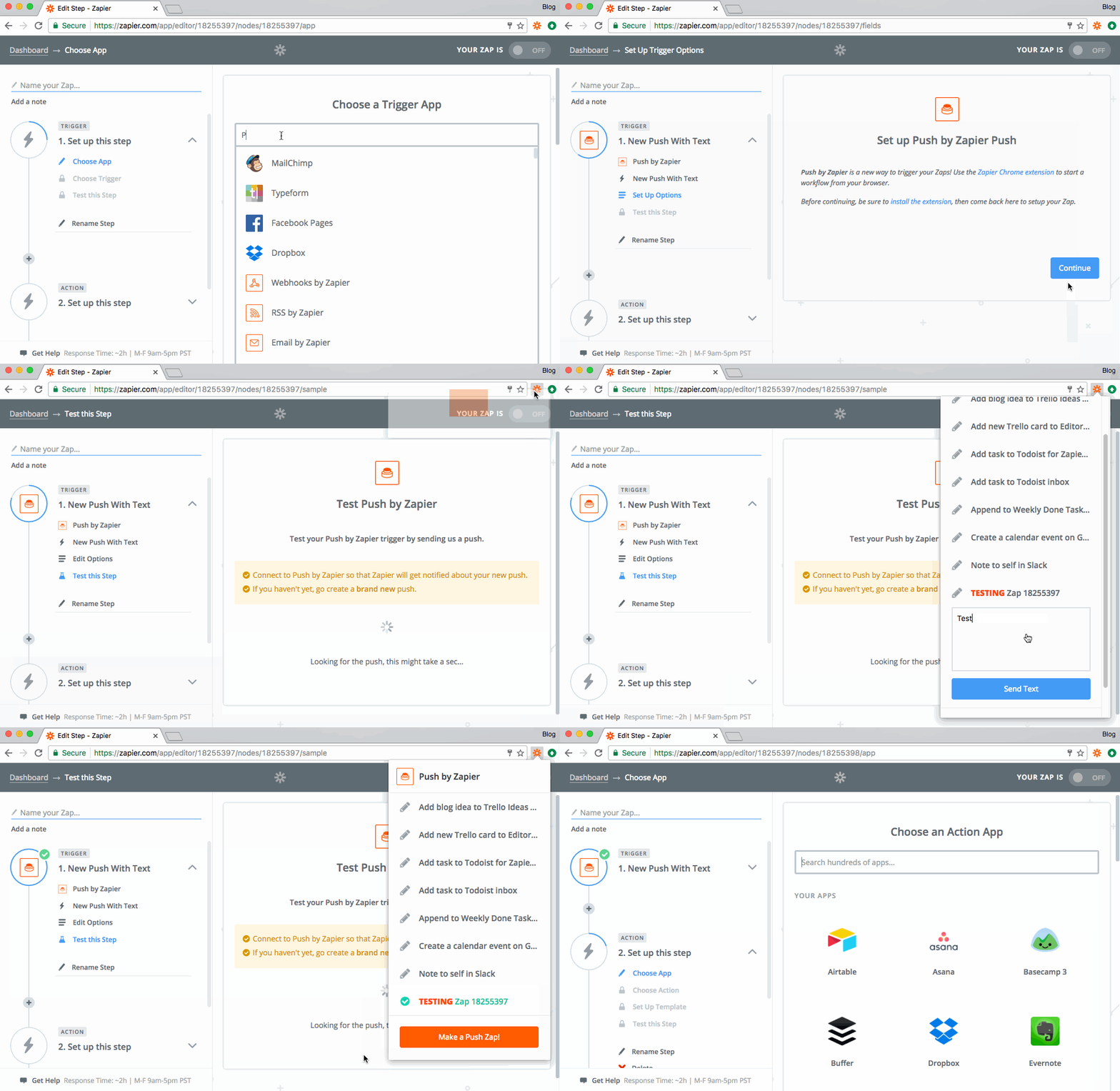
First you need to install the Push extension: Go to Zapier's listing in the Chrome Web Store and click the "Add to Chrome" button. Once installed, you'll see the Zapier logo (i) in your menu bar.

Create the New Push with Text Trigger

Push by Zapier

Then log into your Zapier account and click the "Make a Zap!" button at the top of the home page.

In the Zap editor, search for "Push" to select that as the Trigger app.

Next, choose "New Push with Text" so that you'll be able to enter whatever text you want from the extension to send to Evernote or OneNote. Click "Save & Continue".

In the last step for this part, we'll test the connection:

  1. Click "Connect & Continue".
  2. Then click on the Push icon in the Chrome menu bar and click on the new Zap you just created–it will say "TESTING" next to it. (Don't worry about the name of the Zap yet, you can change it later.)
  3. Enter some test text and click "Send Text".

Now back in the Zap editor, you should see the test was successful. Click "Continue" to set up the next step, sending text to Evernote or OneNote.

Add the Evernote or OneNote Action

Append to OneNote

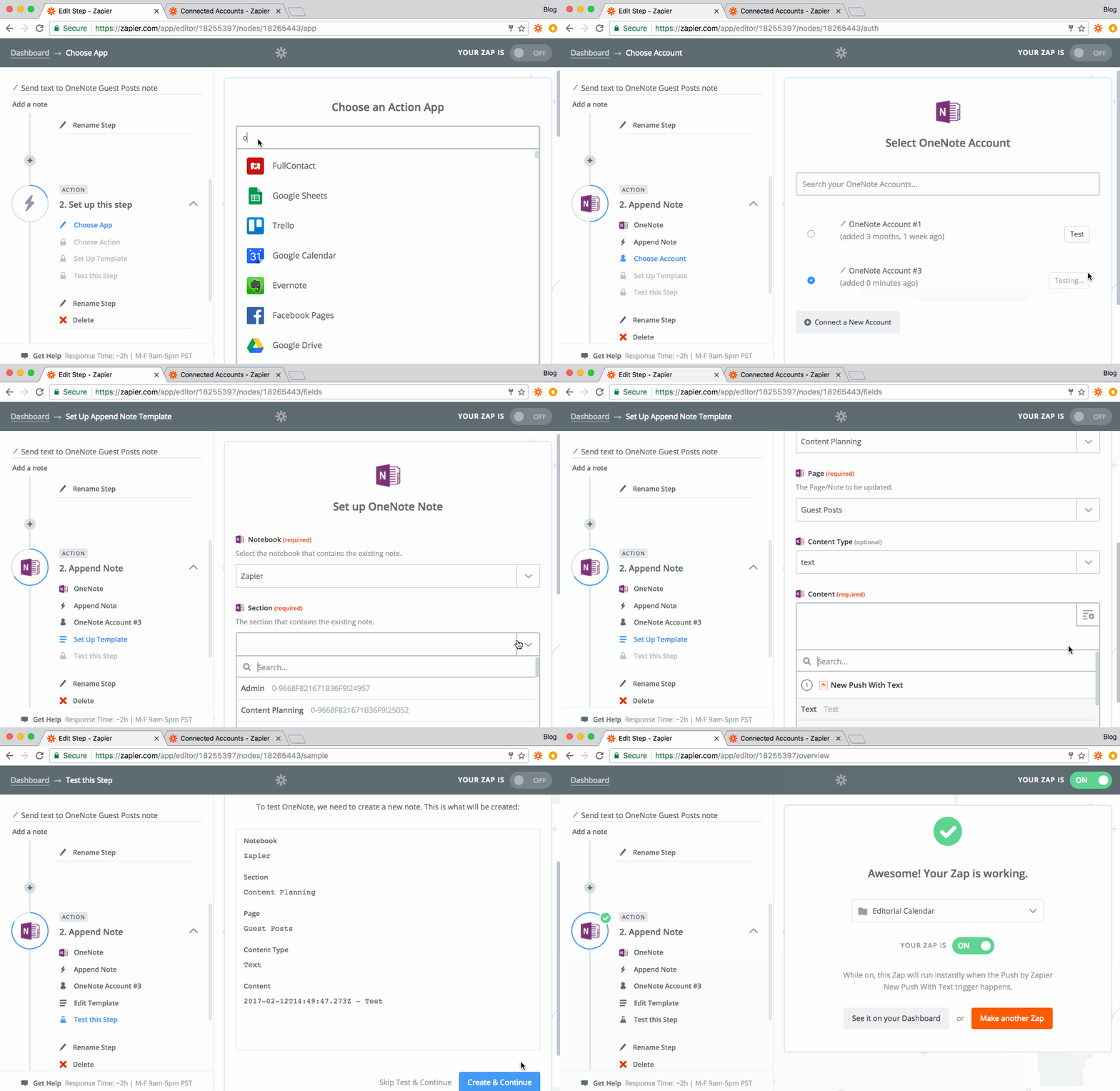
Next, choose either Evernote or OneNote for the Action app. I'm using OneNote as the example here, but the steps would be similar for Evernote.

In the next screen, choose the "Append Note" option. You might need to click "Show less common options" to select it.

Choose or connect your account to Zapier.

And finally, set up the template:

  1. Choose the notebook, section, and page where you want to send the text. Or, for Evernote, choose the Notebook and Title of the note to append to or create.
  2. For the content, select the text field from Step 1 (the Push step). You might also want to include the timestamp–the date and time when you add text to the Push app.

Test the step and give your Zap a name, such as "Append to weekly done tasks in Evernote." Then turn the Zap on and save it to a folder in your Zapier account.

You're all set!

Now when you click on the Push extension in your browser, you can quickly add any text to an existing note in Evernote or OneNote. Also, copy the Zap in your Zapier Dashboard and edit the details in the template to make this work for other notes you have.

You can use this to keep a running list of just about anything.

Push is pretty powerful. Learn more ways you can use Push to send info to and from over 750 apps with just one click.


source https://zapier.com/blog/add-text-to-evernote-onenote/

Thursday, 9 February 2017

Start Your First Store: The 6 Best Free eCommerce Apps

Starting a new business already costs enough. By the time you've registered your business, bought the perfect domain name, and built up your inventory, you might not have much left in the budget for your eCommerce software. Plus, you're just starting out: do you really want to commit to paying for an eCommerce platform when you're not sure how your business will do?

Don't worry. There are a wide variety of ways to start an online store for free. There are the usual culprits, eBay and Amazon and other online marketplaces where you can list your products for free. But perhaps you want something more customized just for your own products.

You can get that, too, for the low price of free. After reviewing over 50 eCommerce platforms for The Ultimate Guide to eCommerce Software, these are the best free apps we found to start your store:

App Icon:  Best for: Free for:
Storenvy Storenvy A fully customizable store inside a marketplace 500 products
Selz Selz A store that's quick and simple to set up and maintain 5 products
Big Cartel Big Cartel A full-featured eCommerce store 5 products
Jimdo Jimdo A store plus a website builder 5 products
Gumroad Gumroad A simple way to sell individual products Unlimited products with 5% per-sale fee
Facebook Pages Facebook Pages A store inside a social network Unlimited products

Storenvy

Best for a fully customizable store inside a marketplace

Storenvy screenshot

It's easy to want your own customized eCommerce store, so you can design it the way you want. But getting customers to visit your store can be tough—enough so that you'll be tempted to just list your products on Amazon or eBay and not worry about getting traffic to the store.

Storenvy gives you both, for free. It's a marketplace, somewhat like Amazon crossed with Etsy, and a store builder all in one. You can build your own customized store and list your products the way you want—even with your own domain name if you'd like. Then, to promote your products, Storenvy lets you also list each item you're selling on Storenvy's marketplace so people can discover them with a quick search.

You'll get to list far more products than most other free eCommerce apps allow, while also getting a wider audience for your products. Win-win.

Storenvy Pricing: Free for sales on your own store with up to 500 product listings; 10% transaction fee for sales on the Storenvy Marketplace

For a deeper look at features and pricing, see our Storenvy review.

See Storenvy integrations on Zapier

Selz

Best for store that's quick and simple to set up and maintain

Selz screenshot

Want to make your products look great? Selz does that automatically.

With a selection of beautiful one-page store themes, your Selz store will make your product listings pop. It'll help you market them, too, with a built-in blog and tools to share your product listings on Facebook, Twitter, and Pinterest. And if you already have your own website, you can embed Selz into your existing site or blog for a great way to sell products to your audience.

Selz works for all types of products: physical goods, eBooks, and even streaming videos or software license codes. It's a simple way to get started selling anything you want online.

Selz Pricing: Free for 5 products; from $19.99/month plus 1% transaction fee Plus plan for unlimited products and main features including a shopping cart

For a deeper look at features and pricing, see our Selz review.

See Selz integrations on Zapier

Big Cartel

Best for a full-featured eCommerce store

Big Cartel screenshot

Big Cartel feels a bit more professional—and comes with the tools you need to nurture and grow your store into a full business.

Say you only have a few items of one product. Big Cartel can track inventory, marking in-stock items as active then showing a Sold Out banner on your product page when your inventory's gone. And if you're selling a lot of similar items, Big Cartel lets you set default pricing and shipping options to help you quickly add everything to your store.

But don't worry, it's not difficult to use. Big Cartel walks you through setting up your store with a checklist to make sure you don't forget anything. You'll get everything you need to market and sell your first 5 items—and can then upgrade as your store grows.

Big Cartel Pricing: Free Gold plan for stores with up to 5 products with core features; from $9.99/month Platinum plan for 25 products and full features.

For a deeper look at features and pricing, see our Big Cartel review.

See Big Cartel integrations on Zapier

Jimdo

Best for a store plus a website builder

Jimdo screenshot

Need more than just a store—perhaps a full website that includes a store as well? Jimdo has what you want. It's an easy-to-use website builder that also lets you build an eCommerce store into your site.

You'll start out by selecting a site design and adding elements you want to the site's one-column design. You can add text, images, videos, and more in sections—or, choose a Product listing to add the first items to your store. There, you can add a preview image, price, and details about the product, then add more products to fill up your full store.

With its tools to tweak your site design, Jimdo will let you customize your store's design more than the other apps on this list. It'll let you build the shopping experience you want to market your products and convince people to add them to their cart.

Jimdo Pricing: Free for a branded store with core features; from $7.50/month JimdoPro plan for custom branding and no ads with annual billing

Gumroad

Best for a simple way to sell individual products

Gumroad screenshot

The simplest way to make a store, though, might be Gumroad. To list products for sale, just drag a photo of them into the Gumroad editor, add a description and price, and share the resulting Gumroad link. That'll let you list a single product for sale in a couple minutes flat anywhere you want.

For a full store, just repeat that process, adding each item you want to sell. Gumroad will put them together in your own simple store page, which you can customize with your profile picture and social media profiles—and, with paid plans, with a customized template. You can even market your products in Gumroad, using its free built-in email newsletter tool.

There's only one catch: Gumroad is the most expensive app in this list, charging 5% per sale on top of the standard payment processing fees. For that, though, you'll be able to list and sell as many products as you want—and you'll barely have to do any work to maintain your store. That's rather valuable in itself.

Gumroad Pricing: 8.5% + 30¢ per sale (including payment processing) Free account with basic features; $10/month plus 3.5% + 30¢ per sale with Premium account.

For a deeper look at features and pricing, see our Gumroad review.

See Gumroad integrations on Zapier

Facebook Pages

Best for a store inside the most popular social network

Facebook Store

Facebook is a bit different from the other apps on this list, but it's hard to pass up a way to start a store for free on the largest social network.

To start a store on Facebook, you'll start by making a standard Facebook Page for your brand. Then, click the Shop tab in your page, and you'll add your business info and a payment processing account. You can then build out your Facebook Shop, adding photos and details of each of your products, and selling them directly to your fans right from Facebook.

You won't get your own store website, per se, but you will get a free store that's easy to run right inside Facebook.

Facebook Pages Pricing: Free, aside from payment processing fees, along with additional Facebook Ad fees to promote products if desired.

For a deeper look at features and pricing, see our Facebook Pages review.

See Facebook Pages integrations on Zapier

Self-Hosted Stores

WooCommerce
Self-hosted eCommerce software is often free—though you'll need to pay for hosting (WooCommerce pictured)

When you look for a free app to build an online store, self-hosted apps like WooCommerce and Magento are often the first to show up. And they can be a good option—but they will cost you a bit more to start your store and will take quite a bit more time to set up.

With free self-hosted eCommerce apps, you can run your store without having to buy software or pay for a monthly service. However, you will have to run the app on your own server or hosting account, which will likely cost at least $10-20 per month. And you'll need to take care of your own site security and maintenance, something you wouldn't need to worry about with a hosted eCommerce app like those above.

In return, you'll get a far more flexible eCommerce store that can be customized however you like. You can extend it with add-ons and extensions, hand-code your own themes, and more. It'll just take time and often money to get it there, but chances are you might want to invest in having your own website anyway.

Here are some of the best options:

  • WooCommerce is one of the most popular self-hosted eCommerce apps, and it's also one of the simplest to use. If you already have a self-hosted WordPress site, just install the WooCommerce plugin, and you'll get a full store right alongside your blog. See our WooCommerce review for more details.
  • Magento is a designed to make listing and promoting your products as simple as possible. It includes tools to help you promote related products, refresh your store design on a schedule, and send email newsletters from your store. See our Magento review for more details.
  • X-Cart is designed to keep your customers around. Visitors to your store can create an account, track info on their orders, and automatically find the best shipping option for their location. And, X-Cart can sync your listings to eBay to sell your products in a marketplace and on your own site.

Form Stores

jotform form store
Add payment fields to your form, and turn it into a store (JotForm pictured)

There is one other option: you could just build a form that accepts payments, and use it to sell individual products on your existing blog, website, or social media profile. That's one of the simplest ways to start a tiny store—and depending on your form app, it can be free too.

Most online form builder apps include a payment field, letting you accept payments from PayPal, Stripe, and more. And if your form builder app doesn't include a payment field, you can make a payment link in PayPal, and redirect your customers from the form to PayPal after they fill out your form.

Just add the order info you need to the form, such as item size or color, shipping address, and anything else you might need. Then, add a payment field, and, just like that, your form's a tiny store. You can then share the form link directly or embed it into your existing blog or website for an inexpensive way to sell anything online.

Here are the best free form apps for that:

  • JotForm is a full-featured form builder that lets you start building your forms without even signing up for an account. And, it lets you accept up to 10 payments each month with a free account. Read our JotForm review.
  • Cognito Forms is designed for payments with detailed calculated fields and a generous free account that lets you accept 500 payments per month with a 1% fee on each payment collected. Read our Cognito Forms review.
  • Google Forms is perhaps the most powerful free form app—but it doesn't include payment fields. But, if you add a PayPal link to the end of your form, you can hack it to work as a simple store. Read our tutorial on Google Forms.

Take Your New Store Further

Ultimate Guide to eCommerce Software

There's more to eCommerce than just starting a store. You'll also need to start a business, with all the complications and legal hassles that go along with that. And your business won't run itself. You'll also need tools to manage your shipping and postage, accounting tools to keep your finances in order, and workflows to keep all your data in sync.

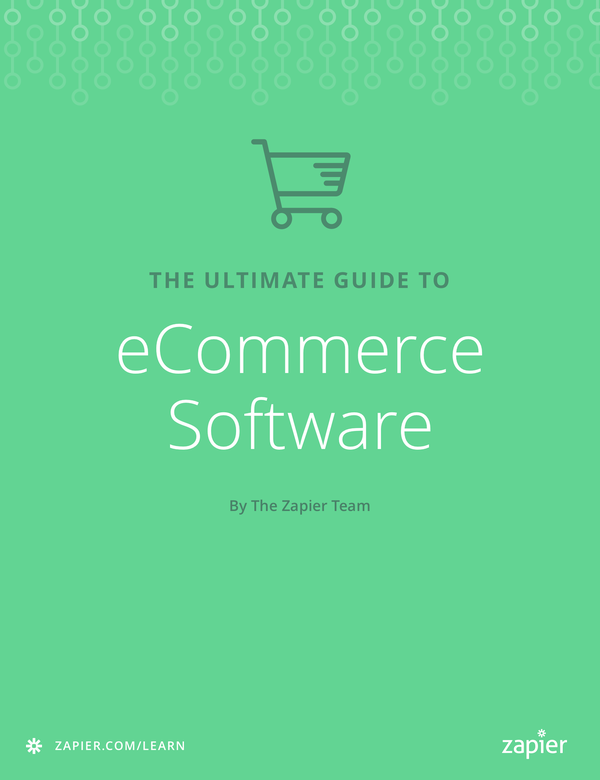
We've got you covered. In Zapier's Ultimate Guide to eCommerce Software, you'll learn everything you need to start and run your online business. From detailed walkthroughs of how to set up your store to additional info on the best eCommerce and payment apps—including those listed in this article—it's the resource you need to keep your store running smoothly.

And, it's free. Download your copy today to have the tips you need as you run your new eCommerce store.


source https://zapier.com/blog/free-ecommerce-platforms/

Tuesday, 7 February 2017

Deep Work vs. Messy: How to Balance Productivity and Creativity

If only your office were quieter, if your colleagues would quit asking questions, if the phone would stop ringing. If only your desk were neater, your notebooks cleaner, your files a bit more organized. If you could shut out all distractions, surely you could do your best work.

But then, there are all the times that something randomly gave you a great idea, the time you accidentally found something important in the mess and made something brilliant under a crushing deadline.

It's a contradiction—one that's most apparent in comparing two of Amazon's best business books of 2016: Deep Work and Messy. The former preaches the evils of distraction and how our scattered workdays are leading to less fulfilling work. The latter entices your creative side, suggesting you embrace frustrations and make greatness out of the chaos.

They're opposite—and yet, not quite as opposite as they seem.

Deep Work

Deep Work book

After reading Deep Work, you'll be ready to sell your earthly possessions, disconnect your phone, and retreat to a cabin in the woods. And you'll know that's not the worst idea ever, that doing so just might produce your life's best work.

Author Cal Newport writes from experience, not as a monk but as an academic who had published 4 books, earned a PhD, published 2 academic papers per year, and became a professor all within a decade. So of course he upped his goals, writing a book in a year while also working as a professor and publishing 9 academic papers—and without working nights and weekends.

His strategy is the namesake of his latest book: Deep Work: Rules for Focused Success in a Distracted World. "To produce at your peak level you need to work for extended periods with full concentration on a single task free from distraction," writes Newport. That's the core idea behind deep work. You need to block out distraction and work on only one task without anything else in your mind—and you need to do that for as long a period as possible, every day. That, according to Newport, is how some of the greatest work is done.

"High-Quality Work Produced = (Time Spent) x (Intensity of Focus)"

Most of us spend our days highly distracted, working in between a constant stream of notifications and messages, beeps and buzzes. It's hard to even finish reading one longform article without checking your phone, let alone work for hours on end without distraction. If anything, our workplaces expect us to be distracted. We're supposed to answer emails at all hours, respond to chat messages seconds after they're received, and answer customers' calls by the 3rd ring—and that's without counting the co-workers walking by and asking questions.

All we're left with is the "shallows," the time between distractions. But it takes so long to get refocused on what we're doing, it's tough to get anything done before the next distraction comes in.

Our best work–the most creative things we can do, the output that's most valuable–that's what most of us say we strive to achieve. It's the only thing that can keep us ahead of AI's onslaught, make us valuable to keep around. And it's that exact work that distractions keep us from accomplishing.

"Who you are, what you think, feel, and do, what you love—is the sum of what you focus on."- Cal Newport

"The ability to perform deep work is becoming increasingly rare at exactly the same time it is becoming increasingly valuable in our economy," writes Newport. "As a consequence, the few who cultivate this skill, and then make it the core of their working life, will thrive."

Later on, he states that "the differences between expert performers and normal adults reflect a life-long period of deliberate effort to improve performance in a specific domain," something that's increasingly important to succeed in today's fast-changing world.

Newport argues it's crucial to achieve deep work, and suggests 4 tips to make it possible:

  1. Work deeply: set aside time to work on projects without distractions, times when your colleagues know you are not to be bugged.
  2. Embrace boredom: stop checking your phone all the time. Learn how to concentrate, meditate, and focus on the task at hand instead of constantly looking for a hit of dopamine.
  3. Quit social media: simple enough. Don't keep social networking—or other distracting things—around because they provide some value; instead, only keep tools that bring the most value to your work.
  4. Drain the shallows: scratch the least important work. Reduce commitments that don't bring as much results, to focus on the things that do help achieve your goals.

The book opens with examples of people like psychiatrist Carl Jung, who built a stone retreat with no electricity where he could write without distraction, and Woody Allen, who wrote and directed 44 films, one per year until 2013, without ever owning a computer. J.K. Rowling eschewed social media while working on the Harry Potter series, even checking herself into a hotel to finish Harry Potter and the Deathly Hallows without distraction. Bill Gates shut himself away for two weeks every year to read and plan.

It seems an impossibly high bar to set—and yet it isn't. "Three to four hours a day, five days a week, of uninterrupted and carefully directed concentration, it turns out, can produce a lot of valuable output," writes Newport from his own experience. His own personal work is structured where he gets that chunk of uninterrupted time each afternoon—and that's when he writes the books and papers that advance his career.

"Who you are, what you think, feel, and do, what you love—is the sum of what you focus on," writes Newport in a call to action. Do you want to be remembered for answering your text messages promptly, or would you rather achieve impactful work while still having time for hobbies and family? Newport proposes that deep work is the way to achieve the latter—and backs his recommendations up with research and his own prodigious output.

Messy

Messy book

If Deep Work's call for focus and quiet inspires you to clear your workspace and open a clean, blank notebook, Tim Harford's Messy: The Power of Disorder to Transform Our Lives might make you think twice. With a cover that looks like a messy desk, it's seemingly the antithesis to the zen retreat Deep Work inspires you to build.

Because when you say zen and clean, you could also say sterile and bland. A plain white table and perfectly centered laptop might look beautiful; it also might not be the best place to produce creative work.

Messy takes you to concert halls and highways, Olympic proving grounds, and landmark monuments. The author talks with Brian Eno, peeks at David Bowie's magic, and deciphers what made Martin Luther King, Jr.'s best speeches great.

Through it all, there's a common thread: mess. "There can sometimes be a certain magic in mess," muses Harford. Somehow, that out-of-control craziness that life throws at you can be where the best sparks of inspiration come from. Eno used random cards to force musicians to try new things; Bowie collaborated with new people and invented new avatars; King's best speeches pulled in audience feedback and crunched his typical week-long preparation into mere hours.

Even London commuters provide inspiration to embrace mess and the unplanned. During a London Underground workers' strike, commuters were forced to find alternate routes to work. Researchers found something surprising when they looked at the data from transit cards—which work both in Tube stations still in operation as well as on London's iconic buses. "A substantial minority [of commuters] promptly found an improvement to the journey they had been making for years," says Harford. "All they needed was an unexpected shock to force them to seek out something better."

"There can sometimes be a certain magic in mess""- Tim Harford

The mess of a strike saved those travelers time and money, perhaps adding up to a significant amount over the course of their careers. And yet, without the mess, they would likely have stuck to their rut and never experimented.

“What makes you alert is to be faced with a situation that is beyond your control so you have to be watching it very carefully to see how it unfolds, to be able to stay on top of it," says Harford. "That kind of alertness is exciting.”

It's not like every mess is good, that you should dump your wastebasket on your desk and keep Twitter open all day to stay on your toes. But it is true that it's easy to get bogged down in work or a routine, and that it can take something to jar your attention and spark new ideas.

As Harford quoted Brian Eno: "The enemy of creative work is boredom, actually, and the friend is alertness."

"We are always reaching for tidy answers, only to find that they’re of little use when the questions get messy"- Tim Harford

In lieu of creating senseless messes, Harford recommends keeping multiple projects going at once. "In truly original work, there will always be impasses and blind alleys," says Harford. "Having another project to turn to can prevent a setback from turning into a crushing experience."

Harford keeps three projects ongoing at all times, turning to another project when he hits an impasse instead of turning to distractions. Top scientists switch projects often, he found, both to get fresh ideas and to collaborate with new people which in itself can inspire new ideas. Don't open Twitter; open that other project and start working on something new, perhaps even as a collaboration with someone you've never worked with before. Make a productive mess that makes you progress in multiple fronts at once.

Sometimes the most productive people have the messiest desks; they know instinctively where things are, and work through the clutter—while the rest of us search helplessly through drawers and boxes under our pristine desks. Perhaps that's an analogy for our lives. "We are always reaching for tidy answers, only to find that they’re of little use when the questions get messy," says Harford. So embrace the mess.

Doing Deep Work, Messy Style

Isolated, focused concentration on one side, random chaos producing bursts of inspiration on the other. Yet, the thesis is much the same: You need to do better, more inspired work, and you need something to make you get that done. The world is increasingly distracting, often from our own doing, and that's not going to help you do more creative Messy or Deep work.

Three core ideas align the two books, tips that can help you do your best work more creatively when seen through both lenses:

1. Do The Most Valuable Work

It's increasingly obvious that just doing stuff won't cut it anymore. You need to do your very best work, keep learning throughout your life, and push yourself to try new things.

As Deep Work says, "to remain valuable in our economy, therefore, you must master the art of quickly learning complicated things. If you can't learn, you can't thrive. If you don't produce, you won't thrive—no matter how skilled or talented you are.

"Technologies change rapidly, [and] this process of mastering hard things never ends: You must be able to do it quickly, again and again."

Take pilots, for instance. Messy documents how autopilot and other automations have taken away the simplest, repetitive parts of the job, leaving pilots to solve the thorniest processes like takeoff, landing, and the unforeseen problems en route. Autopilot is a good thing, something that reduced casualties and eased pilots' jobs. And yet, it's harmed those same pilots, making it easy to ignore problems until they're out of hand while also atrophying their seldom-used skills.

"If you can't learn, you can't thrive."- Cal Newport

"The better the automatic systems, the more out-of-practice human operators will be, and the more unusual will be the situations they face," says Messy. It's like spelling: We're so accustomed to autocorrect, we forget how to spell the least used words—sometimes spelling them so poorly that autocorrect can't decipher what we want to say.

There are two ways to fight this. One, Deep Work style, is to keep learning. Push yourself away from the simpler tasks that can be automated away, and focus on the hardest tasks that can't. Messy proposes we design smarter automated systems, ones that guard us at work and help us out when we fail, not the other way around. "Rather than let the computer fly the plane with the human poised to take over when the computer cannot cope," writes Harford, "perhaps it would be better to have the human fly the plane with the computer monitoring the situation, ready to intervene." Maybe re-type the word until you get it right, instead of relying only on autocorrect—or force yourself to memorize the corrected spelling.

Exercise your memory. Never stop learning.

2. Make Your Workspace Your Own

Deep Work's hideaways and retreats inspired their owners to focus and do some of their best work. Yet perhaps it wasn't the solitude that did the trick. Messy suggests that the clue may lie in autonomy.

Cubicle farms may be the blandest workplace possible, far from something that would inspire creativity. But the most creative-seeming workplaces didn't necessarily inspire creative work either, found Harford.

Renowned ad agency Chiat/Day's Frank Gehry-designed office was designed to be playful and creative, with murals and sculptures and fairground rides—and no assigned desks. There was no clutter, but also none of the sterility of cubicles.

And yet, employees weren't productive. They had nowhere to keep their stuff, nothing of their own to inspire their work. They were distracted, in the most creative way possible, and it didn't work.

Steve Jobs' team at Pixar hit the same dilemma, with Jobs' idea of having one central set of restrooms where people would have to meet random teammates during the day. Ideally, that would spark new ideas and collaborations. Instead, it wasted time and made life difficult for employees—and Jobs finally backed down.

"Something else matters just as much as serendipity: autonomy," writes Harford. "Junior staff were able to stand up to Steve Jobs, the owner, the legend, the control freak’s control freak—and to get their own way about something that mattered to them. That was more important than all the riveted steel and elegant brickwork Pixar’s success could buy."

The best workplaces aren't sterile, but they're not creative by command, either. Instead, they're the places where you can put stuff where you want and have control over your own work. You can choose to focus and shut out distractions, or you can switch to a different task when you're stuck. That's what makes a quiet abode perfect for deep work—and why your messy desk might not actually be a problem at all.

Related: Productivity and Ergonomics: The Best Way to Organize Your Desk

3. Set Quality Goals—Don't Just do Busywork

Perhaps the greatest overarching theme between Deep Work and Messy is the need to do career-advancing, life-changing work. Today's distracted work style is unlikely to bring about either—and if it does, it'll be with extra hours and stress.

So set goals. Deadlines and goals you're held accountable for can be the creative constraints that force you to do focused work—and sometimes can make you do amazing stuff. And don't just set simple goals like doing more tasks or answering emails faster. As Messy warns, "making targets more complex doesn't stop their being gamed—it merely leads to their being gamed in more complex and unpredictable ways."

Make sure those goals are about the most important things. "In the absence of clear indicators of what it means to be productive and valuable in their jobs," reminds Deep Work, "many knowledge workers turn back toward an industrial indicator of productivity: doing lots of stuff in a visible manner." Don't do that. Instead, figure out what matters, and do that. "Clarity about what matters provides clarity about what does not."

Then, break up your routines. "A script can seem protective, like a bulletproof vest," says Messy. "Sometimes it is more like a straitjacket." Take that weird route to work, without waiting for a strike. Talk to someone new at the office, even if your restrooms don't force you to. Test yourself and try something new, without waiting for autopilot to fail.

That's how you make yourself solve the mess with deeper, more creative work.


We're so often our own worst enemies, entertaining ourselves to death with Twitter and Snapfaceinstabookville instead of putting our minds to the task and doing the most important work. We blame it on distractions around us, when often it's the choices we make that split our attention spans into splinters.

Deep Work and Messy both give a call to putting our best effort behind what we do. Together, they show you how you can make this year more productive—how to make your organized and messy sides come together, yin and yang, for the greater good.

Title photo by stokpic via Pixabay.


source https://zapier.com/blog/deep-work-vs-messy/

Review: Leica D110 60 m Geosystems Laser Distance Measure

The Leica D110 60 m laser distance measure is a no frills laser measurement tool, but don’t let that put you off. For the right audience, this is actually all you need! A laser measurement tool does exactly what it says on the tin. This is a device that uses a laser in order to take a very precise measurement that you can then use for making precise cuts, choosing the right sized piece of wood and generally improving the speed and accuracy of your work. It works by firing a small laser which will then bounce directly back to the device. The device knows how quickly this should happen and thus it can use that information to calculate distance.

That means you can forget using your tape measure to make every cut and can instead start working much more quickly and accurately. This means you can say goodbye to tables that rock around when you place any weight on them and instead enjoy a much higher standard of finished product. It can also be useful for interior design, for making floor plans and for a range of professions.

Product Description: Small, Compact and Accurate

The Leica D110 60 m laser distance measure is one of the more affordable options from Leica. Other models have a range of advanced features, even including the ability to use a camera to target particular points on the screen and then zoom in to them to take a measurement that way.
But these features aren’t going to be necessary for DIY hobbyists and the like and in that case, there’s no need to spend over the odds. The Leica D11 60 m laser distance measure is a laser measure and nothing more and is perfect for making quick measurements.

That said, there are also some nice additional features. For instance, you get IP54 dust and water resistance, which will be very handy indeed when you’re leaving it lying around in highly dusty workshops. It’s also shock resistance and will survive a small fall and has Bluetooth for quickly sending your measurements to an iPad or laptop.

On top of all that, it’s also perfectly small to fit into a pocket.
Range is 0.20-60mm and it is accurate up to 1.5mm.

Pros and Cons: Small and Perfectly Forms

This is one of the more affordable laser measures on the market but you’ll still be able to benefit from the recognized Leica brand and the excellent accuracy. This is more than accurate enough for the vast majority of hobbyists and woodworkers and only professional property developers and other industry specialists are really going to need more features.

The flip out extension is also very good and allows you to get a firm grip against a piece of wood or a pillar for example. The small size is also a plus size, as it means you can slip this in a pocket and bring it with you just in case you need to measure something. Yes, you can be ‘that guy’.

But on the downside, you do of course lose out on some of the advanced functionality that you get with more expensive options. IP54 is slightly lesser than the protection you get from some of the others for example. Likewise, the 1.5mm accuracy is a step down from more expensive models like the X310. Then there’s the lack of level (which is missing in all the Leica laser measures). You’re also missing out on some of the sensors that can help to ensure that the device is able to measure at strange angles or around obstructions.

Conclusion: A Pleasure to Measure

In short, this is a smart, compact and accurate measuring device that can greatly improve the quality of your work. It lacks the most advanced features like the screen and isn’t quite as accurate as the top-end offerings but for most people, that isn’t going to be a problem. For a hobbyist or even a casual professional, there isn’t a compelling reason to spend more than this on a device that ultimately does the same thing as a tape measure.
That said, once you’ve used a laser measure, you won’t want to go back!


from Toolerant http://www.toolerant.com/review-leica-d110-60-m-geosystems-laser-distance-measure/

source https://toolerant.tumblr.com/post/156928572470

Monday, 6 February 2017

How the Zapier Team Uses Airtable

The secret's out. Here at Zapier, we have a major app crush on Airtable, an easy-to-use relational database. Over the past year, Airtable has emerged as an app darling across the Zapier team, used by nearly every team from data science to product marketing. We even have an Airtable emoji in Slack.

Zapier and Airtable
You could say the Zapier team is enthusiastic about Airtable

Airtable topped the charts as the fastest growing integration on the Zapier platform in 2016, so we reached out to our users to discover how they are automating their work. We chatted with 14 teams who store, organize, and collaborate on everything from dance auditions to food order deliveries using Airtable and Zapier. Along the way, our own team chimed in with the workflows they've built to get more done, faster. And now we're sharing those stories with you!

So without further ado, here's how four members of the Zapier team are using Airtable and automation to organize their life's work.

Predicting the Next Unicorn

With partnerships with more than 750 apps, it's essential for Zapier to stay on the pulse of what's hot in the app landscape—both to prioritize feature development with existing partners and to proactively reach out to up-and-coming apps not yet on the Zapier platform. Data scientist Russell Pierce uses Airtable to track partner popularity on Twitter and help inform platform development.

"Apps whose Twitter followers are growing in proportion faster than their Zapier users are apps that we want to reach out to or focus on improving," says Pierce.

Zapier and Airtable
The data science team uses Airtable to track partner popularity on Twitter, powered by a Zap

The team manages a master base with records of every app on the Zapier platform. That base has a field for Twitter handles, which are input by a freelancer—since adding data is as simple as typing in a spreadsheet, there's no fear of overwhelming a non-technical freelancer. Once the Twitter handles are entered, Pierce accesses that list via Airtable's API and then sends a webhook that inserts the Twitter data automatically into another database for further analysis by the research team. From there, the team can make a shortlist of partners that may need more attention.

Launching the Next Big Thing

In addition to connecting the apps you use every day, like Slack, MailChimp and Trello, there is also a set of Built-In Apps created by the Zapier team that anyone can use in their workflows, like email, SMS, and a mail parser app.

For Joe Stych, who leads product marketing at Zapier, making sure users know about these tools and are equipped to harness their power is top priority. He's been at Zapier for two years and transitioned from managing project launches with task lists and text documents to queuing up a successful launch using Airtable.

Launch Products with Airtable and Zapier
Adding a new record to the product launch table triggers a Zap

This past year, Stych led the charge on two new product launches for Zapier: Push, a Google Chrome extension to trigger automated workflows on the fly, and Digest, which lets you build custom summaries of the things you care about and deliver them on a schedule. Because there's a long list of to-dos for each new product release, recalling the activities for a previous launch can be a challenge.

Now, there's a Zap for that, so Stych doesn't need to rely on memory to execute a strategic launch. Whenever a new product launch is added to his master calendar in Airtable, Zapier automatically creates a list of standard marketing activities for that launch in a separate table, with filters that decide whether to continue based on the priority of the new launch. Then, with Airtable's database-style linked fields, he can connect the data to organize what's on deck.

"Before I started using this Zap, the process of coming up with marketing activities for a launch was a scramble to try and remember everything we did last time," says Stych. "Now I have a list that's generated for me automatically."

Collecting Customer Feedback

The best business decisions are based off data, not hunches. Product manager Chris Geoghegan uses Airtable and Zapier to establish and automate a feedback loop that guides decision making on new product features.

To gauge customer interest in a new feature, team accounts, Geoghegan placed a survey on the Zapier pricing page. When a prospective customer filled out the form, powered by a Typeform, a Zap automatically transferred their response to an Airtable base.

That Airtable base was set up to automatically sort and filter the entries for customers who were interested in both a paid plan and a team account. Once the record lands in a specific view, an Airtable formula pulls out the customer's first name and domain. From there, Geoghegan simply checks a box in that record to trigger another Zap, sending an email to that user requesting a quick chat about team accounts. Not only does this workflow ensure that the product team is building a feature that Zapier users really need, but storing the feedback in Airtable ensures valuable feedback is accessible to the whole team and doesn't slip through the cracks.

Tracking Entertainment in a Personal Database

Working at Zapier requires a certain fondness for data and analytics. Software engineer David Brownman proves that Zapier's love for Airtable crosses party lines of work and play.

Brownman uses Airtable to track his gaming, reading, and concert-attending habits. Why? Well, for a data junkie, the better question might be, why not?

"I mostly keep track for my own personal interest," says Brownman. "It keeps me more organized and is invaluable when writing lookback pieces about what I've seen, played, or read."

Using a gaming platform called Steam(not yet available publicly on Zapier–stay tuned!), Brownman can track new video game purchases with a Zap. Whenever he buys a game on Steam, Zapier automatically adds that game to Airtable and tags it appropriately. Then, when he plays that game for the first time, the timestamp is added to a table in the base.

Track games in Airtable with Zapier
The Zapier team uses Airtable for work and for play

To keep tabs on his reading list, Brownman uses personal automation tool Workflow. When he cracks open a new book, he posts a webhook to Zapier that shares the book to Airtable and Wunderlist. When finished, he checks it off in Wunderlist, triggering Zapier to update the date field in Airtable. From there, Airtable calculates the average words per day, which Brownman might use as an indicator of subject or author interest.

Track books in Airtable with Zapier
Track your life's work in Airtable - like books you read!

Every team is different, and these are a just a few of the ways the Zapier team uses Airtable every day. Are you or your team harboring a secret crush on Airtable too? We can't blame you. Get your motor running and build your own Airtable workflow on Zapier or try out one of the automations in this article to get started.

How does your team use Airtable and Zapier? Share your ideas with us in the comments.


source https://zapier.com/blog/how-zapier-uses-airtable/

Thursday, 2 February 2017

The Power of Silence: Why You Need Less Noise for Work and Your Health

Shhh. Hear that?

No? That's surprising. Odds are, you can hear something right now: A siren, the hum a fan, the blur of background conversations, the ticking of a watch. It's seldom our worlds are fully silent–so seldom that complete silence feels shocking.

We welcome sound into our lives sometimes to our detriment. Silence, perhaps, is our most under-appreciated productivity tool.

So let's talk about noise.

The Problems with Noise

Hazardous noise
Sounds above 85 decibels (dB) are harmful depending on how long and how often you're exposed to them. Heavy traffic, shouted conversations, motorcycles, and leaf blowers all have dB above that level

It's common knowledge that the jarring sound of a jackhammer—or the loud blasts of a rock concert—can damage our hearing, but that's not the only type of harmful noise.

Two types of everyday noise can be bad for us. One is excessive noise, such as the prolonged loud noise of being near an airport. The other is simply the distraction of general noise around us, such as conversations or interruptions from colleagues in the workplace.

The former may seem worse, but both can be detrimental to our productivity—and sanity.

Excessive Noise Is Bad for Health

Being around excessive noise has been found to affect our health quite seriously. Epidemiologists have found correlations between chronic noise sources such as highways and airports and high blood pressure, something that in turn can lead to other health risks, including damage to our brains and kidneys.

Other studies have found links between noise and sleep loss, heart disease, and tinnitus. People who live in consistently noisy places also commonly have elevated levels of stress hormones.

Quite ahead of her time, Florence Nightingale reportedly considered quiet an important part of patient care. Concerningly, modern hospitals have become far noisier than they were in the past. As more technology is added to wards, the average noise level in hospitals is well above the World Health Organization's hospital noise guidelines for patient rooms, something that is detrimental to patient health and recovery. Such a noisy environment can even cause doctors to confuse similar-sounding drugs—a potentially deadly mistake caused by excess noise.

Excessive Noise Can Harm Brain Function

High-noise environments are dangerous for our mental health as well. One study looked at children who went to school near the Munich airport before and after the airport was relocated. The researchers found that students attending that school performed worse on long-term memory and reading comprehension tests when the airport was near their school.

When the airport was moved, the researchers followed up with the nearby schools and found reading comprehension and long-term memory had improved among students at the school near the old airport site. Children in schools near the airport's new location, however, had worsened.

It's not just airports that cause noise pollution: elevated trains and other transit systems contribute to poorer scores for students in nearby classrooms, but installing noise-reduction materials in the rooms were able to reverse the effects.

Both examples point to good news: removing the noise can take away the mental effects. It may not, however, reverse physical effects from long-term exposure to noise. Going to school near the airport had also led to higher blood pressure and higher levels of stress hormones, as well as trouble with speech perception, problems that didn't improve after the airport was moved.

Constant Interruptions Reduce Focus

Open office
If you need to focus, 'work' is pretty much the worst place you could be ~ Ollie Campbell

So what about those of us who don't live or work near an airport or a highway? How does general daily noise affect us?

For most of us, daily noise tends to involve interruptions and distractions. Coworkers, meetings, phone calls, bustling cafés, street noise, and our phone's various notification sounds all vie for our attention as we try to work.

If you work in an open plan office, you'll probably find this is an even greater problem. Ollie Campbell, CEO of Milanote and part of Navy Design's multi-disciplinary team, says open plan offices come with their own implicit values. They make team members feel that disruption is acceptable, collaboration is the key priority, and serendipity is worth the interruptions it requires. According to Campbell:

In most workplaces, focused work is left to chance.If nobody's called you for a meeting that day, you might get an afternoon to yourself.

If you're lucky.

Distractions and interruptions are such a common part of our workdays, we don't even think of them as excessive noise anymore. It's often more obvious when we don't hear the noise of distractions around us at work than when we do.. A study at the University of California, Irvine, found that knowledge workers have focus periods of just eleven minutes on average, in-between interruptions. As Campbell said, "if you need to focus, 'work' is pretty much the worst place you could be."

Collaboration is important, but so is focus—particularly for those of us who are creators. For knowledge workers, our work happens between us and the blank page. Disruptions and noise only interrupt that process.

Between interruptions, distractions, background noise, and general lack of calm and quiet, the noise of the office can be harmful. With a buzzing office around you, a bustling street out the window, and something distracting you every three minutes, it's almost impossible to create anything of value.

The Benefits of Silence

Quiet zone
Both creative thinking and decision making get a boost from silence

Shutting both types of noise out–literal (and excessive) sound, and the more general commotion of the modern workplace—can improve our ability to focus and create our best work.

Here's why you should replace noise with silence.

Silence Gives the Brain a Break

For a long time, researchers used silence as a control in experiments testing the effects of sound or noise. After realizing silence was fascinating in itself, researchers started focusing more on the effects of silence than relegating it to control status.

In one experiment testing how the brain reacts to different types of music, silence was used as a control between the different music clips. But silence actually produced one of the most interesting effects. When compared with so-called "relaxing" music—or even long silence before the experiment began—short, two-minute silent pauses between the music actually proved more relaxing on the brain. It seems the effect of silence is heightened by contrasting it with noise.

Perhaps our strong reaction to silence's relaxing effects is related to how our brains work when they're not bombarded by the outside world. Research suggests our brains are never really quiet—instead, they're always working, even when we're not actively engaged in a conscious activity. In fact, science suggests when we do engage our brain in a conscious effort, it actually overrides the brain's "default mode," temporarily diverting resources to what we want to do.

Complete silence, then, allows the brain to return to its normal default state and continue its processing.

Our brain's ongoing background processing seems to be responsible for the sounds our brain makes, too. For instance, when a song you know well is stopped in the middle of the chorus, your brain will often fill in the gap by creating the sound of the next line of the song. You're not actually hearing anything, but rather creating that sound inside your mind, according Robert Zatorre, an expert on the neurology of sound. "In the absence of sound, the brain often tends to produce internal representations of sound," says Zatorre.

Silence isn't simply relaxing for the brain, either. One study of mice found that listening to silence for two hours every day prompted the subjects' brains to grow new cells in the hippocampus, which is related to our brain's memory abilities. While new cell growth doesn't always provide health benefits, in this case those new cells did become new, functioning neurons within the mice brains. In other words, silence could make you a little smarter.

We Do Our Best Work in Silence

The ability to shut out the world around us can be beneficial, beyond the pure benefits of silence. Both thinking creatively and considering long-term decisions are skills that, according to psychologist Jonathan Smallwood, "allow us to generate novel solutions to problems," and to stick to our plans long enough to reach our goals.

"It seems that the capacity to disengage from the outside world when the external environment is sufficiently benign reflects a skill set that is important to almost every human endeavor," says Smallwood. Put simply, these skills help us achieve success.

Smallwood isn't the only one who thinks getting away from the noise of the world is a useful habit to build. French mathematician and philosopher Blaise Pascal believed humans should learn to be quiet more often, as expressed in his famous quote: "All the unhappiness of men arises from one simple fact: that they cannot sit quietly in their chamber."

Derek Sivers, writer and founder of CDBaby, says spending time alone, away from the noise of the world, provides the best opportunity for creating new work:

It's not that I hate people. The other best times in my life were with people. But it's interesting how many highlights were just sitting in a room, in that wonderful creative flow. Free from the chatter of the world.

For Sivers, spending time unplugged, disconnected, and in silence is where he feels most creative. "Silence is a great canvas for your thoughts," says Sivers.

At design agency Navy, the struggle to get work done in the office was real. The constant distractions and regular noise was such an issue that employees were staying home when they really needed to focus. To fix this, the Navy team instituted daily "quiet time."

Before lunch at Navy HQ, the team agrees to be completely silent. Not just in person, but online, too. No emails, no slack, no tapping colleagues on the shoulder, and especially no meetings. They even put their phones away in drawers so they can really focus. As Campbell explains, "Quiet time is a contract: a few hours a week where we agree to work even if we don't feel like it."

Though it took months to get used to regular quiet time, after doing it for four years the team is now 23 per cent more productive. They're also less stressed overall and are able to take Friday afternoons off because they get so much done during the week.

It worked. "Work has become the best place to get things done," says Campbell.


You can't always escape noise. Sirens will go by, you'll get stuck at an airport for hours, and you can't force your coworkers to be quiet. And sometimes, you'll want to work from a noisy coffeeshop or attend a concert.

But when you can, it's worth choosing silence. Perhaps you can start by adding a period of strict quiet time in your workplace. Strive to find small pockets of silence for yourself during the day, and savor the silence. Or, if you can, perhaps it's time to add extra insulation and block out the consistent noise from your home and office, something that might pay for itself in increased focus and direct health benefits.

Finding silence and a calm space for yourself won't just improve your health—it'll help you do the best work you can.

Calm lake photo from realworkhard via Pixabay. Hazardous noise image by nick v. Open office photo by Wonderlane. Quiet zone photo by CGP Grey.


source https://zapier.com/blog/silence-health-productivity/