Monday, 12 November 2018

4 Twitter Marketing Strategies for Your Business

Twitter is arguably the most interaction-driven social network for businesses. And a solid Twitter strategy drives revenue. According to the Customer Insights report from Twitter, as much as 93 percent of people who follow small- and medium-sized businesses on Twitter plan to purchase from those they follow, while 69 percent have already purchased from a small business because of something they saw on the network.

Bottom line: It pays to have a solid Twitter marketing strategy.

Getting Started with Twitter

To start marketing your business on Twitter, you first need to set up your profile. Head to Twitter's website, and enter your username, email, and password after clicking Sign Up.

Unlike many other social platforms, Twitter accounts don't have a distinction between personal and business profiles. You can customize the following:

  • Your Twitter @handle, which is your unique identifier and makes up your profile URL (for example, twitter.com/zapier). Keep it straightforward and use your company name. If it isn't available, try changing it up by shortening it or adding a relevant keyword (for example, National Geographic uses @natgeo).

  • Your Twitter name, which appears above your handle on your profile and above all your tweets. Make sure to use your company name.

  • Your profile picture, which visually represents your brand in a small space and appears on the left of all your tweets. Using your logo is the best way to go, unless you're the only person in your company, which is when you can alternatively use your own headshot.

  • Your profile bio, which you can use to share what you tend to tweet about, your location or business hours, and a link to your website.

  • Your header image, which you can use to showcase an ongoing promotion, a photo of your team, upcoming or recent events, and other current information. Review your header image monthly and update it if it feels outdated.

  • Your pinned tweet, which can be any important tweet you've shared. It appears above all your tweets regardless of the timing of the original tweet you pinned. Review your pinned tweet weekly to make sure you're highlighting your most relevant and current tweet.

Twitter profile setup

With your profile completely filled out, you're ready to grow your reach and impact on Twitter with these marketing strategies.

1. Use Twitter Cards to Promote Your Content

Twitter cards expand regular tweets by adding rich content, like photos and video, to the tweet, in addition to the tweet itself. Cards also add additional information such as a headline and description of the page that's linked.

These are the four types of Twitter cards:

  • Summary card: A card with a square thumbnail on the left and a title and description on the right.

  • Summary card with a large image: A card with a full-width image, below which are a title and description.

  • App card: A card that drives mobile app downloads.

  • Player card: A card that can display video, audio, or media along with a title and description.

The key benefit of Twitter cards is that they provide a valuable preview of the content you're sharing without taking up any of the 280 characters in your tweet (aside from the link to the content itself, which won't be displayed in the tweet if you add it to the very end). In other words, they help you make sure you're attracting your target audience—and repelling the wrong one.

Ross Simmonds, a marketing consultant, makes the most out of a single tweet with a player card and a list of ideas to complement the video:

Twitter Player card from Ross Simmonds
The tweet text along with the card title and description make the topic of the video clear.

How to set up Twitter cards with Yoast SEO

For Twitter cards to work, there is some back-end work required. If your website is on wordpress.org, the easiest way to set them up is by using the Yoast SEO plugin.

Step 1: From Dashboard > Plugins > Add New, search for the Yoast SEO plugin, and click Install Now. Once it's installed, click Activate Plugin.

Step 2: Select Social in the SEO menu that will now appear in your main WordPress dashboard. Then, add your Twitter username and any other social profiles you want, and click Save changes.

Step 3: Click on the Twitter tab, and check that the Add Twitter card meta data is set to Enabled. Below it, select your default card type as either Summary or Summary with large image, then click Save changes.

If you're not on WordPress, you can set up Twitter cards by adding some code to your website. Follow Twitter's card setup guide or get a developer to help you out. You can test your URLs afterward with the validator tool.

From now on, whenever someone shares a link from your website, Twitter will pull your content's title, description, and featured image or video and add it to the tweet.

Twitter card from Wave.video

2. Get Creative with Visuals

Businesses with a successful Twitter presence don't just use Twitter to promote their content and send their followers elsewhere like you've seen with Twitter cards. They also use Twitter's creative capabilities to spark brand awareness and tell a story on the platform itself, without sharing their links each time.

People are three times more likely to engage with tweets when they include videos or photos, so it's worth conveying your brand's core messages using visual content.

For example, Airbnb always promotes the idea of unforgettable trips and unique experiences, so they've shared this photo of Cape Verde in combination with a clever caption. As you can see, there are no links added—this is just about what Airbnb as a business stands for:

Airbnb image tweet

Another example is Mailchimp's playful tweet in which they mention their mascot Freddie. Again, no promotion and no external content—it's simply their way of standing out in the feed with their quirky brand:

MailChimp image tweet

You can use any of the following tweet formats to post updates and tell stories on your Twitter account:

  • Videos: up to 140 seconds in length.
  • Images: up to four per tweet.
  • Text only: up to 280 characters per tweet.
  • GIFs.
  • Polls: up to four choices and up to a week in length.

Visual content drives retweets and responses, so the more variety you add into your tweets, the more likely it is you will stand out. Another benefit is that visuals take up a significant portion of the feed, especially on a smartphone, which helps attract and keep attention.

Buffer's video on Twitter
Buffer regularly shares interesting industry news through text-style videos.

How to create visuals for Twitter

Creating images and videos for Twitter doesn't require you to learn advanced editing processes or hire an entire team of designers. Here are some tools that will help you get up and running with visual Twitter posts quickly:

  • Native editing apps: You can use the built-in apps that play videos on your smartphone to trim and edit videos.

  • Wave.video: Wave.video ($39, free trial available) is a web-based video editor. It's perfect if you want to add text, transitions, and even calls to action to your videos. It also comes with a media library with thousands of royalty-free stock videos and images.

  • Twitter smartphone app: You can record a video directly within the Twitter app by tapping the video icon after opening the screen to compose a tweet. Hold down the recording icon, and record as many clips as you want until you reach the time limit of 140 seconds.

Composing a video inside Twitter smartphone app
Creating a video directly from Twitter's smartphone app
  • Canva: Canva (free) is a web-based image editor that comes with plenty of formats, templates, fonts, and design elements like icons to help you create an attractive image.

  • GIPHY: GIPHY (free) is already built into the Twitter ecosystem so that you can add GIFs to your tweets in seconds. However, you can also use their GIF maker to create a GIF out of your own video.

3. Take Action on Your Audience Insights

As with any area of marketing, you can learn a lot by testing various methods and monitoring results to see which ones bring you the best results.

The longer you've been active on Twitter, the better you can leverage audience analysis tools. These tools can help you learn about the times your audience is active on Twitter, the actions they take, their interests, their demographic breakdown, and more. You can then use these insights to plan and optimize your future content plan for Twitter.

How to research your Twitter audience

Here are four tools you can use to better understand your audience:

  • Twitter Analytics: On Twitter's native insights platform, you can access your monthly snapshots of analytics (tweets, impressions, profile visits, mentions, and new followers), individual tweet performance, audience overview (interests, buying styles, gender, income ranges), as well as trending events.

  • Followerwonk: The Analyze feature of Followerwonk (free) adds another layer to your audience profiling. Enter your Twitter handle, select Analyze their followers, and then click Do it. In this report, focus on Mapped locations, Most active hours, and Bio word cloud to learn the best times to tweet and the topics your audience is most interested in.
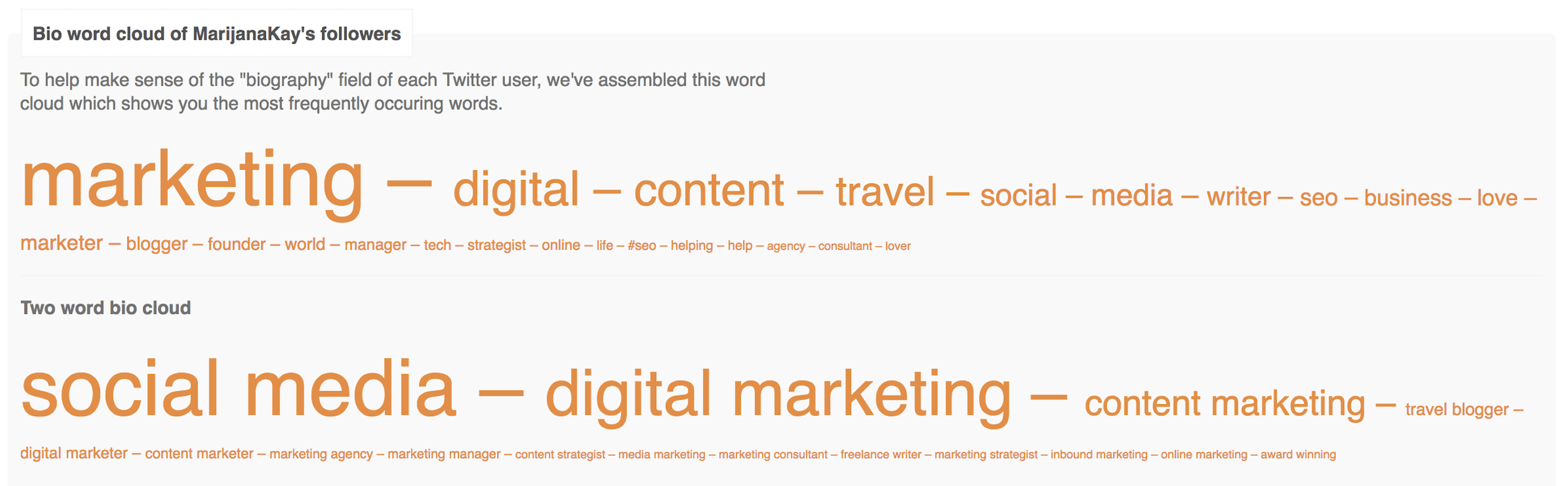
Followerwonk report
  • Audiense: Audiense Connect (free) is a customer insight and engagement platform. One of its most useful features is the ability to analyze your individual followers and filter them by influence, number of followers, account age, and more. You can use this to deepen connections with influencers and amplify your reach on Twitter.

  • SparkScore: SparkScore (free) is extremely useful to take your research from Audiense and learn more about the engagement rates of the accounts you found—as well as accounts similar to it—so you can expand your network.
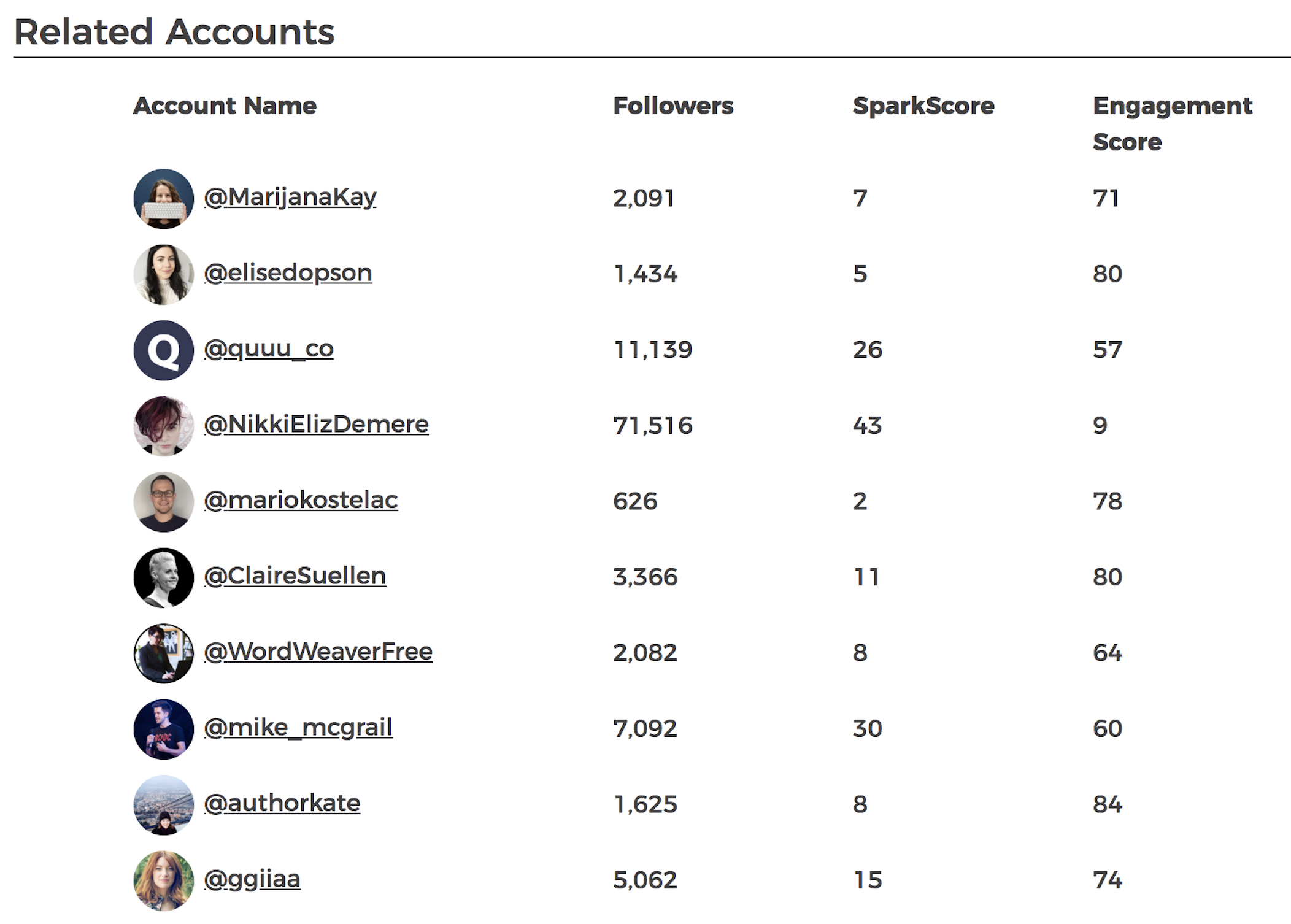
SparkScore report

Tips to implement insights from your audience analysis

Once you've collected the data from the above tools, you can take the following actions to build these insights into your Twitter marketing strategy:

  • Make a list of all the topics you can tweet about and educate your audience on. For example, a Followerwonk word cloud report might show that a lot of your audience is made up of executives, so you may want to create more content targeted at that group.

  • Use a tool like Buffer or Hootsuite to schedule your tweets to be published at times your audience is online.

  • List at least 15 Twitter accounts you can reach out to and build a connection with. You can do this by sharing their content and work, sending them a direct message to let them know their work has helped you, or even encouraging a collaboration of some kind.
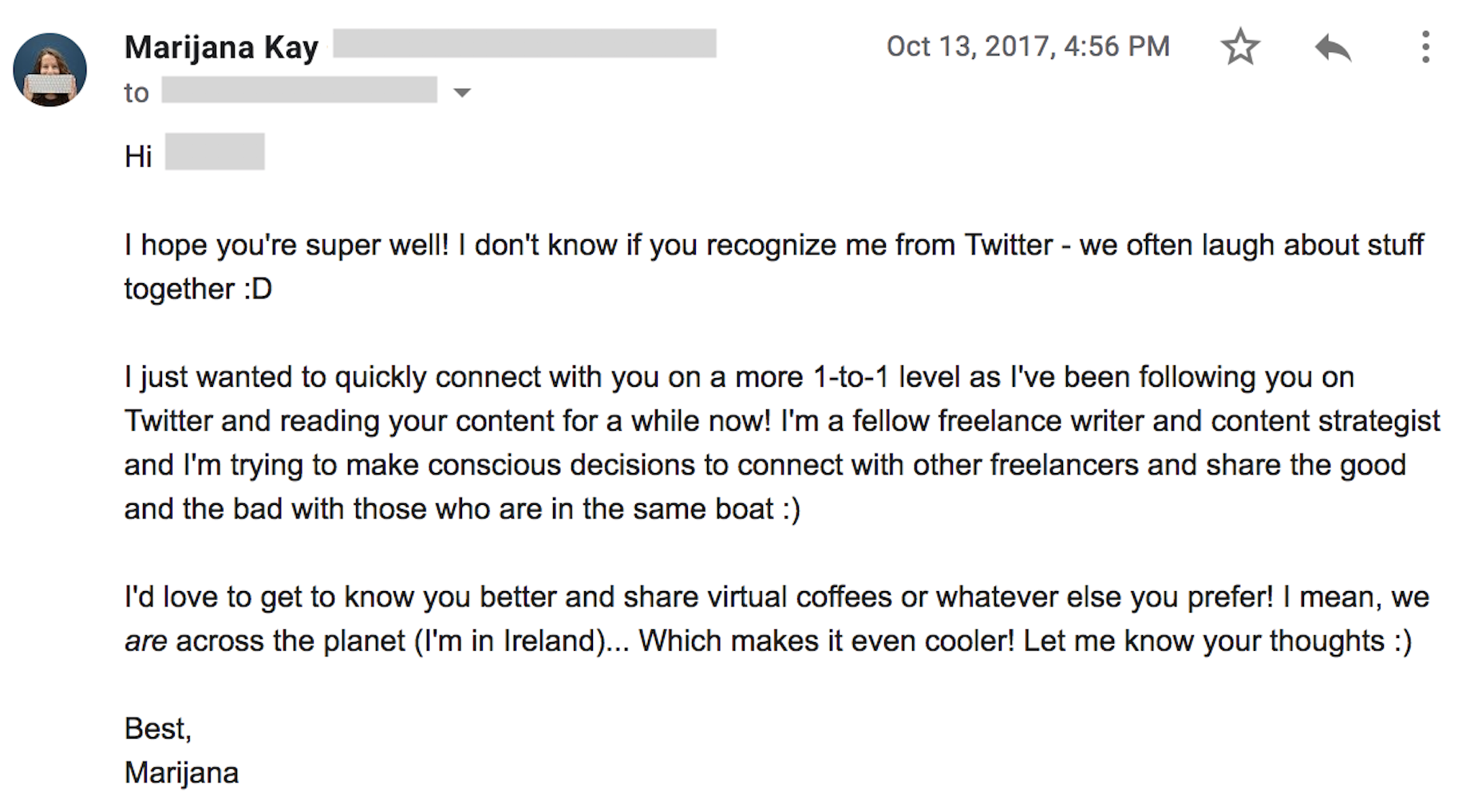
Building connections from Twitter

4. Be Proactive with Social Listening and Customer Support

If someone has an opinion about your brand, they might share it on Twitter. This is especially true if their opinion is extremely positive or extremely negative.

Twitter is a great platform for coming forward as a responsible company that cares about its customers and does everything in its power to remedy negative experiences.
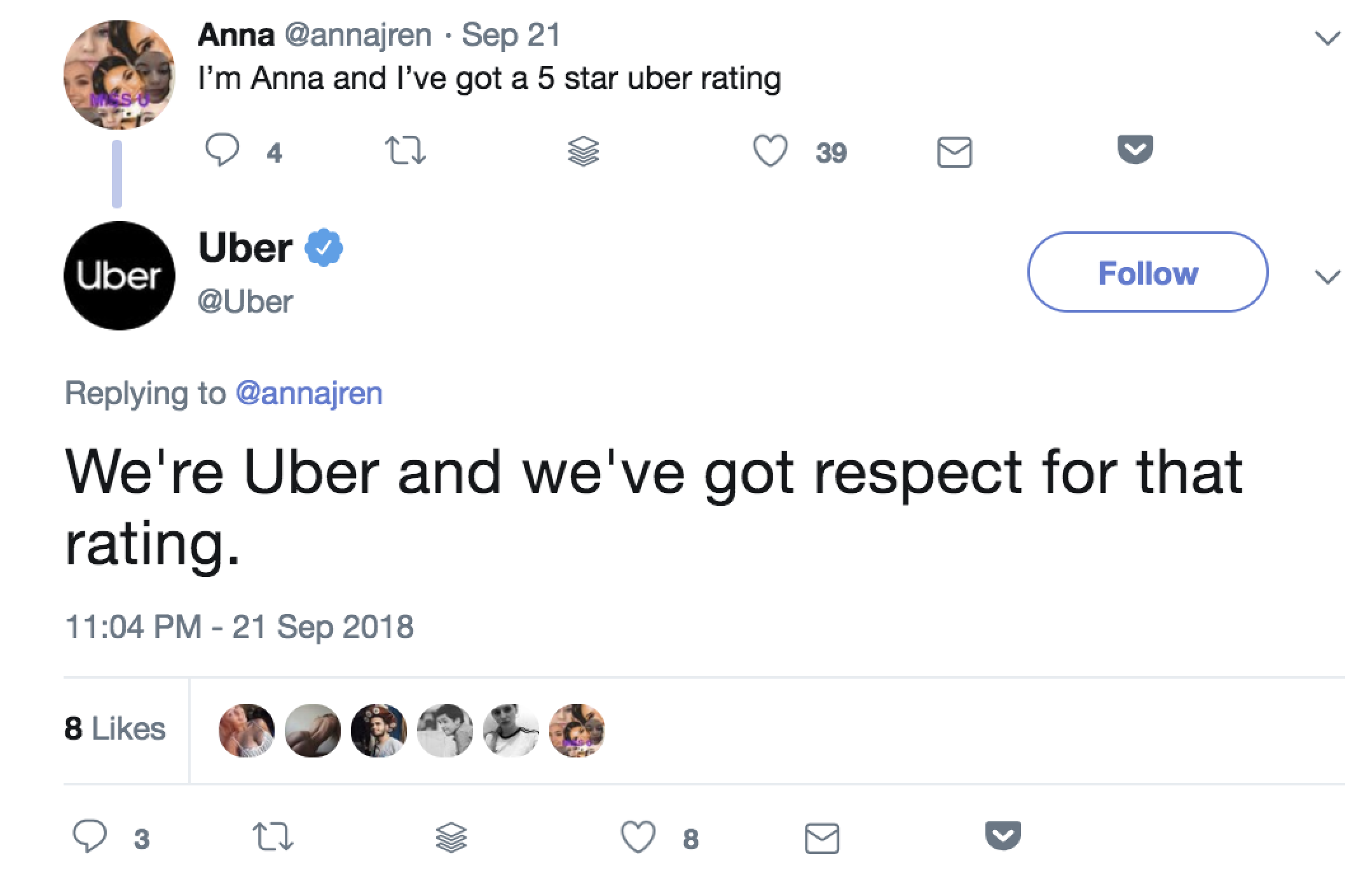
Uber's social listening on Twitter

The problem arises when you don't have a system to keep track of everything being shared, so you rely on Twitter notifications and direct messages. Without being proactive and consistent with social listening, tweets and conversations can easily slip through the cracks, which can result in a bad reputation. However, if you react in a timely manner—and maybe even when your customer doesn't expect it—you can delight them and build long-term connections.

How to set up a social listening process on Twitter

You can use multiple Twitter features to keep track of what your followers and customers are talking about on Twitter. Use your Twitter credentials to log into TweetDeck, a free Twitter dashboard. As you can see, TweetDeck's layout is based on columns, and you have full control over the filters for each column.
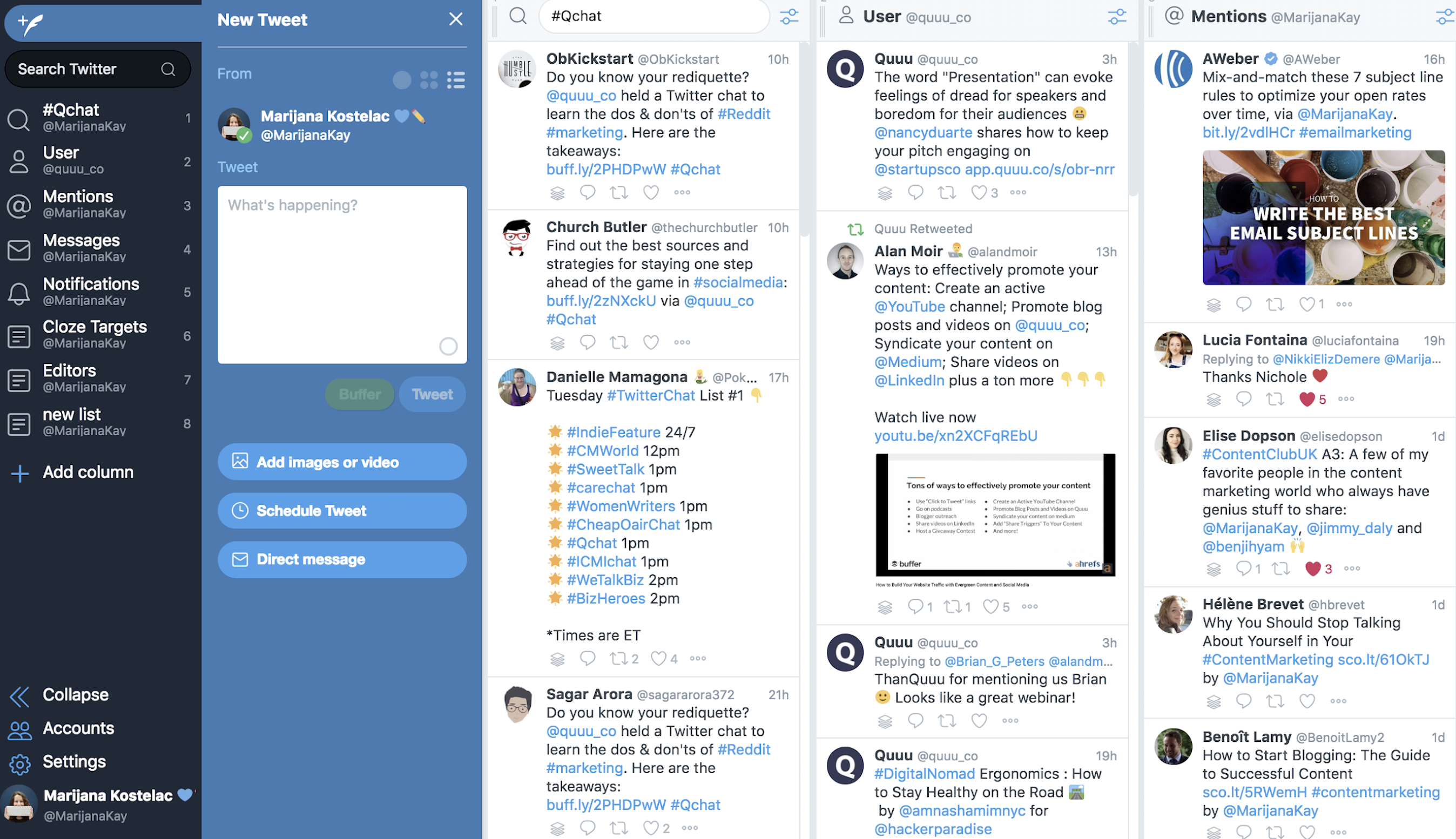
TweetDeck layout

To set up your social listening dashboard, you can click on Add Column on the left-hand side menu. From there, you can select:

  • Search, and enter a hashtag. When you select Search, you will be taken to a search field at the top left corner. You can enter a hashtag related to your industry or a branded hashtag if you have one. As you press Enter, a column that displays all tweets with that hashtag in real time will be added to your dashboard.

  • Lists. On Twitter, you can create lists of people. These can be your competitors, customers, prospects, conference attendees, or any other group that's important to you. If you already have lists, you can select one after you click Add Column > List. Alternatively, click on Create list, add relevant accounts, and click Done.
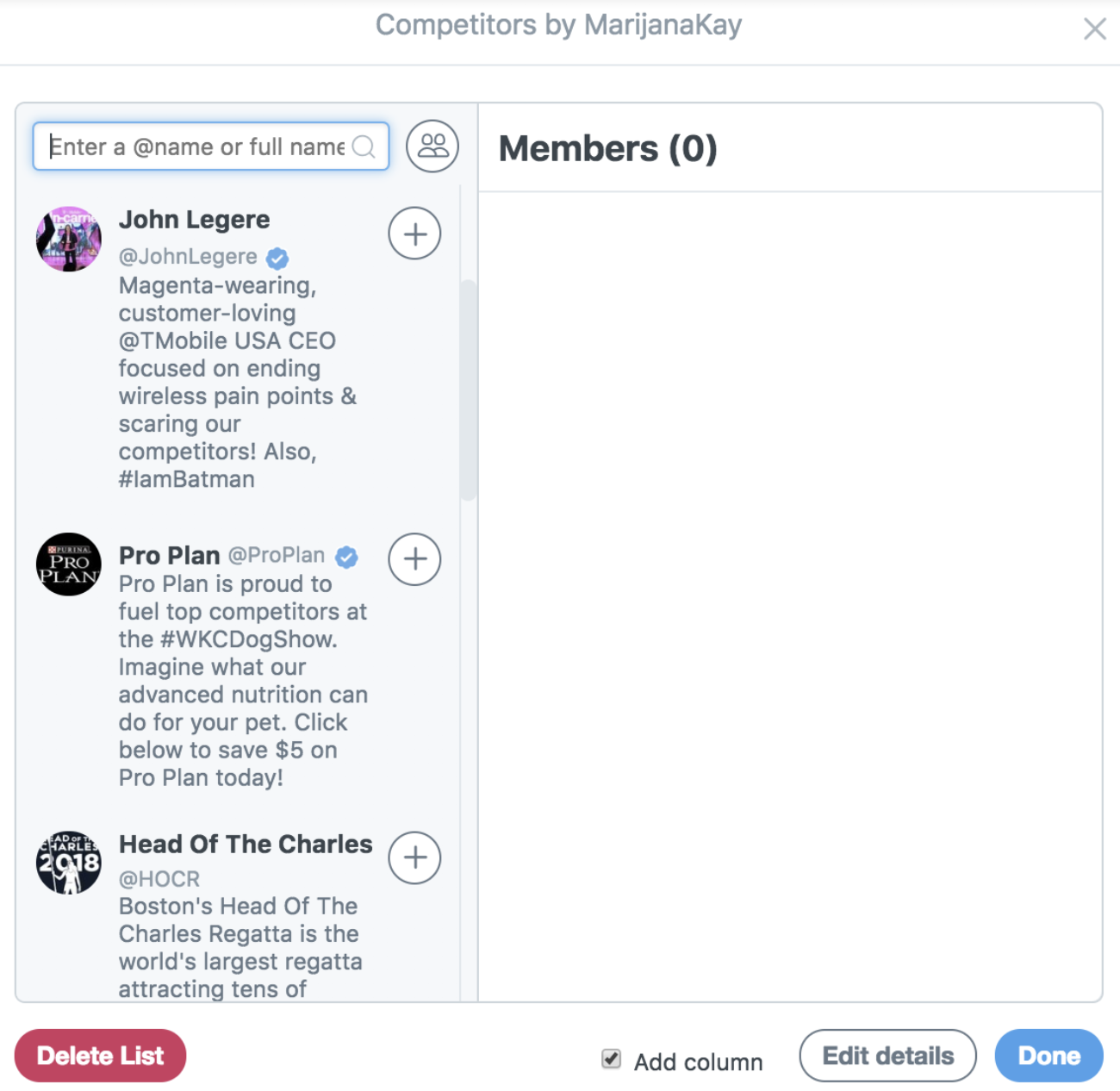
Creating Twitter lists in TweetDeck
  • Mentions. Twitter mentions are easy to track when you first get started, but if and when you start receiving dozens a day, they're easy to miss. Following the same process as above, select Mentions and then Add column, which will create a real-time feed with tweets mentioning you.

  • Search, and enter your brand name. This is the most powerful of all the listening methods because you're not directly notified that someone is talking about you—yet you're seeing it and reacting to it. Once again, select Search when adding a column, and type your company name. If there is a common misspelling, add a column with that version, too.

From there, you can refine each of your columns by clicking the settings icon at the top right corner of each column. Some of the options you have are location matching, tweet engagement, and type of mention.

Dublin Fire Brigade's reactions to relevant tweets
Dublin Fire Brigade consistently reacts to local fire alarm funny tweets.

You should review your social listening dashboard on a regular basis—ideally daily or more frequently if necessary—so that you can react to all relevant tweets about you in a timely manner.

Create a "Send a private message" button on Twitter

Often, your customers or those thinking about purchasing from you might ask you questions. This is a great thing to experience—it's an opportunity to put your best foot forward. But sometimes, you'll want to turn a public conversation private due to personal information you need from the customer. Twitter made this transition easy with a Send a private message button.
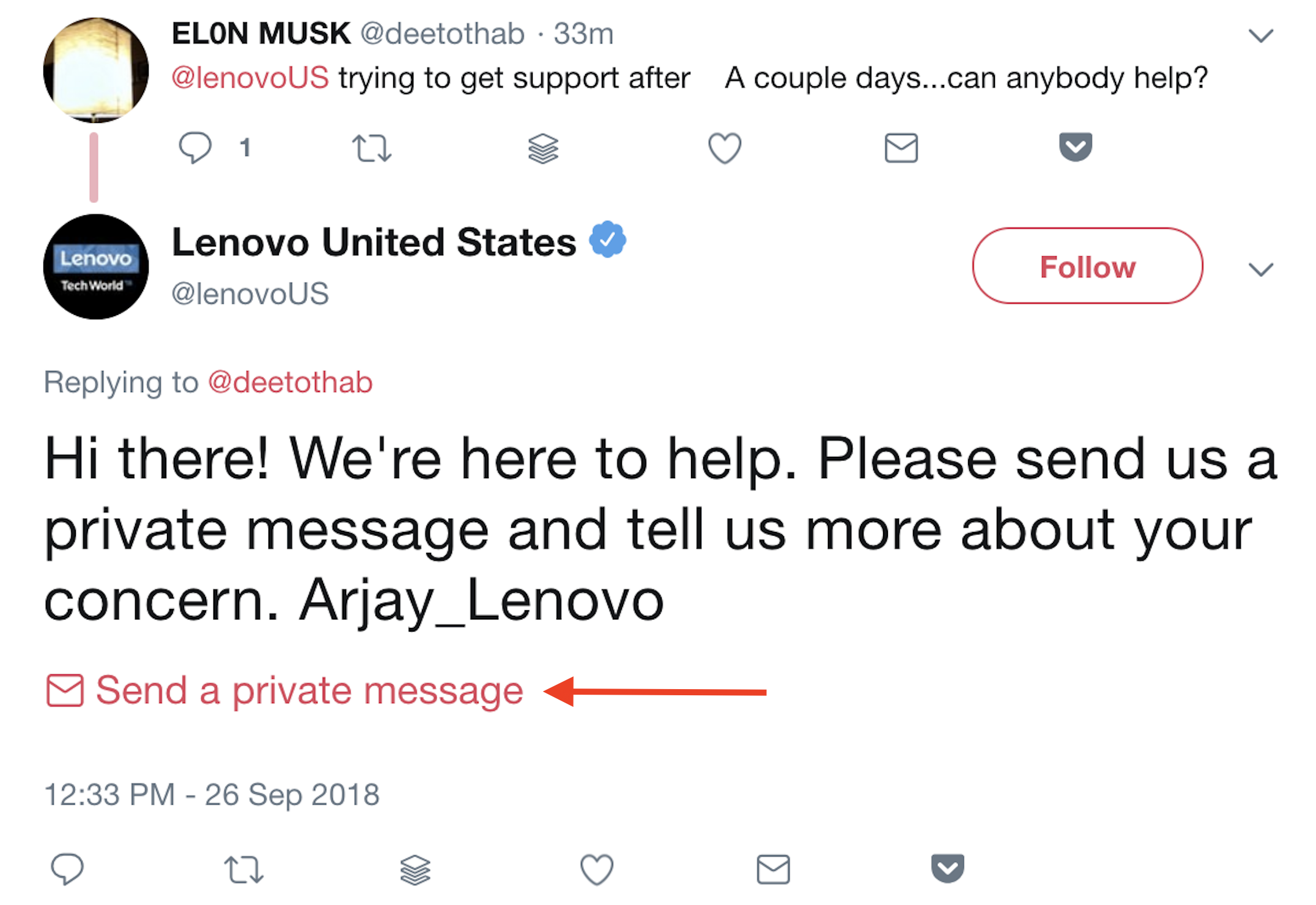
Send a private message button

You can add it to your tweets in a few easy steps:

Step 1: Go to TweeterID, and enter your Twitter handle. This will give you your account's numeric ID.

Step 2: Edit this link so that it contains your account's numeric ID after the equals sign: https://twitter.com/messages/compose?recipient_id=

Step 3: Copy and paste the edited link into your response tweet.

Automate Your Twitter Marketing

Once you've created your marketing plan for Twitter, you can use Zapier to automate many of the processes, including social listening, content promotion, and content curation.

  • Get notified when you're being talked about on Twitter:
  • Record important interactions and mentions:
  • Automatically share new content on Twitter:
  • Curate the most relevant industry content for sharing:

Don't see the workflow you're looking for? Browse more Twitter Zaps, or create your own custom workflow.


People buy from companies they know, like, and trust. Twitter is the perfect platform to build that trust: It helps you showcase your expertise and your intention to look after your customers. Remember to be approachable, honest, and true to your brand's values, and your Twitter marketing strategy will result in sustainable growth for your business.


source https://zapier.com/blog/twitter-marketing/

Thursday, 8 November 2018

The Best LMS Software: 8 Learning Management Systems to Train Your Employees

Your employees require guidance at every stage. As new recruits, they need to understand your organizational policies and procedures. As they grow in their position, you'll want them to acquire new skills for their role. And as your company evolves, so will your guiding principles—and all your employees will need to be informed of these changes too.

Learning management systems offer a solution for all of those stages. They allow you to create online courses with rich content, assess employee progress through various assessment types, and track employee progress throughout the courses.

After testing nearly 20 LMS platforms, we've selected the eight best. Read on to see which one will best serve you and your employees.

What Makes a Great LMS?

Learning management systems aren't only used by companies to train their employees. High schools and colleges—both online and traditional—use LMS software to host content, deliver assessments, and manage student data. But for this piece, we've only considered apps that help businesses deliver courses to their employees.

The LMS software solutions covered in this piece meet a number of important criteria:

  • An easy way to add employees to the training platform
  • Simple course creation tools that don't require technical skills
  • The ability to include images and video in the course content
  • The ability to create assessments
  • The ability to assign specific courses to employees
  • Tools to create certificates for employees
  • Analytics and reporting features to gauge employee progress

Let's take a look at the best learning management systems.

The 8 Best Learning Management Systems to Train Your Employees

  • TalentLMS (Web, Android, iOS) for pre-built courses
  • GoToTraining (Web, Windows, Mac, Linux, Android, iOS) for live online training
  • eCoach (Web) for visually rich courses
  • Teamie (Web, Android, iOS) for a social learning experience
  • eFront (Web) for skill-gap testing
  • Lessonly (Web) for practice-based learning
  • AdaptiveU (Web) for creating a simple training portal
  • Litmos LMS (Web, Android, iOS) for bundling courses into learning paths

TalentLMS (Web, Android, iOS)

Best LMS for pre-built courses

TalentLMS course marketplace

TalentLMS is an all-in-one learning management system that offers flexible course creation features, gamification and certification, and various other learning tools.

But its most valuable offering is an extensive course marketplace. A well-curated library, the marketplace allows you to buy pre-built courses on numerous topics, including sales training, IT skills, workplace safety, customer service, policy and compliance, personal development, communication, health, and project management. There are over 400 courses to choose from. Pick an individual course, or buy a course bundle with access to multiple courses.

Each course is built to engage employees with animated video content and infographics. But if you decide you want to add more to it, TalentLMS allows you to edit and supplement the course to your liking. You can add your own video, audio, images, and other content, reorder the lessons, or add tests and assignments. And even though you're purchasing courses from a marketplace, TalentLMS allows you to customize your portal with your own domain name and logo, or even create your own home page. You get the benefits of customization without having to use the resources to develop courses from scratch.

If you wish to build a course from scratch, the platform accepts audio, video, and plain text and allows you to pull content from YouTube, Flickr, Prezi, Wikipedia, Slideshare, Scribd, and Vimeo. Simply enter a URL, and the text on the page will be available for you to use or edit.

TalentLMS Price: Free for up to five users, 10 courses, and free support; from $39/month (billed annually) for the Small plan that includes 25 users and unlimited courses.

Automate TalentLMS with TalentLMS's Zapier integrations.

GoToTraining (Web, Windows, Mac, Linux, Android, iOS)

Best LMS for live online training

GoToTraining breakout session interface

GoToTraining is a part of the communication apps family by LogMeIn, which also includes LogMeIn Rescue, GoToAccess, GoToMeeting, and Grasshopper. Whether you're looking to welcome new employees, review a new feature with your team, or conduct a strategy session, GoToTraining offers the best live online training tools for every scenario.

Before the live training, the instructor will complete the details of the session. The interface will ask if you want to send any pre-session and post-session emails or conduct any tests, evaluations, or polls during the session. If you do intend to use any of these features, you need to create them before the session starts. While the training is in progress, you can share your screen with attendees or share audio and images that you've previously stored in your content library with your employees.

Like many video conferencing apps, GoToTraining allows you to conduct breakout sessions, where two to five attendees can huddle up virtually before reconvening with the larger group. If you plan to conduct a breakout session during your training, be sure to indicate as much when filling in session details. Finally, select the option to create a recording of your training if you plan to share or archive it.

Once you've filled in the particulars of your session, share the registration URL with your team via email or social media. Then, when it's time to start the training, log in to the GoToTraining software on your device (it will appear as a small widget on your screen), and you'll be live. Attendees can join a training session from the web app, desktop app, or mobile app. Options such as hand-raising and chat allow students and trainers to interact during a session. At the end of a training, you'll get access to a detailed report on attendance and any test results. There's even an option to send a certificate of completion to your attendees.

GoToTraining offers the benefits of a fully-featured video conferencing app and an LMS in one, making it the best choice for anyone intending to conduct live, interactive trainings.

GoToTraining Price: From $109/month (billed annually) for the Starter plan that includes up to 25 attendees, online course catalogs, polls, tests and evaluations, the ability to distribute training materials during sessions, recording management, and reporting.

Automate GoToTraining with GoToTraining's Zapier integrations.

eCoach (Web)

Best LMS for visually rich courses

eCoach question types

While most learning management systems allow you to add text, images, and video to your courses, eCoach helps you build a visually appealing course, with presentations and other interactive content to keep employees engaged.

The app is equipped with numerous content templates to help you get started. For example, the presentation templates allow you to create flowcharts, springy lists, drop-tabs, word circles, and slide-in text. This granular level of customization extends to the assessments. There are many full-fledged quiz templates to choose from for every lesson, and the question types include options like spot the mistake, choose the correct image, hotspot, or label a diagram, in addition to more standard question types. To enhance your course further, you can add case studies, slideshows, and images with text overlay.

To get started, drag and drop the template you want to work from, fill in your content, and that's that. Once you publish a course, share its link with team members or embed it on your website.

eCoach Price: From $99/month for the Lite plan that includes unlimited course creation, live chat, free course templates, custom URL, unlimited URL sharing, and 100 active users.

Automate eCoach with eCoach's Zapier integrations.

Teamie (Web, Android, iOS)

Best LMS for a social learning experience

Teamie Newsfeed

If your team learns better together, Teamie will give you the social learning experience they need. You'll create a classroom for course, and each classroom includes its own set of lessons and assessments. The classrooms also contain a Newsfeed: a place for learners and instructors to post discussions, ask questions, or find out if new lessons or assessments have been created. As the instructor, everything you post to a classroom automatically appears as a post in its Newsfeed.

One thing we found particularly compelling about the Teamie Newsfeed: When you post a question for employees, you can choose the Lock Comments option, which prevents employees from seeing their peers' answers until they make a comment of their own. You'll want to gauge if this feels right for your team, but it can certainly prevent confirmation bias.

The social learning continues with the Stories feature within each classroom. With Stories, students can share their knowledge on a topic, describe an experience, or express their thoughts on a classroom-related topic. As opposed to posts in the Newsfeed which are for quick questions or updates, Stories encourage deeper collections of text, images, video, or audio. What's more, employees can collaborate and create Stories together.

Teamie Price: Pricing available on request.

Automate Teamie with Teamie's Zapier integrations.

eFront (Web)

Best LMS for skill-gap testing

eFront skill-gap testing set-up

eFront uses skill-gap testing to help you identify which skills your employees need to develop, so they don't spend time and resources on material for skills they've already mastered. This can be helpful in a variety of situations, like being sure new hires are on the same page as the rest of the team and evaluating employee progress.

Creating a skill-gap test in eFront is relatively straightforward. Go to the Skill-gap tests page to add a new test, list the skills it should test, select the users who should take the test, and assign a deadline. eFront even allows you to add questions to your skill-gap test from an existing assessment within your LMS, so you don't need to reinvent the wheel each time.

To better tag the skills being tested, you can a assign a skill to each question. Once users complete a skill-gap test, depending on the results, they'll either be assigned a set of skills or presented with a list of courses to take in order to further develop the required skills.

eFront Price: From $750/month for the Business plan that includes up to 1,000 users.

Automate eFront with eFront's Zapier integrations.

Lessonly (Web)

Best LMS for practice-based learning

Lessonly practice session set-up

Assessments can help test an employee's knowledge, but practice makes perfect. Lessonly's practice tools help learners apply their training and get meaningful feedback from their managers, specifically in the sales and customer service departments. With practice sessions, learners can improve their chat skills with customers, practice handling support tickets thoughtfully, learn to deliver effective product presentations, rehearse pitches and customer interactions on video, and compose mock emails to prospects or customers.

When you select the Practice option, you'll see a list of activities you can assign to learners: webcam recording, screen recording, written response, email reply, email composition, chat reply, or ticket handling. For each activity, you can test employees on different criteria that you select beforehand.

Let's say you want to test how well an employee handles support tickets. First, you'll enter a sample customer query. Then, you'll select the criteria, e.g., brevity, clarity, including actionable next steps. If you're testing a candidate on delivering a sales pitch, you might select different criteria, such as confidence, tone, differentiation provided, and case studies cited. This allows you, as an instructor, to provide specific and actionable feedback to employees once they've submitted their practice session.

Lessonly Price: Pricing available upon request.

Automate Lessonly with Lessonly's Zapier integrations.

AdaptiveU (Web)

Best LMS for creating a simple training portal

AdaptiveU user profile

AdaptiveU helps you set up a simple training portal with a custom URL, your logo, and banner images. Invite users to your portal with a URL, or send them an email invite. Every member you add gets their own user profile, showcasing the courses they've completed.

Courses in AdaptiveU are made up of lessons, referred to as Challenges. Each Challenge includes a title, description, and attachments. You also have the option to add a Q&A. At the end of a lesson, employees either have to summarize what they learned in the lesson or rate and review it. This helps you get feedback about your courses and be sure employees are completing them in earnest.

The simplicity of the platform is what sets it apart, but it also includes basic interaction features: a forum for members to share their ideas and an instant messaging option to interact with peers.

AdaptiveU Price: Free for 50 active users and lessons, 2 GB storage, custom branding, and role management; from $99/month for the Starter plan that includes 100 active users and lessons and 4 GB storage.

Automate AdaptiveU with AdaptiveU's Zapier integrations.

Litmos LMS (Web, Android, iOS)

Best LMS for bundling courses into learning paths

Litmost LMS learning paths

Along with easy-to-peruse analytics and reporting features, Litmos LMS is equipped with an important tool for companies: learning paths.

Not every course in your LMS might be essential for every member of your team. Learning paths allow you to indicate prerequisites, organize courses into groups, and guide learners to their next course. Instead of manually assigning different courses to different employees, learning paths help you bundle relevant courses together, assign them to teams or individual employees, and ensure they are taken in the order required.

A single learning path can include up to 50 courses, but it could also be a set of two. Select the Reorder Courses option to change the order in which members should take courses, or mark certain courses as Optional while keeping them within the learning path. At the end of a learning path, you can award certificates to those who have completed it. Think of them as mini-degrees for your employees, who may want to add the certificate to their resume.

Litmos LMS Price: From $4/user/month (billed annually) for the Pro plan that includes 151-500 active users, course builder, learning paths, phone and email support, learner dashboard, and custom branding.


A well-oiled employee training machine is an asset for a company, and a good learning management system helps you get there. It helps you track your employees' progress, provide them with meaningful feedback, and empower them to do their best work.

When selecting an LMS for your company, consider the size of your organization, the number and type of courses you'll be adding, and how much flexibility and customization you need while creating courses and assessments. Above all, make sure your team is comfortable using the platform you choose.


source https://zapier.com/blog/best-lms/

Tuesday, 6 November 2018

The Four-Day Work Week: Why It Works

Work-life balance has always been a struggle. But an increased concern for workers' rights paired with the power of automation has created a shift. Certain industries don't require as many working hours anymore, and the global trend—especially in Europe—leans toward a four-day work week.

Does it work? Can people accomplish the same amount in four days as they can in five? And if so, why isn't everyone doing it? Let's look at what we know so far to see how effective the four-day work week really is.

The Four-Day Work Week: An Idea Ahead of Its Time

The four-day work week has become a hot topic recently, as technology has introduced new ways to increase productivity. But the truth is, the idea has been on people's minds for a while now.

In 1930, during the Great Depression, respected economist John Maynard Keynes predicted that we'd all have a 15-hour work week "within a hundred years."

In his own time, Keynes saw the rise of industrialization and assumed the trend toward more efficient work methods would continue. Once a worker earned enough to pay for their necessities, he suggested, they'd opt to spend more time at home or in leisure, reducing the work week to only two or three days.

Industrial revolution city

As an attractive fantasy to beleaguered workers throughout the century, the idea never quite left the public consciousness. Even Richard Nixon, during his vice presidency in 1956, predicted that the four-day work week was coming "in the not too distant future."

The idea remained just an idea for close to a century, until 1998 when France enacted the first of its two "Aubry" laws that reduced the national work week to 35 hours instead of 39, with excess hours counting as overtime. (In subsequent years, revisions have eroded much of the original laws.) Their aim was to reduce their 12% unemployment rate (at the time) through work sharing, but the success of the legislation got other countries revisiting their standard work schedules.

With the tech disruption evident in the 21st century—similar to the "conveyor belt" tech disruption of the 1920s that ushered in the five-day work week—the idea continues to snowball. Even business mogul Richard Branson supports the shift to a shorter work week, stating in a blog post:

By working more efficiently, there is no reason why people can't work less hours and be equally—if not more—effective. People will need to be paid more for working less time, so they can afford more leisure time. That's going to be a difficult balancing act to get right, but it can be done.

Different countries in Europe are already experimenting and implementing shorter work weeks in varying degrees. But the conversation got louder earlier this year, when a New Zealand firm conducted a formal experiment.

New Zealand Study About the Four-Day Work Week

The Perpetual Guardian is an estate management firm that deals in wills, trusts, and EPAs—a fairly unassuming and conventional company, perfect for capturing a work experience close to the norm.

In March and April of 2018, the firm ran an experiment that reduced their work week from 40 hours to 32 hours, for all of its 240 employees, while still paying the same salaries. They hired a pair of researchers to record the results quantitatively, and what they found shows positive support for the four-day work week:

But above all, "their actual job performance didn't change when doing it over four days instead of five," in the words of Jarrod Harr, the Auckland University of Technology human resources professor who jointly oversaw the experiment.

As reported, with the benefit of an extra free day, employees were exceptionally motivated to meet productivity requirements. This motivation inspired workers to devise better work habits and to waste less of their work time, to say nothing of the improvements in their mood. "Supervisors said staff were more creative, their attendance was better, they were on time, and they didn't leave early or take long breaks," noted Harr.

Helen Delaney, a senior lecturer at the University of Auckland Business School who also supervised the experiment, made a similar observation: "Employees designed a number of innovations and initiatives to work in a more productive and efficient manner, from automating manual processes to reducing or eliminating non-work-related internet usage."

The study seems to offer evidence for what many already predicted: Productivity isn't influenced by just time—employee mentality also plays an influential role.

The Four-Day Work Week Is Already Happening Today

Figurine standing on a map

With the U.S. working longer hours than most other countries, American work ethic seems to demand longer hours, while other parts of the world are demanding shorter. The four-day work week is already well underway in Europe, with more countries expressing interest as time goes on.

Here's a chart of the top ten countries with the shortest average work weeks, set against their average annual salary (PPP) for context. Both data sets are from 2017.

Country Average hours worked/week Average annual salary (USD)
Germany 26.37 $47,585
Netherlands 27.29 $52,877
Norway 27.38 $51,212
Denmark 28.02 $51,466
France 28.50 $43,755
Luxembourg 28.98 $63,062
Belgium 29.63 $49,675
Switzerland 30.58 $62,283
Sweden 31.00 $42,393
Austria 31.25 $50,349

It's worth noting that six of the countries with the ten shortest work weeks are also among the top ten countries with the highest annual salaries (Switzerland, Netherlands, Denmark, Norway, Austria, and Belgium). Those European countries not yet on the list seem to be close behind. Although Britain's average work week consists of 40 hours, recently the Trades Union Congress (TUC) has been pushing for a four-day work week of 29 hours.

Even the U.S. has experimented with shorter work weeks, although more from individual companies and organizations than statewide legislation. Here are some notable examples:

  • Between 2008 and 2011, the Utah state government instituted a 4/10 work week: four ten-hour days with Fridays off.

  • Since 2016, Amazon has offered some employees an optional four-day work week of 30 hours, although at a reduced salary.

  • In 2004, Google initiated a policy where its employees were allowed to pursue whatever projects they wished for 20 percent of their time, or one full day. However, the practice is said to have been abolished informally, with cynics referring to it as the "120 percent" policy because they still use all of their work hours for job duties.

The Pros and Cons of a Four-Day Work Week

Close up of a clock

Factoring in data from the New Zealand study and others, lets see what benefits a four-day work week gives to companies—and at what cost.

Pros

  • Better productivity. Productivity during work hours increases to compensate for the lost day. Aside from the New Zealand study, we also have evidence from another study that overall productivity peaks at 25-30 hours per week for people over the age of 40.
  • More efficient usage of time. Employees spend less time on inefficient tasks like meetings and are less likely to "run out the clock" with time-wasters like social media or excessive breaks.
  • Employee satisfaction. With less stress and a greater work-life balance, happy workers reportedly engage better with their work, along with increased motivation and creativity.
  • Team building. The emphasis on efficiency tends to bring teams closer together, as there's less time to waste on disputes, and the entire team's goals are more focused.
  • Lower unemployment rates. Under the notion of work sharing, companies can fill open hours with new employees, employing multiple workers to fill standard one-person slots. (Of course, this doesn't account for salaries.)
  • Environmental benefits. A four-day work week critically reduces each individual employee's carbon footprint by removing commute pollution.
  • Fewer overhead costs. If all your employees are out of the office one day a week, that reduces all office maintenance fees by 20%, especially electricity.
  • More productivity innovations. By encouraging new time-saving methods, employees are more likely to think up newer and better productivity hacks.

Cons

  • The risk is expensive. The most glaring drawback for employers is the costly risk that workers fail to meet their work requirements. This was most evident in Sweden's two-year trial that reduced a 40-hour week to 30 hours, while continuing a five-day structure. While the study recorded higher worker satisfaction, it ultimately became too costly to uphold.
  • Not all industries can participate. Some industries require a 24/7 presence or other such scheduling, making a four-day work week impractical.
  • There might be unutilized labor. A study on the Netherlands' work week revealed that 1.5 million people wanted to work more hours but were unable to.
  • Workers put in the same hours anyway. Some jobs just take time. As was the case in France, some workers are putting in the same hours anyway—the only difference is they're paid overtime for it. While that helps the workers, paying extra overtime is just another expense for the company on top of already potentially paying for a third "day off."
  • Certain industries might suffer. Industries like office real estate benefit from people being at work in a way that wouldn't be transferred to whatever the workers do in their day off.

How to Implement a Four-Day Work Week

While jumping straight to a four-day work week may seem be a bit extreme, plenty of American companies are testing out the impact of reducing their weekly work hours. If you're interested in implementing it in some degree at your company, consider these four steps.

1. Encourage automation

The backbone of a four-day work week is productivity. To make up the loss in time, you'll need to maximize work efficiency everywhere you can. Of course, that's something you should be doing anyway. After all, if a task is simple enough to be automated in the first place, your time is better spent elsewhere. In that sense, implementing a four-day work week is just an convenient excuse to optimize your operations.

Using Zapier, you can connect over 1,000+ apps to automate workflows that can be completed by a computer. If you start with automation, you might find that there's some wiggle room for you to cut down on hours.

2. Communicate with employees

Working fewer but more productive hours isn't something that can be forced. If your industry can allow for fewer hours, you also need to make sure your employees are up to the task—and that it's even something they want.

Have an open and honest conversation about the idea and see what everyone thinks: Do they want to try it? Do they have suggestions for how to implement it? This could be a formal, company-wide meeting or a more casual conversation, perhaps in a #four-day-week Slack channel. You may also want to send your employees an anonymous survey if you think it would help them open up or be more honest about their opinions.

3. Start gradually and practice adaptive scheduling

Start by reducing the work week by two hours. See how it goes. If productivity increases—or even stays the same—try four hours. Eventually, you'll build up to that four-day work week without as many growing pains.

The logistics of scheduling is one of the lesser-known evils of a reduced work week. This goes double for customer service or any other industry that offers around the clock support to users or clients. To ensure that there are no gaps, you may need to institute rotating schedules. In other words, if you're reducing the work week by two hours, give half your employees the first two hours of Monday and half the last two hours of Friday.

4. Track productivity

You'll need to track your employees' productivity to be sure that the 20% reduction in time is paying off for the company. If you don't already, select a time-tracking app or a project management app that can easily track your team's productivity and output.

Be careful about the implementation here: You don't want your employees to suddenly feel like their time is being micromanaged. Instead, give them the flexibility to be as productive as they can be, while still ensuring that their time is being well spent.


If the working world continues on its current track, the four-day work week is on its way in. Of course, its power depends a lot on context. For example, the American shareholder mentality emphasizes consistent growth, which is necessarily at odds with a mentality of "sure, we can get the same work done in less time." In the U.S., if you can do the same amount of work in less time, then the company may just want you to do more work instead.

But while we wait to see how it all pans out, it's a good time to start experimenting. If you're interested in a reduced-hour work week, test it out at your company in a limited trial and see if your team can accomplish more by working less.

Image of industrial revolution from Jose Romero.09 via Wikimedia Commons. Image of figurine standing on a map from slon_dot_pics via Pexels.


source https://zapier.com/blog/four-day-work-week/

Monday, 5 November 2018

How to Compare Shipping Rates: 6 Apps to Find The Best Shipping Service

Shipping—as much as any software—is what makes eCommerce works. You can sell products from your hometown to customers around the world thanks to the postal service. Yet it’s hardly an enjoyable experience.

Shipping costs are formidable. Amazon spent over 12% of their revenue on shipping in 2017 as they have for many years—and you can easily spend more if you don’t know the best ways to ship your products.

Whether for the holiday rush or to get a package to a customer faster than usual, sometimes you'll need the cheapest way to get a package somewhere really fast. And every so often, it's worth comparing shipping options to make sure you're not spending more on postage than you have to.

Here are some of the best tools for that.

Compare Shipping Prices Quickly Online

When you want to fly from location X to location Y, there are dozens of flight apps to find the cheapest options. With shipping prices, it's not quite as easy.

Most shipping rate calculators are based around shipping from one country. The good news is, that means you just have to find a shipping site from your country, and it'll be able to compare shipping rates whenever you need to mail something fast.

They mostly work the same. Enter your own postal code as the place you're shipping from, along with the destination country and postal code. Then, enter the size and weight of your package, and the tool will show which shipping service will send the packages the quickest—or the cheapest, whichever you need. Typically, the shipping comparison sites sell the postage themselves. Sign up for an account, and you can buy and print the shipping label directly. Or, you can just use the info to choose a carrier and purchase postage on your own.

Here are a few options to try:

Parcel Monkey

for European, American, and international shipping rates

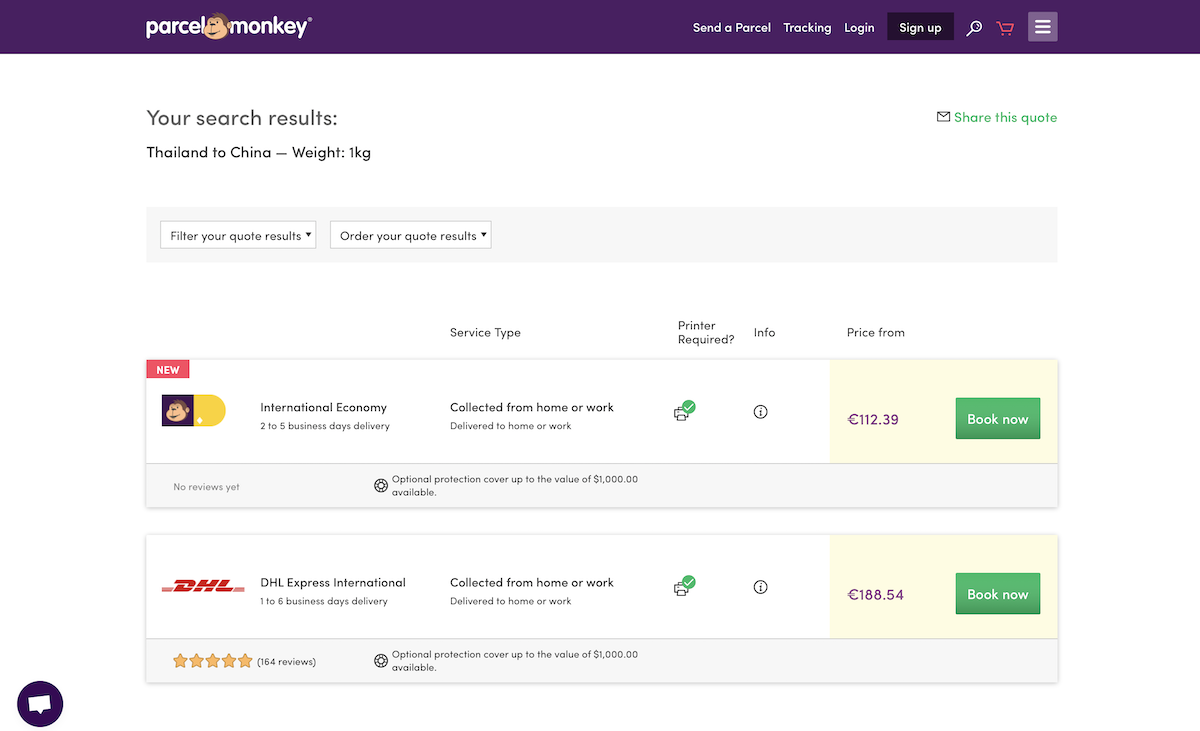
Parcel Monkey shipping rate comparison site

One of the few shipping comparison sites that works to and from almost every country is Parcel Monkey. It has dedicated sites for the UK, Spain, Germany, Belgium, Italy, the Netherlands, and the US, each with local pricing for popular shipping services in those countries. And, it can also calculate shipping rates for most other countries—albeit in the currency of the Parcel Monkey country site you visit.

It's focused on DHL, DPD, TNT, and local post office's EMS services, and you may see slightly different services depending on which of their search sites you use.

Secureship

for Canada and international shipping rates

Secureship

Another tool for finding shipping rates to and from almost anywhere is Canadian site Secureship. It's best for Canadian businesses, as its shipping prices are quoted in Canadian dollars and printed shipping labels are designed for Canadian shipping. But, it's also an easy way to get an estimate on what FedEx and UPS would cost to and from almost anywhere—just remember to convert to estimated cost to your local currency from the quoted Canadian dollar price.

ShipGooder

for US and Canada shipping rate comparison

shipgooder

For quick, discounted shipping price comparison from the US and Canada, ShipGooder is a great tool to try. It recommends both the cheapest and quickest options so you can pick what works best for you. And, with a ShipGooder account, you can get discounted rates on USPS shipping for an even more economical shipping option.

eBay Shipping Calculator

for simple shipping rates from the US

eBay Shipping Calculator

Perhaps the quickest tool to use to calculate shipping from the US is eBay's Shipping Calculator. Enter quick info about your package, then estimate the weight with a slider where you can pick the rate of a basketball, toaster, or other common items. It then shows rates for USPS, FedEx, and UPS to common destinations in that area for a rough estimate of what shipping will cost for your international orders.

FitShipper

to find the best package size and shipping rates

FitShipper

Unsure what size of box would be the most economical to ship? FitShipper can help. Tell it the size and weight of your product, its destination country, with how much padding it needs, and the shipping class you want. FitShipper then finds the best standard package size, and estimates the price with the USPS.

Find the Best Shipping Price for Every Order, Every Time

ShipStation
Shipping services for your store can help you find the best shipping rates for every order (ShipStation pictured)

If you want to always find the cheapest shipping option for each order, the best option is to use a paid shipping service. These tools integrate with your eCommerce platform and automatically find the cheapest shipping option for each product and printing shipping labels for each order. You need a subscription to the shipping service, but will likely make it back in the time and money saved on shipping.

Some popular tools that let you compare shipping rates include ShipStation, ShipWorks, Shipwire, RocketShipIt, XPSship, ShippingEasy, and Ordoro. Most of those are focused on US businesses—be sure to look around for similar services designed for your market if you’re shipping from outside the US.

The most important thing is that your shipping service connects to your eCommerce platform to directly calculate shipping for every order. ShipStation, for example, connects to Shopify, BigCommerce, and WooCommerce, along with marketplaces like Ebay and Etsy, to find shipping for all of your orders in one place. Be sure to check your eCommerce platform's add-ons or app store for shipping services, as the ones that integrate with your store will be the most helpful for your business.

Find the Best Shipping Costs from Favorite Carrier

USPS shipping rate calculator
Check prices online for your default carrier—and compare them to others in separate tabs (USPS pictured)

When all else fails, you can always compare shipping prices on your own—and it's not that hard. Odds are, you'll have a handful of options for easy shipping: Your local postal service, and a few international parcel carriers like FedEx or DHL.

There's a quick rule of thumb you can use, too. For express shipping inside the US, Steve Chou from My Wife Quite Her Job has found that UPS and FedEx are cheaper for packages over 2 pounds, while the USPS is cheaper for packages under 2 pounds. Flat rate boxes can be cheaper, too, for small heavy objects. "If you need a large flat rate Priority Mail box, make sure it’s heavier than 7 lbs," says Chou. "Otherwise, FedEx or UPS Ground will always be cheaper."

You could run with that and only check one site—but it still might be worth comparing a few services. Just open a tab for each service you want to check, and enter your package size and weight into each one. It'll take a bit more time, and you'll have to manually compare each option, but you'll get the most options to choose from.

If you need help comparing, just copy the data into a spreadsheet to quickly sort and compare. And if you have a number of similar sized packages, you could go with the cheapest option for the first package for the rest for a quick way to get decent priced shipping without having to check each package individually.

Here are the websites to check shipping prices with some of the largest national postal services:

You can find your national postal service's website at Wikipedia's list of postal services—and typically the shipping price tool is listed on the front page.

Then—especially for larger packages—it's worth checking an alternate shipping service to see if it's cheaper. Here are the links to check shipping rates from a half-dozen of the largest carriers:


Learn Everything You Need to Run a Store

The Ultimate Guide to eCommerce

Running an eCommerce site is a tough job, one that requires a wide variety of tools in addition to shipping services. You'll need an app to run your store, another to process payments, and others to manage shipping, accounting, and more. And, you'll need workflows to tie it all together so you don't spend all your time copying order info back and forth.

We've got the book for you. In our Ultimate Guide to eCommerce Software book, you'll learn everything you need to run an online store. From tips on starting your own business to detailed tutorials on the best eCommerce software, it's the resource that'll help you keep your store running.

And best of all, you can download a copy for free!

Originally published December 8, 2016; updated November 5, 2018

FedEx Express plane photo by Christian Junker via Flickr.


source https://zapier.com/blog/compare-shipping-rates/

Find Any Email Address for Free With These Tips and Tools

While you can find and message most anyone on social media, email is a more personal—and more professional—way to reach out.

Of course, finding email addresses isn't always easy. Most people are protective of their email address, and for good reason: it's one of the best ways to prevent spam. But with a little investigative work, you can find almost anyone's email address. Here are three easy ways to find email addresses for free.

Option 1: Try Various Search Tricks to Find Email Addresses on Your Own

Google search for email
A Google search might be all you need to find an email.

Company "about" page

The first place you should look for email addresses is the "About" page of your contact's company website. You might find anything from a brief bio to detailed contact info for every team member. Dig around a bit more, and you might find email addresses in unexpected places. For example, on Zapier's "About" page, you'll find team members' contact information by hovering over the photos.

Zapier About page
Hover over team members' photos on Zapier's About page to see their email addresses.

Personal websites

If you can find a personal blog or website for a contact, you may find an email address on their "Contact" page. If not, they may have a contact form on their website that sends them an email without exposing their email address to the public.

Social media

If you can find your prospect's social media account, check their profile for contact information. Here are a couple tips to keep in mind:

  • You may need to connect with the contact to see their email address on LinkedIn.
  • On Twitter, you can search historical tweets to see if a contact has ever tweeted their email address. Search on Twitter for the word email or at dot, and then follow that by from: and the contact's Twitter handle (e.g. email from:dannyaway or at dot from:dannyaway).
Twitter email search

Google search

If a person's email address is published anywhere online, Google may have it indexed and available for discovery. Here are a few search strings to try:

  • [firstname] [lastname] email (e.g., Melanie Pinola email)
  • [firstname] [lastname] contact (e.g., Melanie Pinola contact)
  • [firstname] [lastname] [company] email/contact (e.g., Melanie Pinola Zapier email)
  • [firstname] [lastname] email/contact site:[domain.com] (e.g., Melanie Pinola email site:zapier.com)

If none of these search tricks work, you'll have to do a little more detective work to find your contact's email address.

Option 2: Form an Educated Guess and Test It

Guessing someone's email may sound a little far-fetched, but it's a solid strategy. Companies often use a consistent format when creating new employee email addresses (e.g., firstname.lastname@company.com). So if you can find the email address for one of your contact's coworkers, you can guess that your contact's email may have the same format.

Of course, that's not always the case—and nicknames can complicate things—so your best bet might be to guess based on common email address formats. Here are a few examples:

  • [firstname][lastname]@[company].com
  • [firstname].[lastname]@[company].com
  • [firstinitial][lastname]@[company].com
  • [firstname]@[company].com

But you don't need to come up with a comprehensive list of possible formats: You can use a tool like Email Generator (free) or Email Permutator+ (free). Just type in the contact's first name, last name, and company domain, and these tools will generate a list of possible email addresses based on common email address formats.

You could use a tool like Hunter (free for up to 100 searches per month). Hunter lets you enter a company's domain name, and then it populates all of the email addresses it can find for that company. In doing so, it also identifies the most common email format used by that company, which could be helpful if the email you're looking for isn't listed.

Once you have a list of potential emails, you have to figure out which addresses (if any) are valid. There are a few ways to do this:

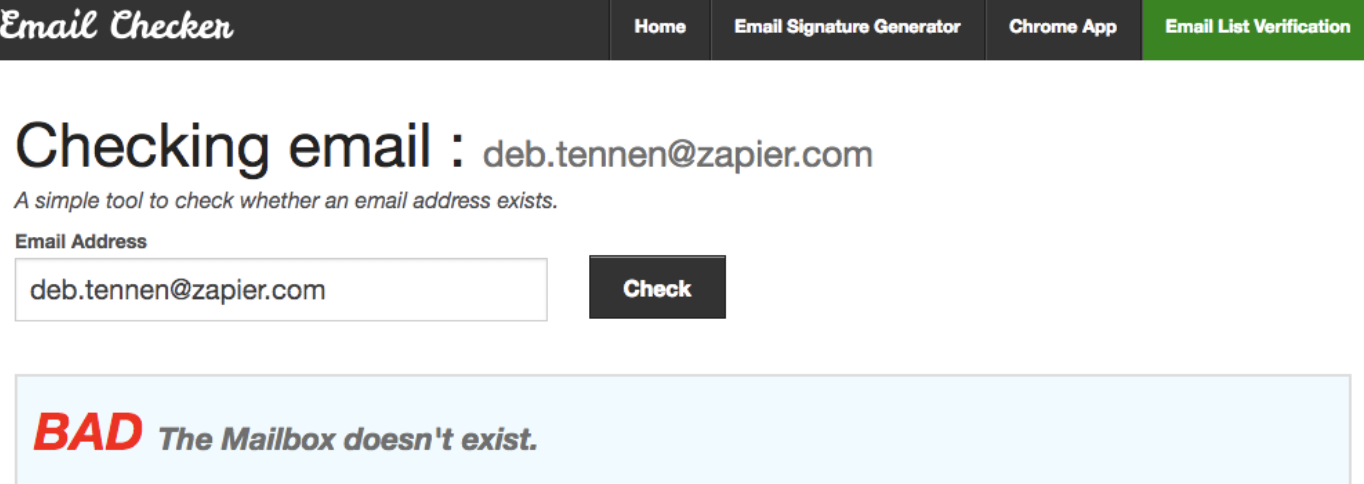
  • Use a free email testing tool like MailTester, Email Checker, or Email Hippo. Type in an email address to test it, and the system will tell you if the email address is valid, invalid, or unable to be verified.
Email Checker
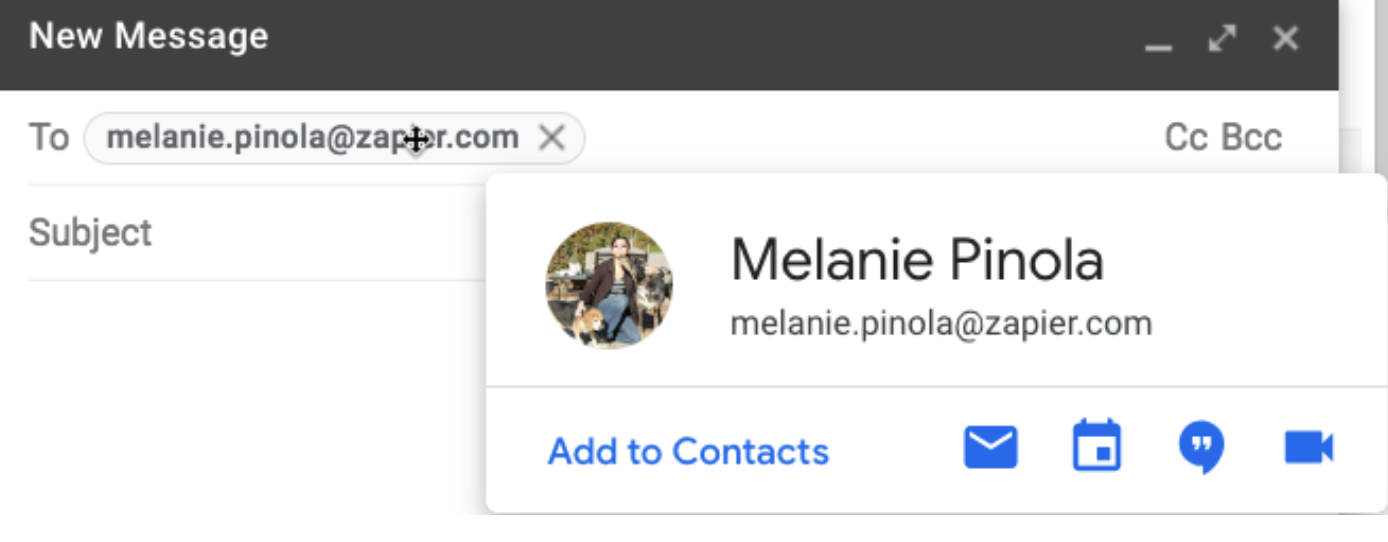
  • If you use Gmail, type in the list of email addresses, click out of the "To" field, and then hover over each email address to see if a picture pops up. If it does (and particularly if the picture is of the person you're trying to get in touch with), you've found the email address you need.
Gmail validate email address
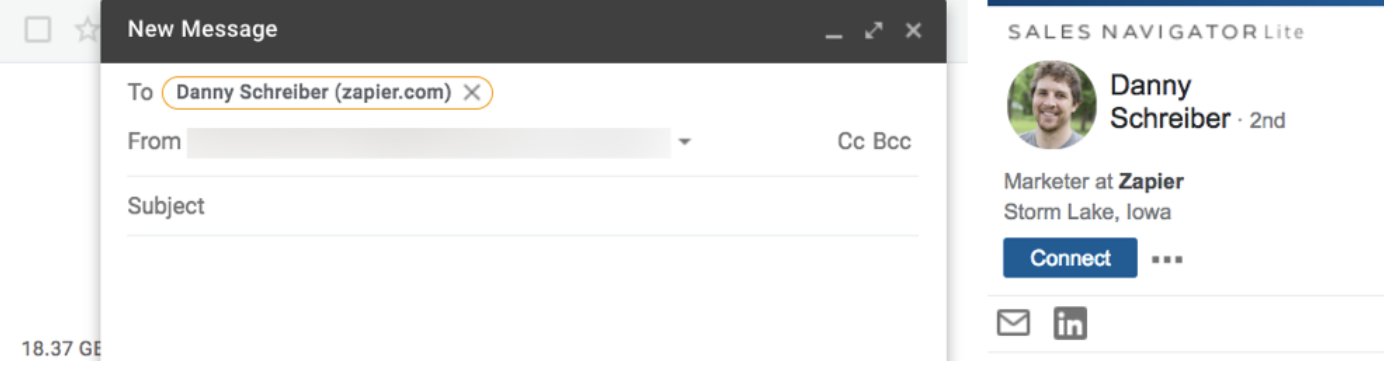
  • Install the LinkedIn Sales Navigator Lite extension (free) for Gmail, and it will pull up a person's LinkedIn profile information when you enter their email address. If the profile it pulls up is the person you're trying to reach, you've likely found a valid email address.
LinkedIn Sales Navigator Lite

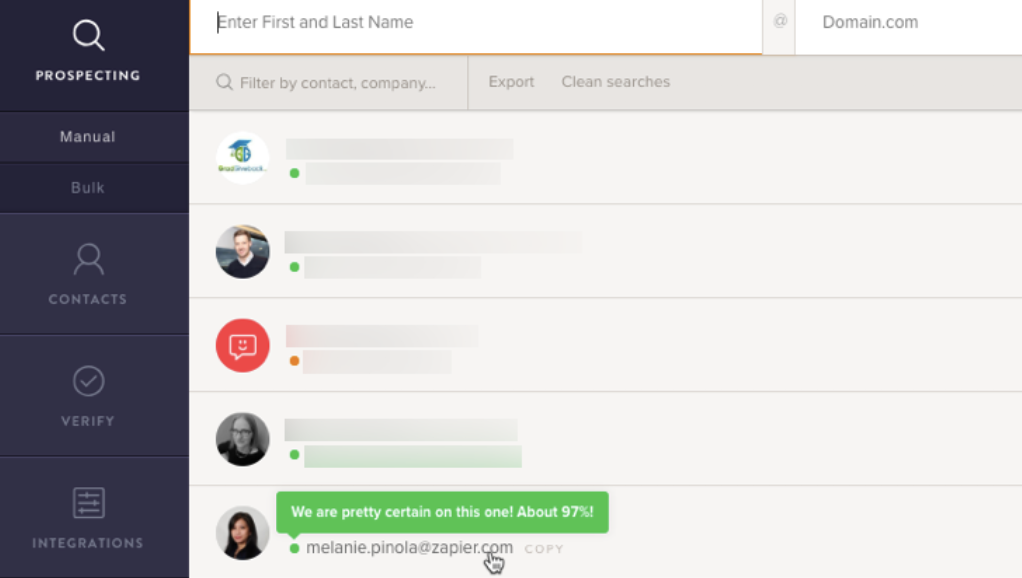
If you want to reduce the number of steps in this option, try the Name2Email (free) Gmail extension. Type in the first name, last name, and domain for the person you're trying to get in touch with, and Name2Email inserts 15 possible versions of that person's email. Then, just hover over each until you find one that populates a picture.

Name2Email

Option 3: Use These 7 Free Apps and Extensions to Find Email Addresses

If the options above didn't work—or if you just want to bypass the manual searching—use an app or extension that's designed to find email addresses for you. The seven apps and extensions listed below are either fully free, offer a set number of free searches to start with, or offer a set number of free searches per month.

To test the accuracy of these tools, we used each one to find email addresses for five separate people from different—and differently sized—companies. Each of the seven tools listed below was able to find accurate email addresses for at least three of the five people we searched for. The email addresses that certain tools couldn't find were for contacts at one-person companies; all were able to find the email addresses for our contacts at larger, more established businesses.

  • Norbert (Web, Chrome, Gmail) for accuracy in finding email addresses
  • Clearbit Connect (Gmail, Outlook) for finding email addresses without leaving your inbox
  • RocketReach (Web, Chrome) for finding personal email addresses
  • Datanyze Insider (Chrome) for finding email addresses while browsing social media sites
  • GetProspect (Web, Chrome) for sales professionals who prospect on LinkedIn
  • FindThatLead (Web, Chrome) for finding email addresses while surfing the web
  • Anymail Finder (Web) for finding lots of emails at once

Norbert

Best free tool for accuracy in finding email addresses

Norbert

Norbert is one of the simplest ways to find an email address. Just enter the first and last name of anyone you're trying to find, along with the company's domain name. Norbert provides its best guess for that person's email within seconds and shows you a rating of how accurate it believes the results to be.

Of all of the apps we tested for this piece, Norbert was the most accurate. It was the only tool that found the correct email address for all five of our test searches.

Norbert Price: Free for finding up to 50 email addresses; from 10 cents per lead for the Prepaid plan that lets you pay as you go.

Automate VoilaNorbert with Norbert's Zapier integration.

Clearbit Connect

Best free tool for finding email addresses without leaving your inbox

Clearbit Connect on Outlook

Clearbit Connect is an extension that works with both Gmail and Outlook. After installing the extension, enter the domain name for your contact's company. Clearbit then displays every individual it has on file for that company. Next, filter the results by name to find the person you're looking for and view that person's email address.

In our testing, Clearbit Connect was the second-most accurate of the tools we tested, finding the correct email addresses for four of the five email searches we conducted.

Clearbit Connect Price: Free for up to 100 email lookups per month; from $6,000/year for a premium version of the extension that allows for 1,000 email lookups per month.

Automate Clearbit with Clearbit's Zapier integration.

RocketReach

Best free tool for finding personal email addresses

RocketReach

If you're trying to get in touch with an old friend or relative, you'd probably prefer to find their personal email than their work email.

RocketReach can help. In addition to finding the business email addresses for most people we searched for, in many cases it also found personal email addresses. Plus, it lets you narrow your search by several different attributes, such as company, location, job title, and education.

RocketReach Pricing: Free for finding up to five email addresses per month; from $39/month for the Bronze plan that lets you find up to 170 email addresses per month.

Automate RocketReach with RocketReach's Zapier integration.

Datanyze Insider

Best free tool for finding email addresses while browsing social media sites

Datanyze Insider

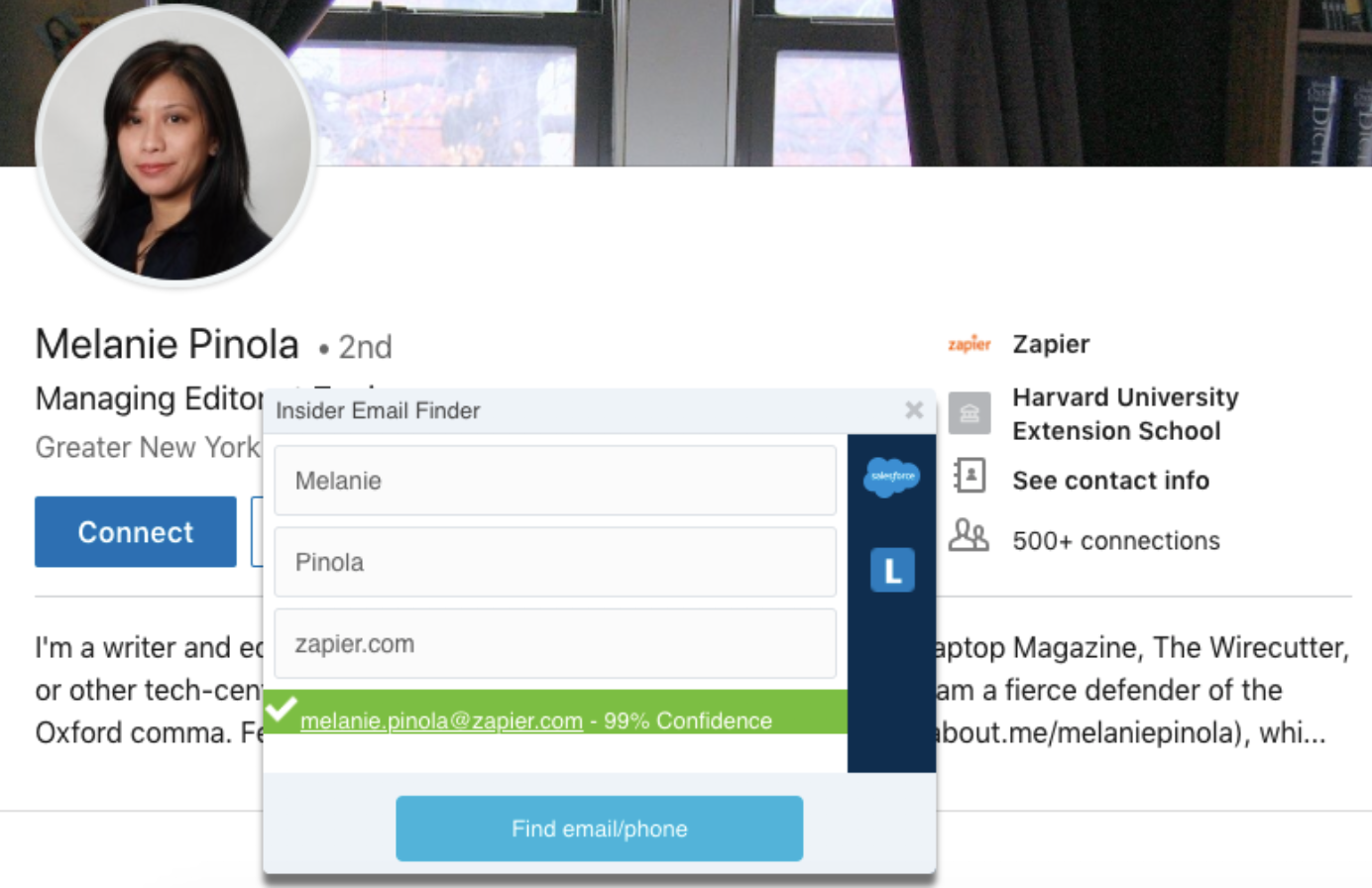
Datanyze Insider lets you find email addresses while you're looking at social media profiles. Just highlight a contact's name, right click, choose "Datanyze Insider," enter the domain for the person's company, and click "Find email/phone." Datanyze then displays an email for that person along with a percentage for how confident it is that it found the correct email address.

Datanyze Insider Price: Free

GetProspect

Best free tool for finding email addresses via LinkedIn

GetProspect

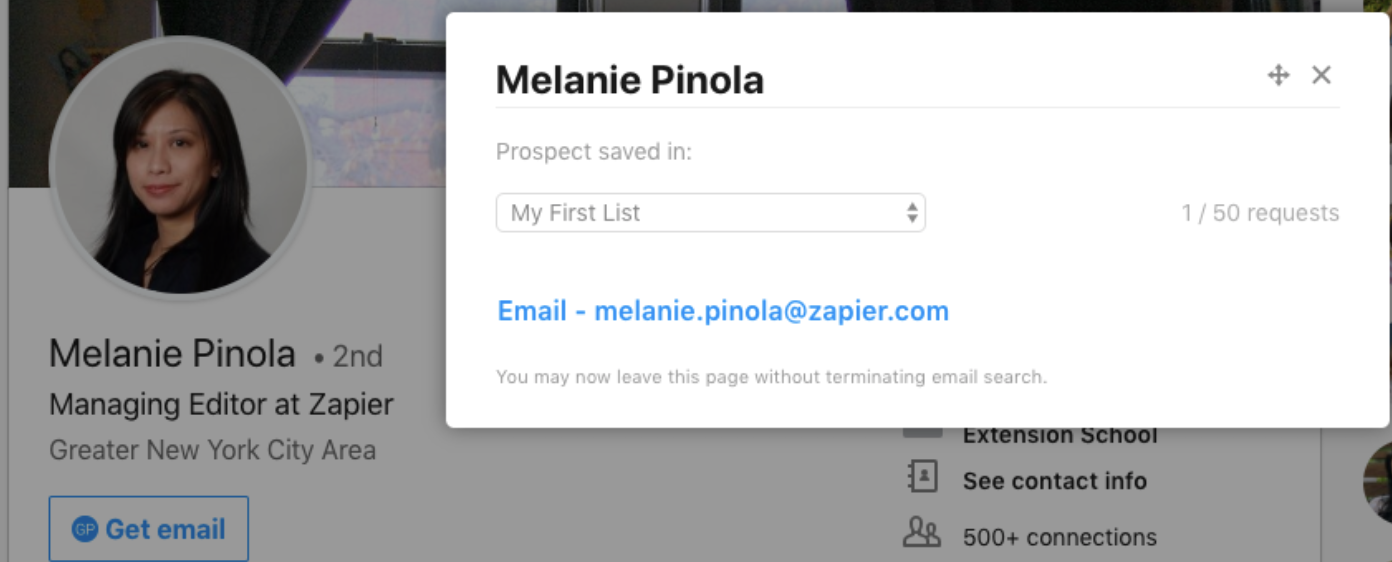
If you can find your contact's LinkedIn profile, you can use GetProspect to find their email address quickly. Just create an account and install the Chrome extension, and GetProspect adds a "Get email" button to every profile you look at on LinkedIn. Click the button to search for that person's email address, and get it without ever leaving the page.

If you're in sales and do a lot of prospecting on LinkedIn, GetProspect also allows you to add a contact to a list in your account. Then you can review everyone you found—along with their contact information—in a single place once you're ready to reach out to your new prospects.

GetProspect Price: Free for finding 50 emails/month; from $29/month for the Premium plan that lets you find up to 1,000 emails per month.

Automate GetProspect with GetProspect's Zapier integration.

FindThatLead

Best free tool for finding email addresses while surfing the web

FindThatLead

FindThatLead offers a variety of ways to find email addresses.

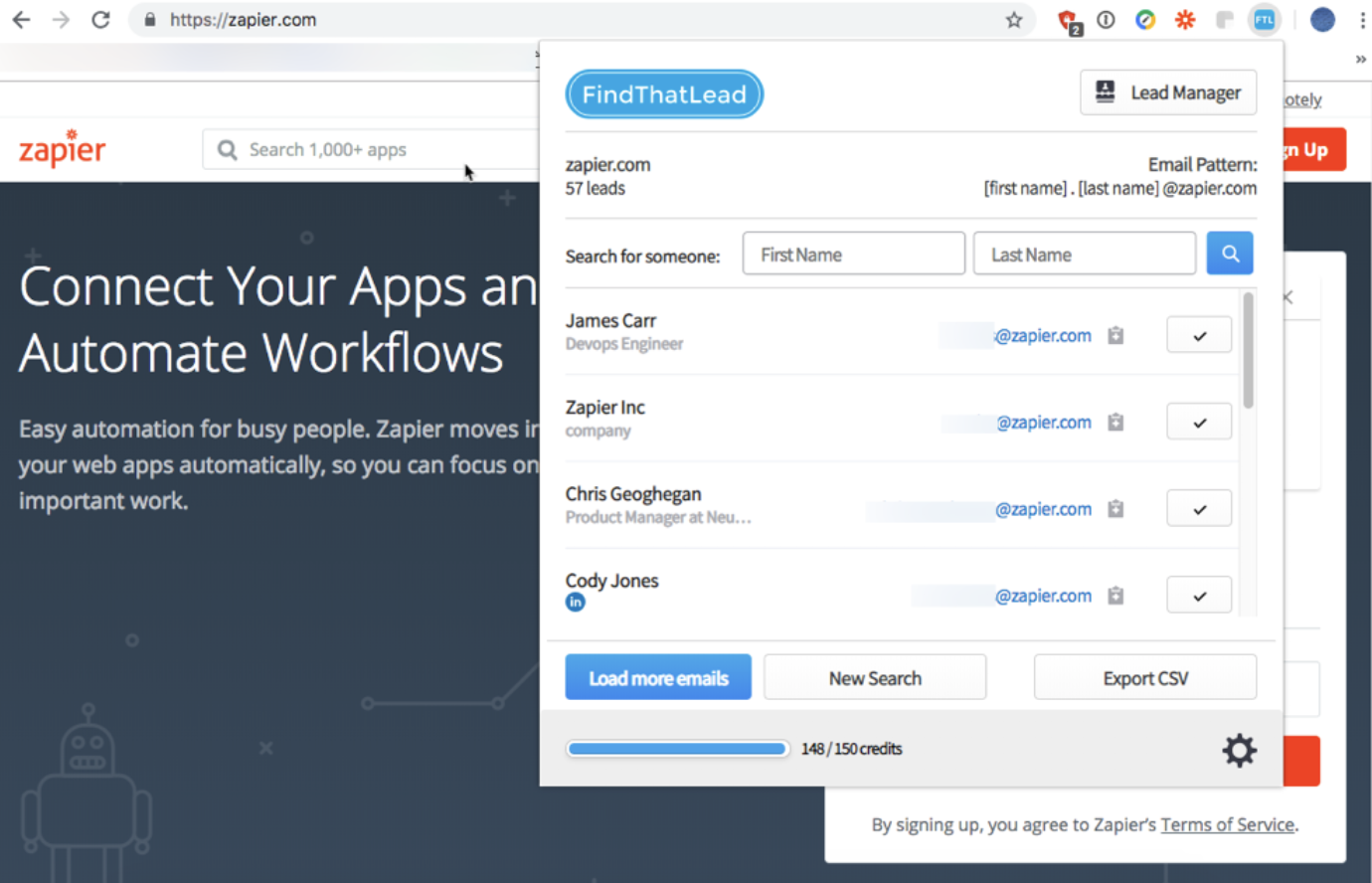
Using its web app, you can search for emails by domain name and get a list of every email address it has on file for that company's domain. And if you install the FindThatLead Chrome extension, you can also get a list of emails for any domain by navigating to a domain in your browser and clicking the extension's icon.

If you want to grab a specific person's email address while browsing social media, just open the FindThatLead extension while viewing that individual's profile. It will automatically populate the search fields for you with data from the page. Just click "Find email," and the extension populates an email address and an accuracy score.

FindThatLead Price: Free for up to 150 searches/month; from $29/month for the Small plan that allows for 1,500 searches/month.

Anymail Finder

Best free tool for finding lots of emails at once

Anymail Finder

Like most of the other tools on this list, you can use Anymail Finder to enter a person's name and company and get an email address. And it correctly identified four of the five emails we searched for.

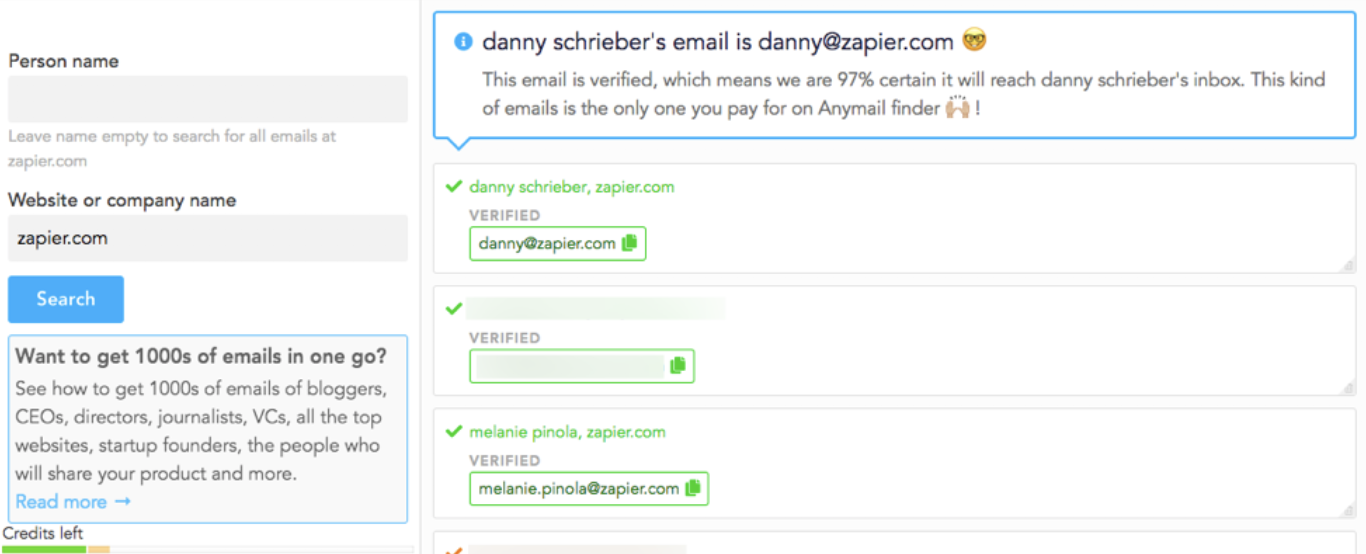
But Anymail Finder also has a couple of tools to help you find lots of email addresses at once. First, you can upload a CSV file to the tool with names and companies and get the same CSV file back with email addresses included. Additionally, if you need to find email addresses using an API, Anymail Finder lets you do that too, providing 500 free credits to developers for testing API implementations.

Anymail credits don't expire, so if your email search needs vary each month, the credits you don't use in lower-volume months carry over to be used during higher-volume months.

Anymail Finder Price: Free for 20 verified email addresses; from $49 for 1,000 verified emails available in pay-as-you-go or monthly pricing models.


With a little sleuthing—or the help of a great tool—you can find the email address for just about anyone. But if all else fails, there's one final method to try: Ask. Find an active profile for your contact on a social media site, and send them a message. If the person you're trying to email wants to hear from you, they likely won't hesitate to send you the contact info you need to get in touch.

Email photo by Atos via Flickr.


source https://zapier.com/blog/find-email-address/

Thursday, 1 November 2018

Job Search Strategies for the Age of AI

In recent years, technology companies have set their sights on improving the recruiting process for employers, and it's resulting in many changes to how job candidates are sourced, reviewed, and considered. Today, companies look at fewer resumes than ever, and some never even post their open positions to job boards.

As a modern job seeker, it's crucial to understand the technologies companies are using in their hiring processes today. By familiarizing yourself with the new rules of recruitment, you'll be in a much better position to get your resume in front of a real person—and much more likely to make it past the layers of technology that stand between you and your dream job.

The Evolution of Job Hunting

hiring sign

When I set out in search of my first job as a 15-year-old, there were three ways to find a job. You could scan through the classifieds section of the newspaper, drive around your neighborhood looking for "Now Hiring" signs, or ask your friends and family members if they knew of any companies that were hiring. Once you found a place that was hiring, you either filled out an application or dropped off your resume, then you crossed your fingers and hoped for the best.

But before I graduated from college, online job boards had taken over as the preferred way to find open roles and solicit applications. Unfortunately, the earliest job board sites got spammy pretty quickly. Once, I got a call to come in and interview with a company that found my resume on a popular job board, but when I arrived, I realized I wasn't attending an interview at all. Instead, it was a seminar for a multi-level marketing scheme selling water filtration devices.

In recent years, that's all improved. You now have sites like Glassdoor that make it easier for people to point out the scams and LinkedIn that makes it easier for recruiters to find you even if you're not actively applying for a job. If you're looking for work with a specific company, most organizations post open roles to the careers pages of their websites. And the new Job Search on Google—available directly in search results—aggregates job posts from multiple sources.

Job Search on Google

All of these changes have made it much easier to find open roles as a job seeker. But there's a flip side: employers are getting more applications than ever. Ultimately, something had to change on the employer's end to make sorting through applications more manageable. And in recent years, the task has fallen to technologies like algorithms and artificial intelligence.

Recruiting with Artificial Intelligence

Many employers today—including 95 percent of Fortune 500 companies—use an applicant tracking system (ATS). Applicant tracking systems from companies like Jobvite and BambooHR help recruiters and HR teams stay organized by collecting all resumes, hiring activities, and candidate data in a central place.

But applicant tracking systems also use algorithms to assign rankings to candidates, displaying the most qualified candidates at the top of the list and the least qualified at the bottom.

Jobvite Hire
Applicant tracking systems use algorithms that scan resumes for indicators that candidates are qualified and automatically assign a rank or score to each application.

Few employers go through every application they receive, saving time by reviewing only those candidates either referred by existing employees or ranked highly by their ATS.

But applicant tracking systems aren't really new—they've been around for nearly 20 years. And while they do help recruiters minimize the number of applications they have to sift through, they're not perfect. Most just use basic keyword matching to rank candidates, meaning highly qualified candidates are sometimes passed over, while less-qualified candidates—but those who are more familiar with optimizing their resumes for the technology—can be elevated.

So recently, companies have turned to more emerging technologies to simplify candidate recruiting and screening: artificial intelligence (AI) and machine learning (ML). Here are a few examples:

  • Ideal uses AI and ML to identify commonalities—things like skills or experiences—between a company's highest-performing and/or longest-tenured employees. Then, it looks for those same skills/experiences in candidate resumes to provide a quality ranking that goes beyond the simple keyword matching of applicant tracking systems.

  • HireVue lets employers pre-screen candidates with automated video interviews. Candidates play short games and answer a series of questions. Then, HireVue uses AI and ML to analyze language patterns, detect emotions, and measure cognitive abilities, helping employers determine which candidates are most likely to succeed in the role long-term.

  • Engage uses AI to analyze job descriptions, review the application materials for candidates who applied for roles previously but weren't hired, and surface qualified, passive candidates (people who didn't specifically apply for the role) that recruiters can then reach out to.

Engage features
Here's how Engage describes the features of its AI-powered recruiting technology.

So what does all of this new technology mean for job seekers? Finding the perfect job is no longer a simple matter of searching job boards and submitting resumes.

In some cases, recruiters are using technology to do a first pass of resumes, meaning you can be removed from consideration by an algorithm without ever being considered by a human. In others, recruiters are bypassing the process of posting jobs and reviewing resumes altogether in favor of using technology to find qualified candidates who never even applied for open roles.

In good news, with the right job search techniques, you can cater to these new technologies, giving yourself a better chance at getting your resume in front of the people who make hiring decisions at the companies you want to work for.

4 Passive Job Search Strategies for the Age of AI

Maybe you're one of 45% of people who aren't actively looking for work but are open to job offers. Even if you don't consider yourself part of this group, it's important to partake in the passive job search process. That way, your name is out there and you're a step ahead when you decide to make a change.

1. Keep your profiles on career-focused sites up-to-date

LinkedIn update experience form

It's crucial to keep your profile on professional networking sites like LinkedIn, Indeed, and AngelList up to date. Why? Technology companies like Fetcher "aggregate candidate information across the most valuable professional and social networks"—i.e., they use publicly available data from career-focused sites to help employers find passive candidates. So if you think you'd like to consider offers from companies—even if you're not actively looking for work—take time to update your professional profiles regularly.

2. Add your resume to the ATS for companies you want to work for

Any job by Lever
Add your application to a company's applicant tracking system by applying for a generic job listing, if possible.

Some companies let you add your data to their applicant tracking systems—even if you're not applying for an open role—by having you apply for an "Any" position. An "Any" position (see the example in the image above) is just a placeholder job that employers use to collect the resumes of individuals who are interested in working for the company.

If you want to work for a specific company but don't see a job you're interested in/qualified for on its careers page, look to see if they have an "Any" position listed.

Applying for an "Any" position is technically applying for nothing. However, by adding your resume and contact information to the company's ATS, there's a chance that the ATS will surface your application for consideration for future roles even if you don't actively apply for newly opened positions.

3. Accept invitations to talent pools

Final Stage invite request
If you've made it to the last stage of the hiring process with a company that uses Final Stage, you can request an invite to its talent pool even if you didn't receive one from the employer.

Some recruiting technology companies focus on aggregating data from professional networking sites. Some focus on surfacing talent among candidates who've applied to a specific company but weren't hired. And others are focused on creating pools of vetted talent to share high-quality candidates with other prospective employers.

For example, Final Stage lets employers add candidates to its talent pool who were passed on for roles at other companies. Basically, getting invited to the talent pool is an employer's way of saying "This person wasn't perfect for our role, but they would be a great addition to any company looking for talent."

Getting an email notifying you that you didn't get a job you were excited about is disappointing, but if the email includes an invitation to join a talent pool, take advantage of it. It may get you in front of other great employers without ever having to apply, saving you time and helping you find a great job without all of the searching and cover-letter writing.

4. Add your resume to the databases for recruiting tools

create a profile on Hired

If you really want to up your passive job search game, add your resume to the databases for popular recruiting technology tools. Sure, it takes time and requires a lot of effort to create profiles on each tool and add your resume, but in the end, it's probably not as time-consuming as searching for roles you're interested in and applying for each individually.

Here are a few recruiting tech tools that allow candidates to create job seeker profiles:

Optimize Your Resume and Profiles for Machines

It's difficult to know when your resume will be vetted by an ATS's algorithm before landing on the desk of a hiring manager, so it's best to just assume it will and optimize accordingly.

Essentially, these algorithms identify keywords in the job description and see if those words—or synonyms of those words—appear in your resume. For example, say that one of the listed job requirements is a bachelor's degree. The algorithm will likely look for words like "bachelor's degree," "bachelor of science," or "BA" on all submitted resumes, scoring those that include some variation of "bachelor's degree" higher than those that don't.

When applying for a job, it's good to review the requirements and make sure that you've included some statement on your resume that speaks to how to meet each requirement. If you can't find a place to fit it in naturally, you can always add a "Summary of Professional Qualifications" section at the top of your resume that you customize for each job you apply for:

summary of professional qualifications
Here's a screenshot of an old resume of mine where I included a Summary of Professional Qualifications section.

Keywords are important for a passive job search, too. Many recruiters search for candidates on sites like LinkedIn, and in order to show up in search results, you need to include the words and phrases these recruiters might be searching for in your profile. Just make sure not to resort to keyword stuffing (i.e., repeating the same words and phrases over and over again). Remember: If you make it past the machines, a real person gets your resume at the other end. A keyword-stuffed resume is unlikely to make a great impression.

You can also use a tool like Jobscan to help when updating your resume and profile for robots and algorithms. Simply paste your resume and a job description into Jobscan's tool, and it produces a report showing how well your resume matches the job description. You can also connect your LinkedIn profile to get tips on how to optimize it for your passive job search.

Jobscan report
Jobscan uses ATS technology to score how well your resume meets the requirements stated in a job description.

Jobscan Price: Free for resume scanning and optimization reports; free for up to five LinkedIn profile scans per month (up to a max of 20 lifetime scans); from $49.95/month for the Monthly plan that includes unlimited LinkedIn profile scans.

Strategies for Finding Work in Specific Roles and Companies

The tips above will help you take advantage of employers using ATSs and AI-powered tools, but not every company uses those systems. For that reason, some of the old techniques are still necessary when searching for jobs. Use these tools and tactics to take your job search to the next level.

1. Search Google like a pro

searching for jobs on Google

Not every company pays to post their open roles to sites like LinkedIn, Indeed, or Glassdoor. If they have enough interest from qualified candidates, some only list open roles on the careers pages of their websites.

You can uncover these opportunities, but you'll have a hard time doing so if you're only conducting general Google searches. Instead, use Google search operators to narrow the results. Google search operators let you do things like:

  • Remove postings from sites like LinkedIn and Glassdoor from your results
  • Restrict results to show only those posted or updated in the last day, week, or month
  • Show only results posted to sites with an .edu or .gov domain

To learn how to use Google for finding unadvertised jobs, check out our piece on finding the perfect job with Google search operators.

2. Take advantage of niche job boards

AngelList jobs

If you're looking for a specific type of job or want to work for a specific type of company, you may be better off checking smaller, niche job boards than poring over the hodgepodge of positions on sites like LinkedIn, Glassdoor, or Indeed. Here are a few of the more popular niche job board sites for specific careers and interests:

If the niche you're looking for doesn't appear in the list above, it's easy enough to find potential sites that cater to your industry by Googling "[job/industry] job boards" (e.g., human resources job boards). Google will surface the most relevant results. Be sure to take a few minutes to make sure the site seems legitimate before you upload your resume.

Look to see if there's a fee for employers to post jobs on the site. If they charge for posting jobs, there will likely be fewer scam/spam posts. Also, make sure people post jobs to the site somewhat regularly. Like all things online, sites go in and out of favor, and it's possible that Google will direct you to a site that people aren't using as much anymore.

3. Bookmark the careers pages of companies you want to work for

Chrome bookmarks
Right-click any bookmarks folder in Chrome, and you get an option to open all of the bookmarked pages in a single click.

If your goal is to work for a specific company you adore, consider creating a bookmark folder in your browser and adding the career pages of the companies you're interested in. Then, once a week/month—depending on how often that company posts new roles—open all of your bookmarked pages and scan them for jobs you might want to apply for.

Automate Your Job Search

Looking for a new job and keeping your resume and profiles updated are time-consuming tasks. By automating parts of your job search process, you can reduce the effort required. Here are a few ways Zapier can make your job search less labor intensive.

  • If AngelList is your favorite place to look for jobs, create an RSS feed of new AngelList job postings and get an entry in your favorite RSS reader app any time a new job is posted to the site.
  • Want to work for Zapier? Use a Zap to email you whenever there's a new opening.
  • Activity is one of the factors LinkedIn considers when determining in what order profiles are displayed in its search results. If you have a WordPress blog and want to keep your LinkedIn profile fresh, use this Zap to automatically post updates to LinkedIn when you publish a new blog post.
  • Need to set up reminders to check the careers pages for your favorite companies every week or update your LinkedIn or AngelList profile every quarter? Use the Zaps below to have Zapier send a reminder to your preferred to-do app when it's time to perform the task.

By understanding the role technology plays in modern recruiting, you'll be in a better position to get job offers even when you're not actively looking for work—and to get your resume in front of a real person when you're on the hunt for a new job.

It's a beast to update your LinkedIn profile after neglecting it for years, but it's easy to make small tweaks when you make time for it every few months. And once you start adding a "Summary of Professional Qualifications" section to your resume every time you apply for a job, you'll eventually end up with a long selection of bullet points you can copy and paste as needed.

And in the end, the time you put into these tasks is well worth it if it helps you find your dream job, get hired by a company you love, or take the next step in your career.

Hiring sign by geralt via Pixabay. Jobvite Hire screenshot via Jobvite.


source https://zapier.com/blog/job-search-strategies/